

Gallery Lock and Photo Locker Apps: Do They Actually Protect Your Photos?
Most gallery lock and photo locker apps put a PIN in front of unencrypted files.
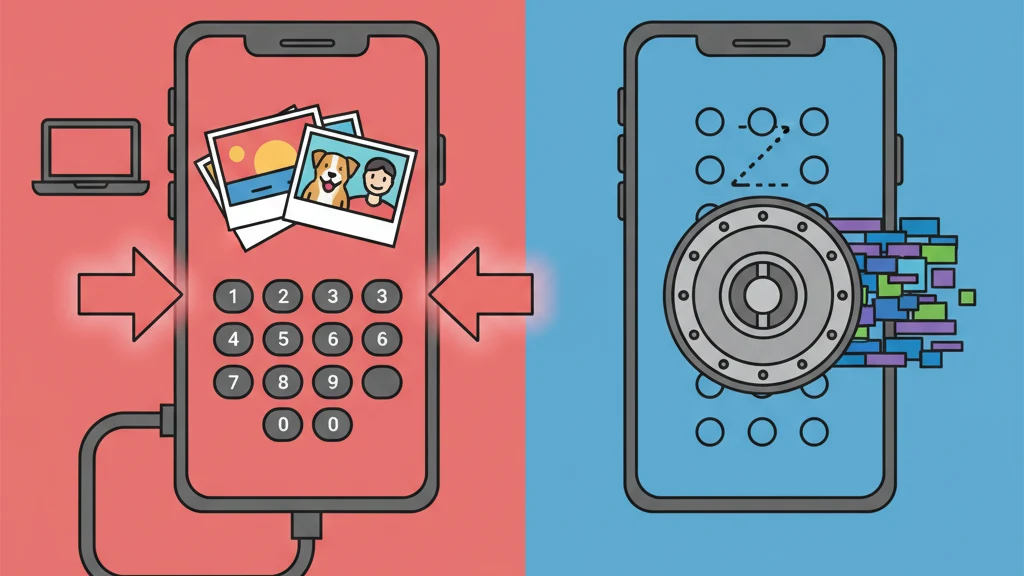
Gallery lock and photo locker apps put a PIN or password screen in front of your photos. The marketing language implies security: "lock," "safe," "secure," "protected." But in the majority of these apps, the PIN screen is the entire protection. Behind it, your photos sit unencrypted in a standard folder.
A lock on a glass door stops people who respect locks. It does not stop anyone who looks through the glass.
This guide examines what gallery lock and photo locker apps actually do at the technical level, explains the gap between "locked" and "encrypted," and defines what genuine photo protection requires.
What Gallery Lock Apps Actually Do
Gallery lock apps (also called photo lockers, gallery vaults, or private gallery apps) follow a consistent architecture:
- Import. Photos are copied or moved from the device camera roll into the app's private storage directory.
- Gate. A PIN, password, pattern, or biometric check is placed at the app's entry point.
- Display. When the correct credential is entered, the app displays the stored photos in a gallery interface.
That is the full mechanism for most gallery lock apps. The credential unlocks the app's user interface. It does not encrypt, transform, or cryptographically protect the underlying files.
What "locked" means in practice
When a gallery lock app says your photos are "locked," it typically means:
- The Photos app no longer shows them (they have been moved to the app's directory)
- Opening the gallery lock app requires a PIN
- The photos inside the app are viewable only through the app's interface
What "locked" does not mean:
- The files are encrypted
- The files are unreadable without the PIN
- The files are protected against filesystem access
- The files survive forensic examination
The distinction matters because "lock" and "encrypt" describe fundamentally different operations. Locking controls who can walk through a door. Encrypting transforms the contents so they are unreadable without a mathematical key.
The "Lock" vs. "Encrypt" Gap
This is the core technical issue with the gallery lock category.
| Operation | What happens to the file | Protection level |
|---|---|---|
| Lock (access control) | File remains in original format (JPEG, HEIC, PNG). A UI barrier prevents viewing through the app. | Protected from app-level access only |
| Encrypt (cryptographic protection) | File is transformed by a cipher (e.g., AES-256-GCM) into data indistinguishable from random noise. | Protected from all access without the correct key |
In a locked gallery app, your photos exist as standard image files. They have EXIF metadata. They have normal file extensions. They are readable by any image viewer. The PIN prevents the app from displaying them, but the files themselves are unchanged.
In an encrypted vault app, the files no longer exist as images. They are encrypted data blocks. Opening them in an image viewer shows nothing. There is no EXIF metadata to read. The file structure reveals nothing about the content. Without the correct encryption key, the data is mathematically equivalent to random noise.
A concrete example
Imagine you store a photo in both types of app:
Gallery lock app: The file IMG_4521.heic gets moved to /AppData/GalleryLock/photos/IMG_4521.heic. Anyone with filesystem access opens it and sees the photo. The PIN prevents the app from displaying it. The file is fully intact and readable.
Encrypted vault app: The file IMG_4521.heic is encrypted into a data block like a8f3b2c1... stored with a random filename and no file extension. Opening it in any viewer shows garbage data. The original file no longer exists in any readable form on the device.
That is the difference. Not theoretical. Not marginal. Categorical.
How Gallery Lock Apps Get Bypassed
Understanding the bypass methods clarifies why the "lock" metaphor is misleading.
1. Computer connection
When an iPhone is backed up through iTunes or Finder (or an Android through ADB), the backup can include the app's sandbox data. In a gallery lock app, this backup contains the original, unencrypted photo files. Extracting them requires free, widely available software.
2. Forensic tools
Law enforcement and forensic examiners use tools like Cellebrite UFED and GrayKey that extract data from mobile devices at the filesystem level. These tools do not interact with the app's UI. They read the storage directly. Unencrypted files in a gallery lock's directory are fully accessible.
According to publicly available Cellebrite documentation, their tools support extraction of app sandbox data from iOS devices, including third-party vault and gallery lock applications. The PIN is irrelevant because the extraction occurs below the application layer.
3. Cloud backup exposure
If the device backs up to iCloud or Google Cloud, the gallery lock app's data may be included in the backup. Apple and Google can access these backups under legal compulsion. Since the files in a gallery lock are unencrypted, they are fully readable once extracted from the backup.
4. App deletion
If a gallery lock app is deleted (accidentally, during an OS update issue, or by a third party), the unencrypted files in the app's sandbox are also deleted. Unlike encrypted vaults with separate backup mechanisms, gallery lock apps typically do not provide recovery options outside the app itself.
5. App vulnerability
Gallery lock apps that do not encrypt files have a simpler security perimeter to breach. Any vulnerability in the app (a debug backdoor left in production, an insecure local API, or a bypassed authentication screen) exposes the files directly because there is no encryption layer as a second line of defense.
The Data Collection Problem
Most gallery lock and photo locker apps are free with ads. The ad-supported model requires tracking SDKs that collect device identifiers, usage patterns, and behavioral data.
A 2023 review of popular gallery lock apps on the iOS App Store found patterns consistent with extensive data collection:
- Multiple advertising SDKs (Facebook Audience Network, Google AdMob, Unity Ads)
- Analytics frameworks tracking screen views, session duration, and feature usage
- Device fingerprinting for ad targeting
- In some cases, location data access
The irony is acute. Users download these apps specifically for privacy. The apps then collect and transmit behavioral data to advertising networks. The photos may be "locked" from casual observers, but the user's behavior is broadcast to data brokers.
Apps that charge a fair price for genuine encryption tend to have minimal or no tracking because their business model is the product, not the user's data.
What Real Photo Protection Looks Like
If gallery lock apps represent the "lock" end of the spectrum, here is what the "encrypt" end looks like:
Encryption standard
AES-256-GCM (Advanced Encryption Standard, 256-bit key, Galois/Counter Mode). This is the authenticated encryption algorithm recommended by NIST (SP 800-38D) for high-security applications. It provides both confidentiality (data is unreadable without the key) and integrity (any tampering with the encrypted data is detected).
Key derivation
The user's credential (password, pattern) is transformed into a 256-bit encryption key through a key derivation function like PBKDF2 with a high iteration count and a unique per-vault salt. This makes each guess computationally expensive, turning brute-force attacks into multi-year efforts.
Per-file isolation
Each file gets a unique, randomly generated initialization vector (IV). Identical photos produce different encrypted outputs. There is no pattern for an attacker to exploit across files.
Metadata encryption
File names, creation dates, and vault structure are encrypted with a separate cipher. Even if someone knows files exist, the metadata reveals nothing about the content.
Zero-knowledge architecture
The app developer never has the encryption keys. Keys are derived locally and never transmitted. If the developer is served with a legal order, there is nothing to hand over. This is not a policy; it is a mathematical constraint.
Vaultaire implements this full stack: AES-256-GCM file encryption, PBKDF2 with HMAC-SHA512 key derivation, ChaCha20 metadata encryption, per-file initialization vectors, and zero-knowledge architecture. Additionally, it provides plausible deniability (no master index of vaults, no way to prove additional vaults exist) and duress mode (destroy cryptographic access to hidden vaults under coercion).
Every pattern drawn on the 5x5 grid opens a different vault. There is no registry. No vault count. A forensic examiner can confirm Vaultaire is installed and encrypted data exists, but cannot determine how many vaults exist or what they contain.
How to Tell if Your App Actually Encrypts
Three quick tests:
Test 1: Password reset
Try resetting your password or PIN through the app. If the app sends you an email that restores access to your files, the developer holds the encryption keys (or there are no encryption keys). A zero-knowledge encrypted app cannot reset your credentials because it never had them.
Test 2: Encryption specification
Check the app's website or App Store description for a named encryption algorithm: AES-256-GCM, AES-256-CBC, ChaCha20-Poly1305. If the app says "secure" or "protected" without naming a cipher, it probably does not encrypt.
Test 3: Privacy nutrition labels
Check the App Store privacy labels. Compare what data the app collects against what you would expect from a privacy-focused app. Multiple tracking categories (especially "Data Used to Track You" and "Data Linked to You") indicate an ad-supported model with extensive data collection.
Frequently Asked Questions
Do gallery lock apps actually protect photos?
Gallery lock apps protect photos from being viewed through the device's Photos app or by someone casually using the phone. They do not protect photos at the filesystem level. Files stored in most gallery lock apps are unencrypted and accessible through computer connections, backup extraction, or forensic tools. The PIN prevents app-level access; it does not encrypt the files.
What is the difference between locking and encrypting photos?
Locking places an access control barrier (PIN, password, biometric) in front of files that remain in their original format. Encrypting transforms files with a cipher like AES-256-GCM into data that is mathematically unreadable without the correct key. Locked files can be accessed by bypassing the UI. Encrypted files cannot be accessed without the encryption key, regardless of how the storage is accessed.
Can forensic tools access gallery lock apps?
Yes. Forensic tools like Cellebrite UFED and GrayKey extract data at the filesystem level, bypassing app-level authentication entirely. Since most gallery lock apps store unencrypted files, the tools access photos directly without the app's PIN. This is a routine capability in law enforcement and corporate forensics.
Are paid gallery lock apps more secure than free ones?
Not necessarily. The paid/free distinction does not reliably predict encryption. Some paid gallery lock apps still use access control without encryption. The criteria that matter are: named encryption algorithm, key management model (client-side vs. server-side), and data collection policy. Price does not guarantee security architecture.
What should I use instead of a gallery lock?
For genuine photo protection, use an encrypted vault app with: AES-256-GCM or equivalent encryption, client-side key derivation (PBKDF2, Argon2), zero-knowledge architecture where the developer cannot access files, and minimal data collection. Check that the app names its encryption algorithm explicitly and does not offer server-based password reset.
Bottom Line
Gallery lock and photo locker apps answer a real question: "How do I keep certain photos private?" But most of them answer it with a PIN screen and nothing else.
The word "lock" implies security. In practice, it means access control. The PIN is a suggestion to the software. It is not a barrier to the data.
If a PIN screen is enough for your situation, any gallery lock app works. Many people genuinely need nothing more. But if someone with tools, knowledge, or legal authority might try to access those photos, the PIN is not what protects you. The encryption is.
The difference between "locked" and "encrypted" is the difference between a door and a wall. One can be opened. The other cannot.
Related guides: Photo Vault App: What to Look For | Best Photo Vault Apps for iPhone | How to Lock Photos on iPhone | App to Hide Photos: 5 Approaches