Best Photo Locker App for iPhone (2026): Which One Actually Encrypts
Photo locker apps promise something simple: tap a lock, and your private pictures disappear behind it. The problem is that most of them stop at the lock. They hide your photos from the Camera Roll and put a passcode on the door, but the files themselves stay readable on the device. The best photo locker app for iPhone does something more important than hiding. It encrypts every photo and video, so the files are unreadable even if someone gets past the lock. This guide compares how the popular options actually protect your photos, and which one to install if you want real privacy instead of a polite suggestion.
The best photo locker app for iPhone is one that encrypts your photos on the device, not one that only hides them behind a PIN. Vaultaire is our top pick because it encrypts every file with AES-256, keeps the keys in the iPhone Secure Enclave, works with no account, and costs a single 29.99 dollar payment instead of a subscription. If you only need to hide a few photos from someone glancing at your screen, the built in Hidden album is enough. If you want photos that stay private even when your iPhone is unlocked, lost, or inspected, choose an encrypted vault.
The Verdict: What To Use
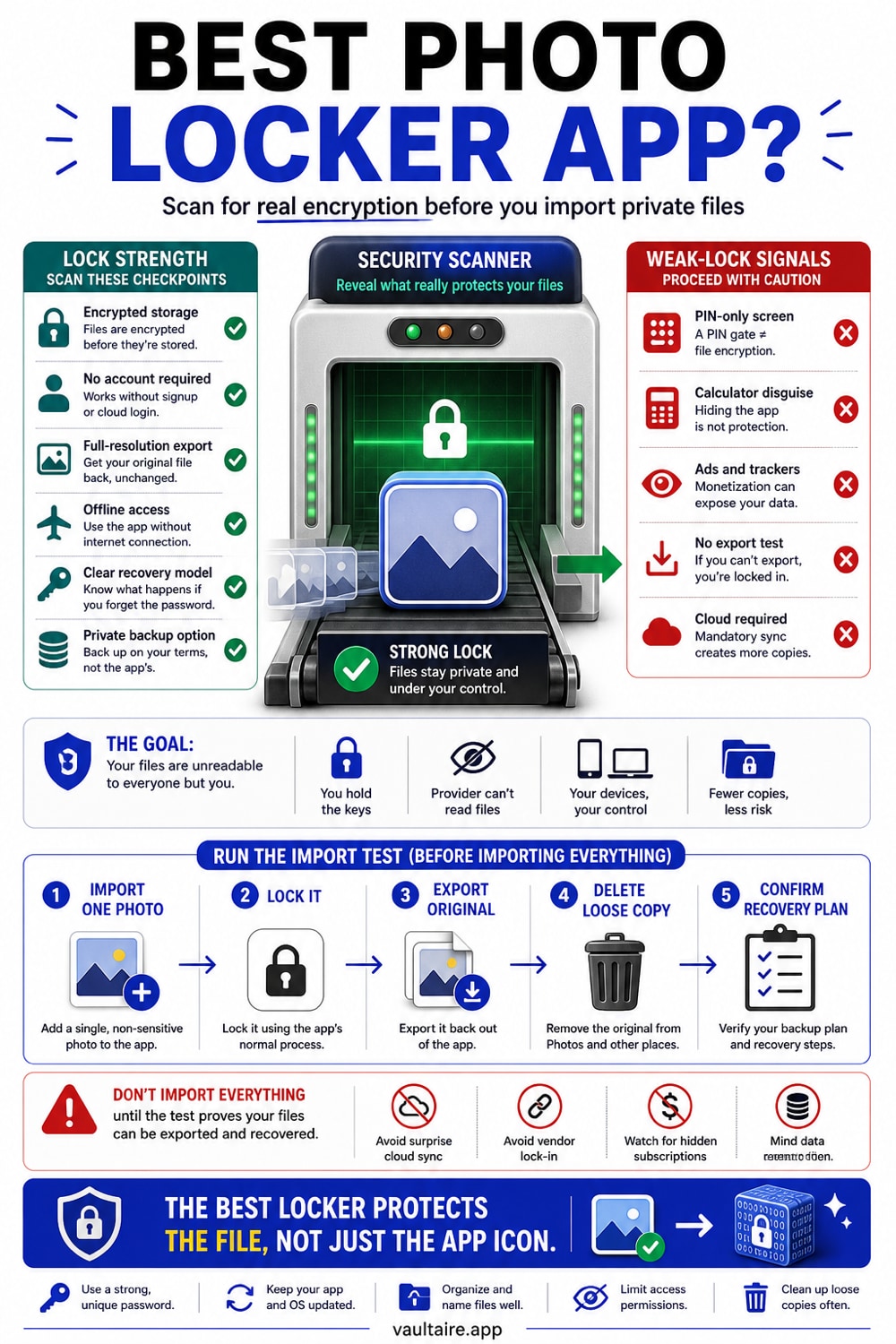
If you want the short version, install an encrypted vault rather than a basic locker. A locker that only hides photos behind a passcode leaves the original files sitting in app storage in plain form, which means a backup extraction, a repair shop tool, or anyone who learns your PIN can read them. Vaultaire is the photo locker app we recommend for iPhone because it treats every photo and video as a file to encrypt, not just to hide. Each item is sealed with AES-256 encryption, the keys live in the Secure Enclave, and nothing is uploaded to a server you do not control.
For most people the decision comes down to two honest choices. Use the built in Hidden album when you only need to keep a photo out of casual view and you trust everyone who can unlock your iPhone. Use an encrypted vault like Vaultaire when the photos are genuinely sensitive, when you share your device, or when losing your iPhone would be a real privacy problem. The rest of this guide shows how the common photo locker options compare on the one measure that matters, which is whether your files stay readable after the lock is bypassed.
How The Options Compare
Photo locker apps for iPhone fall into three groups. The first group hides photos behind a PIN or Face ID but stores them unencrypted, so the lock is the only barrier. The second group adds a disguise, like a calculator front end, which hides the app itself but can still leave the files readable underneath. The third group, true encrypted vaults, scrambles each file so that even a copy pulled directly from storage is meaningless without your key. Many free lockers sit in the first group, which is why a free app to hide pictures on iPhone can feel secure while offering very little real protection.
When you compare the best photo vault app candidates side by side, look past the lock screen and ask three questions. Does the app encrypt files, or only hide them? Does it require an account and upload your photos to its cloud, which creates a second copy you cannot see? And does it charge a recurring subscription for something that should be a one time purchase? Vaultaire answers those three the way a privacy tool should: it encrypts every file, it works with no account and no server, and it is a single payment. That combination is rare, and it is why it tops this list.
Tradeoffs To Weigh
No tool is free of tradeoffs, and an honest comparison should name them. An encrypted vault asks you to remember a passcode that genuinely cannot be recovered, because the encryption is real and there is no backdoor reset. That is a feature, not a flaw, but it means you carry responsibility for your key. A vault also keeps photos inside the app rather than the main Camera Roll, so you import the photos you want protected and delete the originals afterward. If you skip that second step, a readable copy stays in Photos and quietly defeats the purpose.
Free lockers carry a different and larger cost. Many fund themselves with ads or analytics, and some have shipped serious security flaws, including cloud storage that exposed users' private photos. A subscription locker spreads its price out, but over a few years you often pay far more than a one time vault while still owning nothing. Weigh convenience against control. If your photos are not sensitive, a simple locker is fine. If they are, the small effort of setting up a real encrypted vault is the cheapest insurance you can buy for your privacy.
What To Do Next
Here is a simple path you can follow today. Decide which photos you actually need to protect, since you do not have to lock your entire library to feel safe. Install an encrypted vault, set a passcode you will remember but others cannot guess, and import that first set of photos. Confirm each one opens correctly inside the vault, then delete the originals from the Camera Roll and empty the Recently Deleted album so no readable copy remains. The whole process takes about five minutes and gives you protection that survives an unlocked or lost iPhone.
If you want the version we recommend, Vaultaire is free to download and lets you protect your first photos right away, with a one time upgrade when you are ready for the full library. It encrypts every file with AES-256, requires no account, and never sends your photos to a server. That is what separates the best photo locker app for iPhone from the rest: not a nicer lock screen, but files that stay private no matter who gets past the lock. Download Vaultaire, lock your most sensitive photos first, and judge it for yourself.
Related reading:
- Best photo vault apps for iPhone, compared
- How the iPhone Hidden album actually works
- How to hide photos on iPhone, step by step
- Calculator vault apps: real security or just a disguise?
Sources
Frequently Asked Questions
Which photo locker app is best?
The best photo locker app is one that encrypts your photos rather than only hiding them behind a PIN. Vaultaire is our top pick for iPhone because it encrypts every file with AES-256, stores the keys in the Secure Enclave, and needs no account. A locker that only hides files leaves them readable if someone bypasses the lock.
What is the best photo storage app for iPhone?
For private photos, the best storage app is an encrypted vault that keeps files on your device, like Vaultaire. iCloud Photos is excellent for general backup and sync, but it is built for convenience, not secrecy, and it syncs to every device on your Apple ID. If a photo is sensitive, store it in an encrypted vault instead of a shared library.
What is the best way to store photos off your iPhone?
To move photos off your iPhone safely, export them to encrypted storage rather than an unprotected cloud folder or USB drive. Encrypt the files first, or use a vault app that encrypts on import, so a copied or intercepted file stays unreadable. Always delete the readable original from the Camera Roll and Recently Deleted once the protected copy is confirmed.
Where is the safest place to store photos from an iPhone?
The safest place for sensitive photos is encrypted storage on your device, where you hold the only key, such as a vault app using AES-256. That keeps your photos private even if your iPhone is lost, unlocked, or inspected, because the files are meaningless without your passcode. Cloud libraries are convenient but place a second copy on servers you do not control.