

Photo Vault App: What It Is, How It Works, and What to Look For
Photo vault apps range from unencrypted folder hiders to AES-256 zero-knowledge vaults.
A photo vault app is a mobile application designed to store photos and videos in a private, protected space separate from the device's default photo library. The protection level varies enormously: some photo vault apps simply hide files behind a PIN screen with no encryption, while others use AES-256-GCM authenticated encryption where files are mathematically unreadable without the correct credentials.
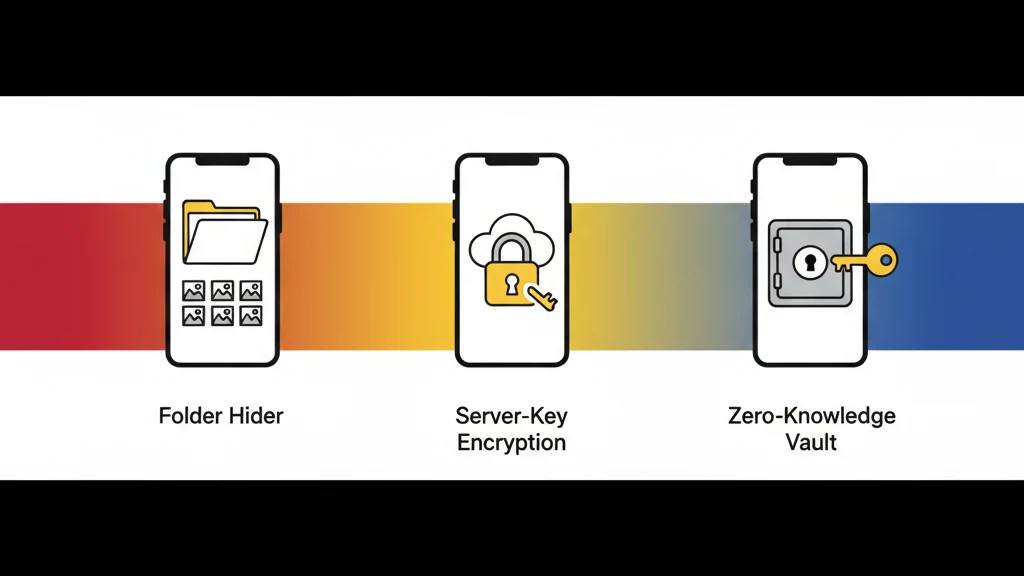
The term "photo vault app" covers a spectrum from basic folder-hiders to zero-knowledge encrypted vaults. Understanding where an app falls on that spectrum determines whether your photos are genuinely protected or just out of casual sight.
This guide defines what a photo vault app is, explains how different types work, and provides the specific criteria you should check before trusting one with your private files.
What Is a Photo Vault App?
A photo vault app is software that creates a separate, access-controlled storage area for photos and videos on a mobile device. At minimum, it provides a barrier between the device's standard photo library and the private files. At maximum, it provides cryptographic protection equivalent to what governments use for classified information.
The category includes three distinct types:
Type 1: Folder Hiders
Folder hiders move photos from the camera roll into a hidden directory within the app's storage. Access is gated by a PIN, password, or biometric check. The files themselves are stored in their original format (JPEG, PNG, HEIC) without encryption.
What they protect against: Someone casually browsing the Photos app.
What they do not protect against: Anyone with filesystem access. Connecting the phone to a computer, extracting a backup, or using forensic tools exposes the files without needing the PIN.
Examples: Many free vault apps on the App Store and Google Play fall into this category. They are the most downloaded and least secure type.
Type 2: Encrypted Storage with Server-Side Keys
These apps encrypt photos before storage, but the encryption keys are managed by the company's servers. The app may use strong encryption (AES-256), but the key management means the company can theoretically decrypt your files. If served with a legal order, they can comply. If breached, the keys are compromised along with the data.
What they protect against: Casual access, device theft (if the device is locked), basic forensic examination.
What they do not protect against: The app company itself, legal compulsion directed at the company, server-side breaches.
Examples: Some premium vault apps and cloud-storage services with vault features.
Type 3: Zero-Knowledge Encrypted Vaults
Zero-knowledge encrypted vaults derive encryption keys locally from the user's credentials (password, pattern, biometric). The keys never leave the device and are never transmitted to the developer's servers. The developer mathematically cannot access stored files, even under legal compulsion. There is nothing to hand over because the capability to decrypt does not exist outside the user's device.
What they protect against: All of the above, plus compelled access from the developer, server breaches, and insider threats.
What they do not protect against: The user forgetting their credentials without a recovery mechanism.
Examples: Vaultaire (AES-256-GCM with PBKDF2 key derivation, zero-knowledge architecture), and a small number of other apps with verified zero-knowledge implementations.
The Photo Vault Spectrum: From Hidden to Encrypted
| Feature | Folder hider | Encrypted (server keys) | Zero-knowledge vault |
|---|---|---|---|
| Files encrypted at rest | No | Yes | Yes |
| Encryption standard | None | Varies (often unspecified) | AES-256-GCM or equivalent |
| Who holds the keys | N/A (no encryption) | The company | Only the user |
| Survives forensic examination | No | Partially | Yes |
| Developer can access files | Yes (no encryption) | Yes (holds keys) | No (mathematically impossible) |
| Survives company breach | No | No (keys compromised) | Yes (no keys to steal) |
| Recovery if credentials lost | Usually email-based reset | Email-based or server-side | Recovery phrase only (no backdoor) |
| Typical data collection | Extensive (ads, tracking) | Moderate | Minimal or none |
This spectrum is the most important thing to understand about photo vault apps. The App Store does not distinguish between these types. A folder hider with millions of downloads sits next to a zero-knowledge encrypted vault, and both call themselves "photo vault apps."
How Photo Vault Apps Work: The Technical Layer
Import and Storage
When you add a photo to a vault app, the app copies (or moves) the file from the camera roll into its own storage area. On iOS, each app has a sandboxed directory that other apps cannot access directly. On Android, the level of isolation depends on the OS version and the app's implementation.
The critical question is what happens to the file after import. In a folder hider, the file sits in the app's directory in its original format. In an encrypted vault, the file is transformed by a cipher (like AES-256-GCM) into encrypted data before being written to storage.
Authentication
Photo vault apps use various authentication methods:
| Method | Security level | Notes |
|---|---|---|
| 4-digit PIN | Low | 10,000 possible combinations; brute-forceable |
| 6-digit PIN | Low-medium | 1,000,000 combinations; still brute-forceable with automation |
| Password | Medium-high | Depends entirely on password complexity |
| Pattern on 3x3 grid | Low-medium | ~389,000 possible patterns (Android lock screen equivalent) |
| Pattern on 5x5 grid | High | Billions of possible patterns connecting 4+ dots |
| Biometric (Face ID / Touch ID) | Medium-high | Convenient but can be compelled; best as second factor |
The distinction between authentication and encryption matters. Authentication determines who can open the app. Encryption determines whether files are readable without the key. A strong PIN on an app that does not encrypt files protects nothing if the filesystem is accessed directly.
Key Derivation
In encrypted vault apps, the user's credential (password, pattern, etc.) is transformed into an encryption key through a key derivation function. The standard approach uses algorithms like PBKDF2, Argon2, or scrypt with a high iteration count and a per-vault salt.
Vaultaire uses PBKDF2 with HMAC-SHA512 and a unique cryptographic salt per vault. The iteration count makes each key derivation computationally expensive, so testing a billion pattern guesses would require years of continuous computation per vault.
The key derivation step is what transforms a human-memorable credential into a 256-bit encryption key suitable for AES-256-GCM. Without this step, the encryption key would be as weak as the password itself.
Metadata Protection
A detail most vault apps overlook: even if photos are encrypted, metadata can leak information. File names, creation dates, thumbnail dimensions, and vault structure are all metadata. If this metadata is stored in cleartext, it reveals what kind of content is stored even if the content itself is encrypted.
Vaultaire encrypts all metadata with ChaCha20, a separate cipher from the file encryption (AES-256-GCM). Using a different cipher for metadata provides cryptographic diversity and eliminates cache-timing side-channel attacks.
What to Check Before Trusting a Photo Vault App
1. Encryption Standard
Check whether the app specifies its encryption algorithm. Trustworthy apps name it explicitly: AES-256-GCM, AES-256-CBC, ChaCha20-Poly1305. If the app says "military-grade encryption" or "bank-level security" without naming a specific cipher, that is a red flag. Those phrases are marketing language, not technical specifications.
According to NIST SP 800-38D, AES-256-GCM is the recommended authenticated encryption algorithm for high-security applications. It provides both confidentiality (data is unreadable) and integrity (tampering is detected).
2. Key Management
Where are the encryption keys? Three possibilities:
- On the device only (zero-knowledge): The developer cannot access your files. This is the strongest model.
- On the company's servers: The developer can decrypt your files. This is common with cloud-synced vault apps.
- Not applicable: The app does not actually encrypt files.
If the app offers email-based password reset that restores access to your encrypted files, the developer holds the keys. True zero-knowledge apps cannot reset your password because they never had it.
3. Data Collection Policy
Check the App Store privacy nutrition labels. These are self-reported by developers, but they indicate the scope of data collection. A vault app that collects device identifiers, usage data, and advertising data is monetizing your behavior alongside protecting your files.
Apps with zero data collection (no analytics, no advertising, no identifiers) demonstrate that the business model is the product itself, not user data.
4. Recovery Mechanism
How does the app handle forgotten passwords? The answer reveals the security architecture:
- Recovery phrase (word sequence): Indicates client-side key derivation. The phrase regenerates the key locally. No server involvement.
- Email reset: Indicates server-side key management. The company holds or can regenerate your key.
- No recovery at all: Indicates strong zero-knowledge design but carries permanent data loss risk.
Vaultaire uses BIP-39 standard recovery phrases. Each vault generates a unique word sequence that can regenerate the same encryption key. If both the pattern and recovery phrase are lost, the data is permanently unrecoverable. There is no backdoor.
5. Open Audit Status
Has the encryption implementation been independently verified? Self-claimed encryption can be implemented incorrectly. Common mistakes include reusing initialization vectors, using weak key derivation, or storing keys in accessible locations.
Apps that submit to independent security audits or open-source their cryptographic code provide stronger assurance than apps that make claims without verification.
6. Platform and Update History
Check when the app was last updated. Vault apps that have not been updated in over a year may not support current OS security features, may have unpatched vulnerabilities, and may not work correctly after OS updates.
Photo Vault Apps vs. Built-In Solutions
Both iOS and Android provide built-in options for hiding photos. How do they compare?
iOS Hidden Album
Starting with iOS 16, the Hidden Album in the Photos app requires Face ID, Touch ID, or passcode to view. This is a significant improvement over previous versions where the Hidden Album was accessible to anyone with device access.
Limitations: The Hidden Album is access-controlled, not encrypted. Apple manages the keys. A forensic examination of the device can reveal hidden photos. Anyone with the device passcode has access. There is no way to create multiple hidden spaces or provide plausible deniability.
Android Locked Folder (Google Photos)
Google Photos offers a Locked Folder that requires biometric or device PIN to access. Similar to iOS, this is access control rather than independent encryption.
Limitations: Google holds the keys for cloud-synced content. The locked folder is a UI layer over Google's infrastructure. Forensic tools can access the contents.
Where Vault Apps Add Value
Third-party vault apps add value in three specific areas:
- Independent encryption. Keys derived from user credentials, not managed by Apple or Google.
- Plausible deniability. The ability to have multiple hidden spaces whose existence cannot be proven.
- Zero-knowledge architecture. Neither the device manufacturer nor the app developer can access files.
For users whose threat model goes beyond "keep photos out of the camera roll," a dedicated photo vault app with real encryption provides protection that built-in features do not offer.
Frequently Asked Questions
What is a photo vault app?
A photo vault app is a mobile application that stores photos and videos in a private, protected area separate from the device's default photo library. Protection levels range from simple folder hiding (no encryption) to zero-knowledge encrypted storage where files are mathematically unreadable without the user's credentials. The term covers a broad spectrum; the encryption implementation determines actual security.
Are photo vault apps safe?
It depends entirely on the type. Folder hiders that store unencrypted files behind a PIN are not safe against technical examination. Encrypted vault apps using AES-256-GCM with zero-knowledge key management are safe against forensic analysis, device theft, and server breaches. Check the encryption standard, key management model, and data collection policy before trusting any vault app with sensitive files.
Do photo vault apps actually encrypt photos?
Not all of them. Many popular photo vault apps, particularly free ad-supported ones, store files in their original format and rely on a PIN as the sole protection. Apps that genuinely encrypt use named algorithms (AES-256-GCM, ChaCha20-Poly1305) and derive keys from user credentials through functions like PBKDF2 or Argon2. If the app does not specify its encryption algorithm, assume it does not encrypt.
Can Apple or Google see photos in a vault app?
If the vault app uses zero-knowledge encryption with client-side key derivation, neither Apple nor Google can access the encrypted files, even if they host backups. Without the user's key, the encrypted data is mathematically indistinguishable from random noise. If the vault app stores files unencrypted or uses server-managed keys, the platform or developer may have access.
What happens if I forget my vault app password?
The answer depends on the security architecture. Apps with server-side key management offer email-based password reset but can also access your files. Zero-knowledge vault apps provide recovery phrases (word sequences) that regenerate the key locally. If both the password/pattern and recovery phrase are lost in a zero-knowledge app, the data is permanently unrecoverable. There is no backdoor.
What is the most secure type of photo vault app?
A zero-knowledge encrypted vault using AES-256-GCM or equivalent, with PBKDF2/Argon2 key derivation, per-file initialization vectors, metadata encryption, and no server-side key storage. This type ensures that only the user can decrypt files, the developer cannot access data even under legal compulsion, and stored files survive forensic examination without compromise.
Bottom Line
"Photo vault app" is a category label, not a security guarantee. The range within the category spans from apps that provide less protection than the built-in iOS Hidden Album to apps that provide protection equivalent to government-classified data storage.
Before trusting a photo vault app with files that matter, check six things: encryption standard, key management, data collection, recovery mechanism, audit status, and update history. If the app cannot answer these questions with specifics, it belongs in the folder-hider category regardless of what the marketing says.
The photos on your phone are a record of your life. The protection they deserve should be based on mathematics, not marketing.
Related guides: Best Photo Vault Apps for iPhone | How to Lock Photos on iPhone | What Is Zero-Knowledge Encryption? | Gallery Lock vs. Encrypted Vault