Can Apple See Your Hidden Photos on iPhone?
Hiding a photo feels like putting it somewhere private, so it is fair to ask whether Apple itself can still see it. The honest answer depends on one setting most people never touch. Here is what really happens to a hidden photo, who at Apple could reach it, and how to make sure the pictures that matter are ones nobody can open.
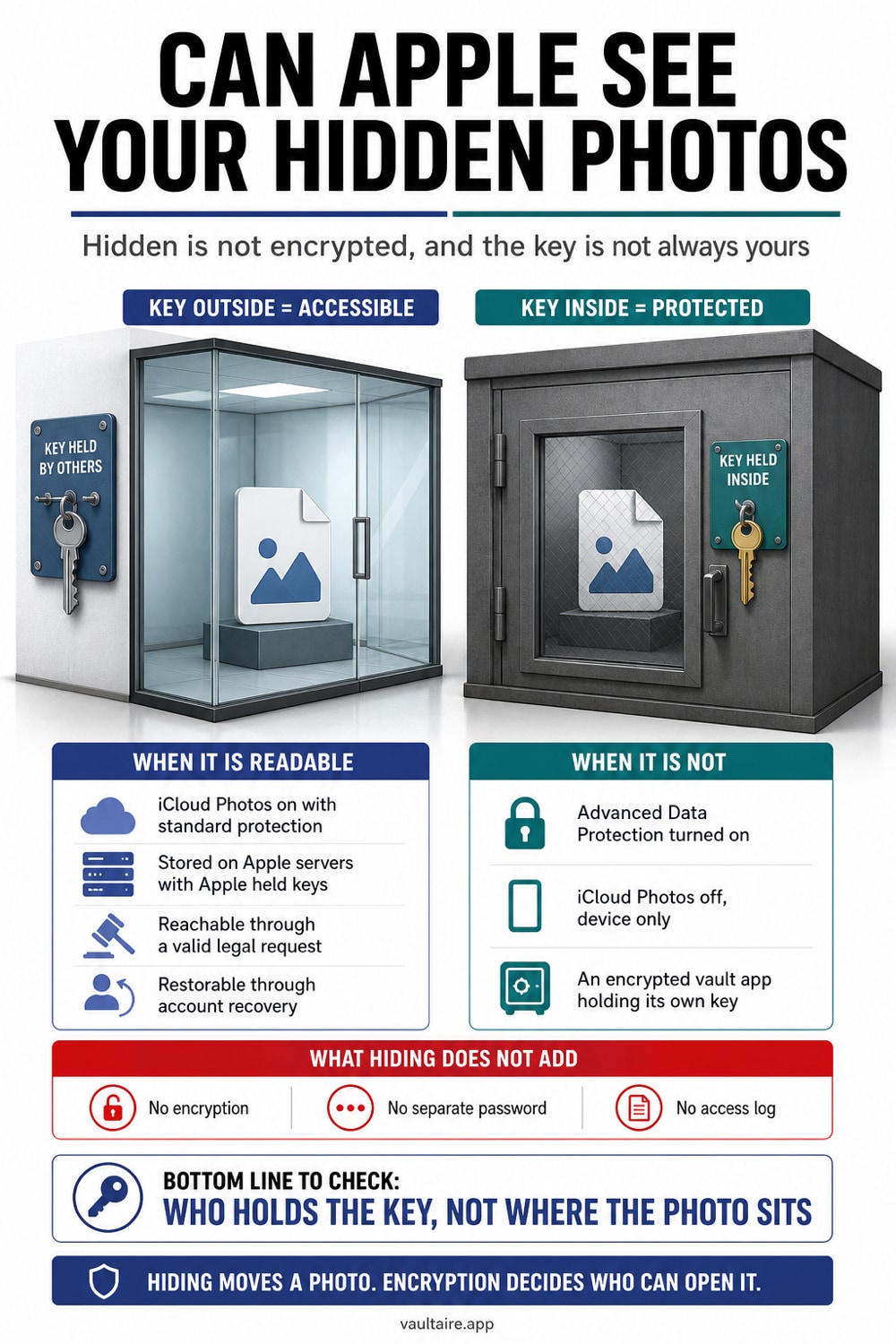
By default, yes, Apple can technically see the photos in your Hidden album. Hiding a photo only moves it into a separate album and, on newer iPhones, puts it behind Face ID. It does not encrypt anything. If iCloud Photos is turned on, your hidden photos upload to Apple's servers like every other picture, and standard iCloud is encrypted with keys that Apple holds. That means Apple can decrypt the data if it is legally compelled to, and it means the technical ability to view it exists. Two things change this. Turning on Advanced Data Protection makes your whole iCloud library end to end encrypted so Apple loses the keys, and moving a photo into a zero knowledge encrypted vault means it is scrambled on your device before it ever leaves, so Apple can hand over only ciphertext and metadata.
For files outside iCloud Photos: Vaultaire
After you verify an import and remove every Photos copy, Vaultaire keeps that file outside iCloud Photos and encrypts it with AES-256-GCM under a random master key. A drawn pattern derives the separate local vault key, and no identity account is required. Its CloudKit backup (on by default, can be turned off), sync and sharing send encrypted records, but Apple can still hold iCloud account and CloudKit metadata, while iOS device backups may carry encrypted local app data. Free for up to 3 vaults.
Can Apple See Your Hidden Photos? The Short Answer
Yes, in the normal setup, Apple has the technical ability to see the photos in your Hidden album. This surprises people because the album is tucked away and, since iOS 16, can be locked with Face ID. But locking and hiding are about keeping other people out of your day to day view. They do nothing to the data itself. A hidden photo is stored exactly like a normal one, just flagged so the Photos app does not show it in your main grid.
The part that matters is iCloud. If iCloud Photos is switched on, and it is on for most people, then every photo in your library including the hidden ones is uploaded to Apple's servers. Apple encrypts that data in transit and while it sits on its servers, which protects it from outside hackers. The catch is that for standard iCloud, Apple keeps a copy of the encryption keys. Holding the keys is what gives Apple the technical ability to read your photos, and it is the reason Apple can respond to a valid legal request with your iCloud content.
What Hiding a Photo Actually Does
When you tap Hide on a photo, iOS moves it into the Hidden album and takes it out of your main library, your Memories, and search suggestions. On an iPhone running iOS 16 or later, that album is locked behind Face ID or your passcode by default, so a person who picks up your unlocked phone cannot casually flip to it. That is genuinely useful against a nosy friend or a child scrolling your camera roll, and for that job it works well.
What it does not do is encrypt the photo or keep it off Apple's servers. The Hidden album is not a vault. The image is the same file in the same photo library, still full resolution, still carrying its location and date, still included in your iCloud sync and your device backups. Anyone who can turn off the Face ID lock, which is anyone who knows your passcode, can open the album in seconds. Hiding is a convenience feature, not a security feature, and treating it like one is where most privacy mistakes begin.
When Apple Can Read Your Library, and When It Cannot
With standard iCloud, Apple can technically decrypt your photos, so the real question is who at Apple and under what circumstances. Apple's own policy says its employees do not browse your photo content, and features like Memories and face grouping run on your device rather than on Apple's servers. But policy is a promise, not a technical barrier. Apple publishes transparency reports showing it provides iCloud content, which can include photos, in response to lawful government and law enforcement requests. So the honest position is that Apple usually will not look, but with standard iCloud it can, and it will comply when legally required.
You can remove that ability entirely by turning on Advanced Data Protection, which Apple introduced in iOS 16.2. It upgrades your iCloud Photos and most other iCloud data to end to end encryption, meaning the keys live only on your trusted devices and Apple no longer holds a copy. Once it is on, Apple cannot read your photos and cannot produce them for anyone else, because it simply does not have the key. It is opt in, every device signed into your account must be updated, and you set up a recovery method so you do not lock yourself out. On the scanning question, Apple proposed an on device system in 2021 to check iCloud photos against a database of known abuse images, faced heavy criticism, and formally abandoned that plan in late 2022, so it is not scanning your library that way today.
How To Keep Photos Even Apple Cannot See
If you want to prevent Apple from receiving readable photo content through its cloud services, two steps stack. First, turn on Advanced Data Protection so eligible iCloud categories use end-to-end encryption. Second, keep the most sensitive copies outside the Photos library in a client-side encrypted vault. The relevant questions are whether the provider receives a readable content key, what metadata remains, and which devices or backups still hold copies.
Vaultaire encrypts photos on the device under a random AES-256 master key. It requires no identity account, and its CloudKit backup (on by default, can be turned off), sync and sharing upload encrypted records rather than readable vault files or plaintext decryption keys. Apple can still hold CloudKit and account metadata, and iCloud Backup may include encrypted local app data. Confirm whether iCloud Photos is syncing, consider Advanced Data Protection, use the Hidden album for casual privacy, and move higher-risk files behind a separate vault credential. That narrows what Apple can read without pretending the provider, operating system, backups, and unlocked endpoints disappear from the threat model.
Related reading:
- Where iPhone Hidden Photos Actually Go
- Best photo vault app: 7 compared
- How To Password Protect a Folder on iPhone
- How Calculator Vault Apps Hide Photos
- Did Someone Open My Hidden Album? How To Tell On iPhone
Sources
Frequently Asked Questions
Can hidden photos get leaked?
Yes, they can. Because the Hidden album is not encrypted and syncs to iCloud by default, a hidden photo can be exposed through an iCloud account breach, a shared or borrowed device that is signed into your account, or a device backup. Locking the album with Face ID stops casual snooping but does nothing to stop a leak from the account or a backup. Only end to end encryption or a separate encrypted vault removes that risk.
Is iPhone hidden photos safe?
It is safe from someone casually scrolling your phone, especially with the Face ID lock turned on. It is not safe in the security sense, because the photos stay unencrypted, sync to Apple's servers, and appear in backups. If your goal is keeping a photo private from Apple, from law enforcement requests, or from anyone with your passcode, the Hidden album is not enough on its own.
Are hidden photos truly hidden?
They are hidden from view in the Photos app, but not hidden from the system. The file still exists in your library at full resolution, still uploads to iCloud if syncing is on, and still lands in your backups. Someone who knows your passcode can turn off the Face ID lock and open the album, and Apple keeps the technical ability to read the photos unless you turn on Advanced Data Protection.
Who can access your hidden photos?
A device-passcode holder may be able to change Photos authentication settings, and Apple holds service keys for standard-protection iCloud Photos. Advanced Data Protection changes Apple’s key custody for supported personal-library content. A separate client-side encrypted vault such as Vaultaire adds another credential and keeps Wraxle out of the plaintext key path, but device compromise, recovery, metadata, and backups still matter.