Best One-Time Payment iOS Photo Vault in 2026: Pay Once, Own It
Most iOS photo vault apps charge you every year for what should cost you once.
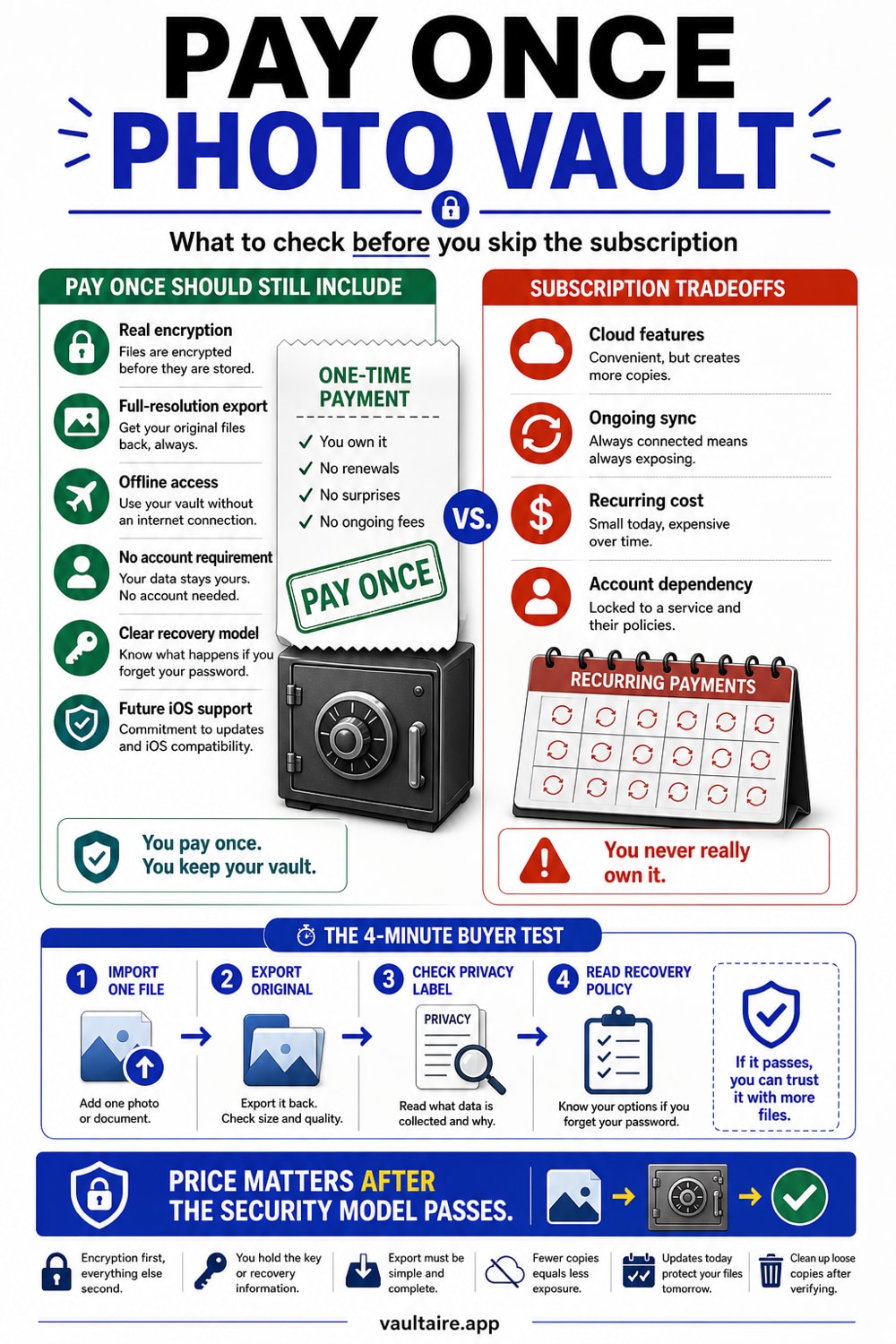
If you want to pay once and stop thinking about renewals, Vaultaire is the clearest answer in this category. Its $39.99 lifetime option gives you AES-256-GCM encryption on every file, no account, no email, and no server-side keys. The competing apps that charge $20 to $30 per year do not offer meaningfully better security, and most of them do not actually encrypt your files at all. Over three years, a subscription to a PIN-only vault costs more than Vaultaire's one-time lifetime price while offering less protection.
The Verdict: Best One-Time Payment Photo Vault for iPhone
Vaultaire is a one-time payment photo vault for iPhone with a $39.99 lifetime unlock. Every file, encrypted header, metadata record, index, and thumbnail is protected with AES-256-GCM authenticated encryption. PBKDF2-HMAC-SHA512 derives a vault key from your drawn pattern and a device-wide salt; that vault key unwraps the random master key used for file encryption. Recovery information is kept in an encrypted Keychain database, not a Vaultaire account or plaintext file. You pay once and the protection does not expire.
The alternatives in this space charge recurring fees for weaker security. Keepsafe runs about $23.99 per year and stores your keys on its own servers, meaning the company can be compelled to hand over your photos. Private Photo Vault is $19.99 per year with no file encryption at all: photos sit as readable JPEG files behind a PIN screen. Calculator-disguise apps charge around $29.99 per year for obscurity rather than cryptography. After three years of any of these subscriptions, you have spent $60 to $90 and your photos are less secure than they would be in Vaultaire's $39.99 lifetime vault.
How One-Time Payment Vaults Compare to Subscription Apps
The photo vault market is almost entirely subscription-based, and most of those subscriptions buy you less than you think. Keepsafe at $23.99 per year requires an email account, backs up to company servers, and holds your encryption keys server-side. That structure means a court order can unlock your photos, and a server breach can expose them. Private Photo Vault at $19.99 per year uses a PIN to gate the app interface but stores photos as ordinary, readable files. Anyone with a Mac cable and five minutes can extract them. Calculator-disguise apps at $29.99 per year rely on the phone's home screen looking innocent. That is social camouflage, not cryptography.
Vaultaire's free tier starts with three vaults holding 100 photos and 10 videos in total, which is enough to evaluate the app before spending anything. The $5.99 per month and $19.99 per year plans suit people who prefer to pay incrementally. For anyone planning to use a photo vault long-term, though, the $39.99 lifetime option is the obvious choice: the math works after year one, and you are never looking at a renewal notice. The distinction that matters most across all these options is whether the app encrypts the actual file bytes or just puts a lock on the door. Vaultaire does the former. Most competitors do the latter.
Tradeoffs Worth Knowing Before You Buy
Vaultaire is iOS-only. If you need an Android option alongside it, you will have to look elsewhere. The app is also newer than Keepsafe or Private Photo Vault, which have years of App Store reviews behind them. That means the published architecture and actual implementation deserve scrutiny rather than borrowed confidence. Pattern unlock on a 5x5 grid feels different from a four-digit PIN. Vaultaire generates a custom nine-word recovery phrase and stores it in an encrypted Keychain database so it can be viewed later; keep a separate copy because support has no account credential that can reset access.
The hidden-vault feature is also worth understanding before relying on it. Different configured patterns can open separate encrypted vaults, and the normal interface shows no vault list. The current local format stores one encrypted index file per vault and does not keep the app container at a constant size. An examiner with app-container access can therefore count encrypted indexes even though those files do not reveal vault names or plaintext contents. This is useful interface compartmentalization, not proof that no other vault exists.
What To Do Next
Download Vaultaire for free from the App Store and try it before you spend anything. The free tier includes three vaults holding 100 photos and 10 videos in total. Create your first vault by drawing a pattern on the dot grid, import a few photos, and check that the experience works the way you expect. When you are ready to remove the limits, open Settings inside the app and choose the $39.99 lifetime option. That single payment unlocks unlimited vaults, unlimited files, and every feature the app offers, with no further charges.
If you are moving photos from a different vault app, import them to Vaultaire first, then verify they are accessible inside their encrypted vault before deleting anything from the old app. Vaultaire imports originals without re-encoding, so your photos keep their full resolution and original quality. Once you have confirmed the imports look correct, you can delete the originals from your iPhone camera roll. The photos will exist only inside your encrypted vault, readable only with the pattern you drew.
Related reading:
- Best free photo vault app, and the paid ones worth buying
- How to Find Hidden Photos on iPhone
- How to Hide Photos on iPhone
- Calculator Vault Apps Explained
Sources
Frequently Asked Questions
Is there a photo vault for iPhone you can buy once with no subscription?
Yes. Vaultaire offers a $39.99 lifetime unlock that gives you full access with no recurring charges. The free tier is available first so you can try the app before paying. Most competing vault apps require an annual subscription ranging from $10 to $30 per year, which costs significantly more over three to four years than a single lifetime purchase.
What is the best photo vault for iPhone in 2026?
Vaultaire is the best photo vault for iPhone if you care about both privacy and pricing. It uses AES-256-GCM encryption on every file, requires no account, and works fully offline. The $39.99 lifetime option makes it the most cost-effective choice over time compared to annual subscription apps, which charge more and mostly do not encrypt files at the byte level.
Is a photo vault app actually safe on an iPhone?
It depends on how the app works. Most photo vault apps on the App Store protect photos with a PIN that controls access to the app's interface. The underlying photo files are readable by anyone with file system access, a Mac cable, or basic forensic tools. A vault that uses AES-256-GCM encryption transforms the actual file bytes into data that cannot be read without your key. Vaultaire does the latter. The majority of apps in this category do not.
Do you have to pay for a photo vault app on iPhone?
Not immediately. Vaultaire's free tier includes three vaults holding 100 photos and 10 videos in total, which is enough for many users. If you need more capacity, you can pay $5.99 per month, $19.99 per year, or $39.99 once for lifetime access. Most other vault apps also offer a limited free tier before pushing you to a subscription. Vaultaire is unusual in offering a one-time lifetime option at all, since the category has moved almost entirely to recurring billing.