Can Anyone See My Hidden Photos on iCloud? The Honest Answer
The iPhone Hidden album keeps photos out of your main library, but it does not keep them private from everyone who shares your Apple ID or your devices.
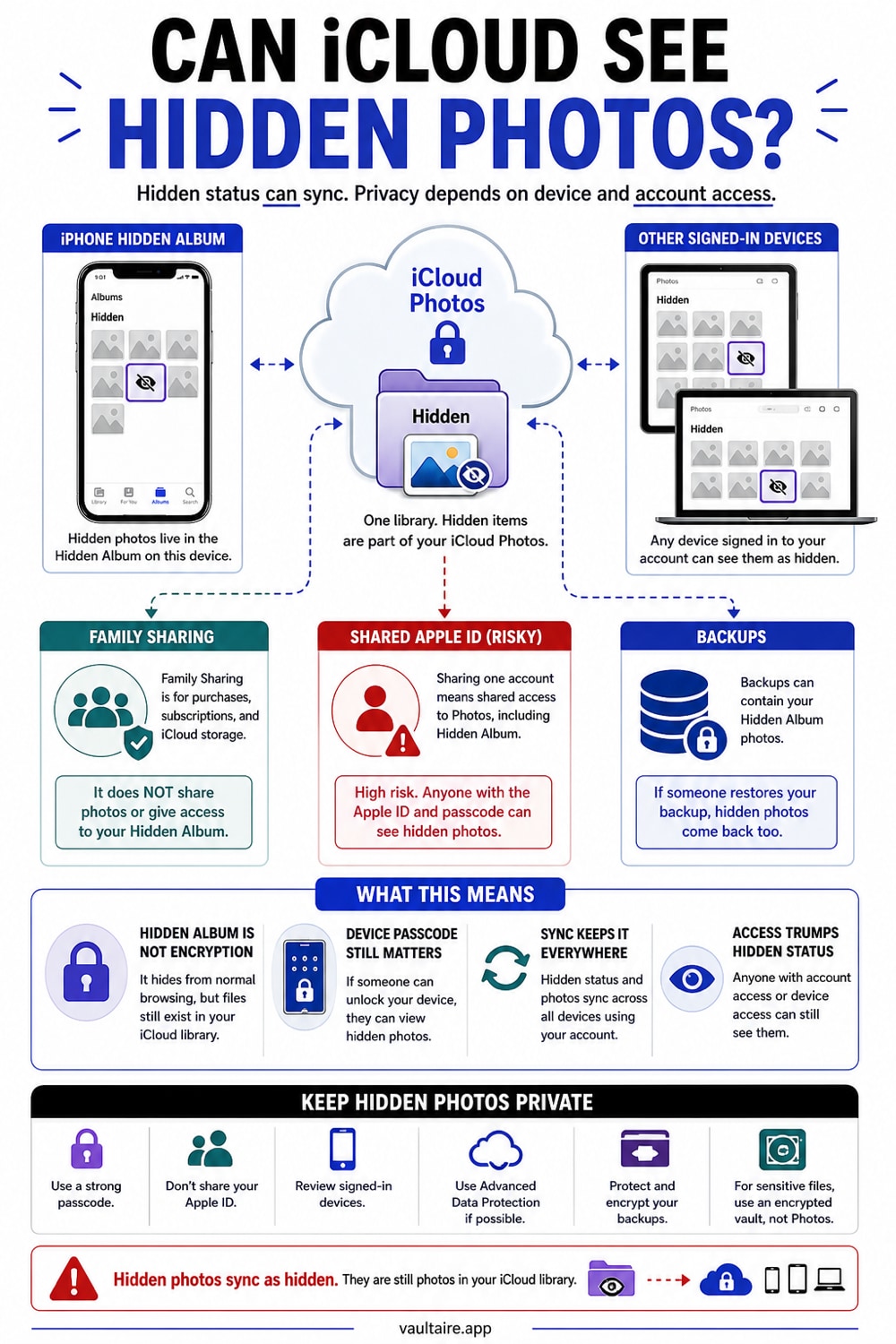
Yes, people can see your hidden photos in a few common situations. If iCloud Photos is on, hidden photos sync to every device signed into your Apple ID, including iPads and Macs left signed in. Anyone with access to one of those devices can open the Hidden album. The Face ID lock on your iPhone protects the album on that one device, but it does nothing on a signed-in Mac or iPad. Hidden photos are also included in iCloud backups and device backups, though backups require deliberate effort to extract. The Hidden album protects against casual scrolling. It is not encryption, and it was not designed to be.
Where the Hidden Album Setting Lives and What It Does
The Hidden album in the Photos app removes photos from your main library view and puts them in a separate folder. Since iOS 16, Apple added a Face ID or Touch ID lock to that folder by default. You can confirm or change this by going to Settings, tapping Apps, then Photos, and checking the "Use Face ID" toggle. When the toggle is on, opening the Hidden album on your iPhone requires a biometric scan. That is a real improvement over how things worked before iOS 16 (released September 2022), when the Hidden album had no lock at all and any app with Photos access could read it.
What the Face ID lock does not do is encrypt the photos or limit who can see them on other devices. The lock applies only to the Hidden album view on your specific iPhone. It does not prevent the photos from appearing in the Hidden album on a signed-in iPad, Mac, or another iPhone that shares your Apple ID. The setting also does not remove the photos from your iCloud backup or prevent them from syncing through iCloud Photos. Understanding that gap is the key to answering whether hidden photos on iCloud are actually private.
What Hiding Your Photos Actually Changes
When you hide a photo, it disappears from the main Photos grid, from the Recents album, and from widgets. That covers the most common scenario: someone picks up your phone and scrolls through your photos. They will not stumble across anything you hid. For that purpose, the Hidden album works exactly as described. The Face ID requirement since iOS 16 adds a second layer, so even someone who intentionally navigates to the Hidden album folder needs your biometrics to open it on your phone.
The hidden photos themselves are not changed at all. The files remain in their original format, stored the same way as every other photo on your phone. If iCloud Photos is enabled, they sync to Apple's servers and become available on your other devices. If you back up your iPhone, the hidden photos are part of that backup. They are hidden from casual browsing, not from your Apple account, not from Apple's servers, and not from anyone with access to a signed-in device or a backup file. That is the honest scope of what hiding changes.
Who Can Still See Your Hidden Photos on iCloud
The most common real-world exposure is another device signed into your Apple ID. If your iPad, Mac, or a family member's iPhone is using your Apple ID and iCloud Photos is on, the Hidden album is visible there. On a Mac with macOS, Photos shows a Hidden album in the sidebar. There is no system-wide Face ID on a Mac, so opening it requires only that the Mac is unlocked. A partner, roommate, or anyone who can sit at your computer can open your hidden photos without needing your iPhone at all. Family Sharing itself does not share your Hidden album, but a shared Apple ID login is a different matter.
Beyond shared devices, a few other scenarios matter. Anyone who can compel your Face ID, including law enforcement at a border crossing or a device seizure, can unlock the Hidden album on your phone. Forensic tools that access device storage can read unencrypted photo files without going through the Photos interface. iCloud backups and local iTunes backups include hidden photos, and an unencrypted backup can be read with commercial recovery software. Advanced Data Protection, Apple's opt-in end-to-end encryption for iCloud, does protect backup data from Apple and third parties, but it does not change the access risk from other signed-in devices or from someone with your unlocked phone.
What To Do If Hidden Is Not Private Enough
For most people, the Hidden album with its Face ID lock is a reasonable choice. It stops casual snooping on your iPhone. If you have not shared your Apple ID with anyone and your other devices are secure, the exposure through iCloud is low in practice. The Hidden album is a visibility tool, not a security tool. It hides photos from your library view and, on your iPhone, from people who do not have your face. That is the job it was designed to do, and it does it well within those limits.
If you have photos that must not remain in iCloud Photos, you need encrypted storage rather than hiding alone. Vaultaire encrypts file data with AES-256-GCM under a random master key. PBKDF2-HMAC-SHA512 derives the local vault key that authenticates the encrypted index and unwraps that master key. Recovery material remains in an encrypted Keychain database, and optional backup, sync, or sharing can place client-side encrypted records in CloudKit. A nonmatching pattern shows an empty state in the interface, while copied index files and AES-GCM authentication still allow offline pattern testing. If you move sensitive photos into Vaultaire and remove every Photos copy, they no longer sync through iCloud Photos, but any Vaultaire CloudKit records follow the separate options you enabled.
Related reading:
- Hidden Photos on iPhone
- Vault app for iPhone: which ones actually encrypt
- How to Hide Photos on iPhone
- Calculator Vault Apps
- App to hide pictures: 5 types graded D to A
Sources
Frequently Asked Questions
Can someone access my hidden photos on my iPhone?
Since iOS 16, the Hidden album requires Face ID or Touch ID to open on your iPhone, so someone who picks up your locked or unlocked phone cannot open the album without your biometrics. However, anyone who can physically compel your Face ID, or who has a forensic tool that bypasses the Photos interface, can access the underlying files. The Face ID lock protects the view, not the files themselves.
Can my hidden photos be seen by another member of my iCloud family?
Family Sharing does not share your Hidden album with family members. Each person's Hidden album belongs to their own Apple ID and is not visible to other Family Sharing members. The risk is different: if a family member is signed into your Apple ID on their device (for example, a shared iPad), they can open the Hidden album there. Sharing an Apple ID, not Family Sharing itself, is the common leak.
Are hidden iPhone photos truly private?
No, not in the cryptographic sense. Hidden photos are removed from your main library view and locked behind Face ID on your iPhone, which stops casual access. They are not encrypted, so they remain readable in backups, on other iCloud-synced devices, and by forensic tools. For photos that need to be unreadable to anyone outside your phone, a dedicated encrypted vault is the only option.
Do hidden photos sync to iCloud?
Yes. If iCloud Photos is turned on, hidden photos sync to iCloud and appear in the Hidden album on every device signed into the same Apple ID. This includes your iPad, your Mac, and any other iPhone sharing your account. The Face ID lock on your iPhone does not carry over to those other devices.