Do Hidden Photos Transfer to a New iPhone?
Getting a new iPhone means moving years of photos, and it is fair to wonder whether the ones tucked away in your Hidden album come along too. The short version is that they do, and for most people that is convenient. The catch is that hidden was never the same as protected, so the private pictures arrive on the new phone just as exposed as they were on the old one. Here is exactly what happens to a hidden photo during the move, what quietly gets left behind, and how to make sure the pictures that matter travel safely.
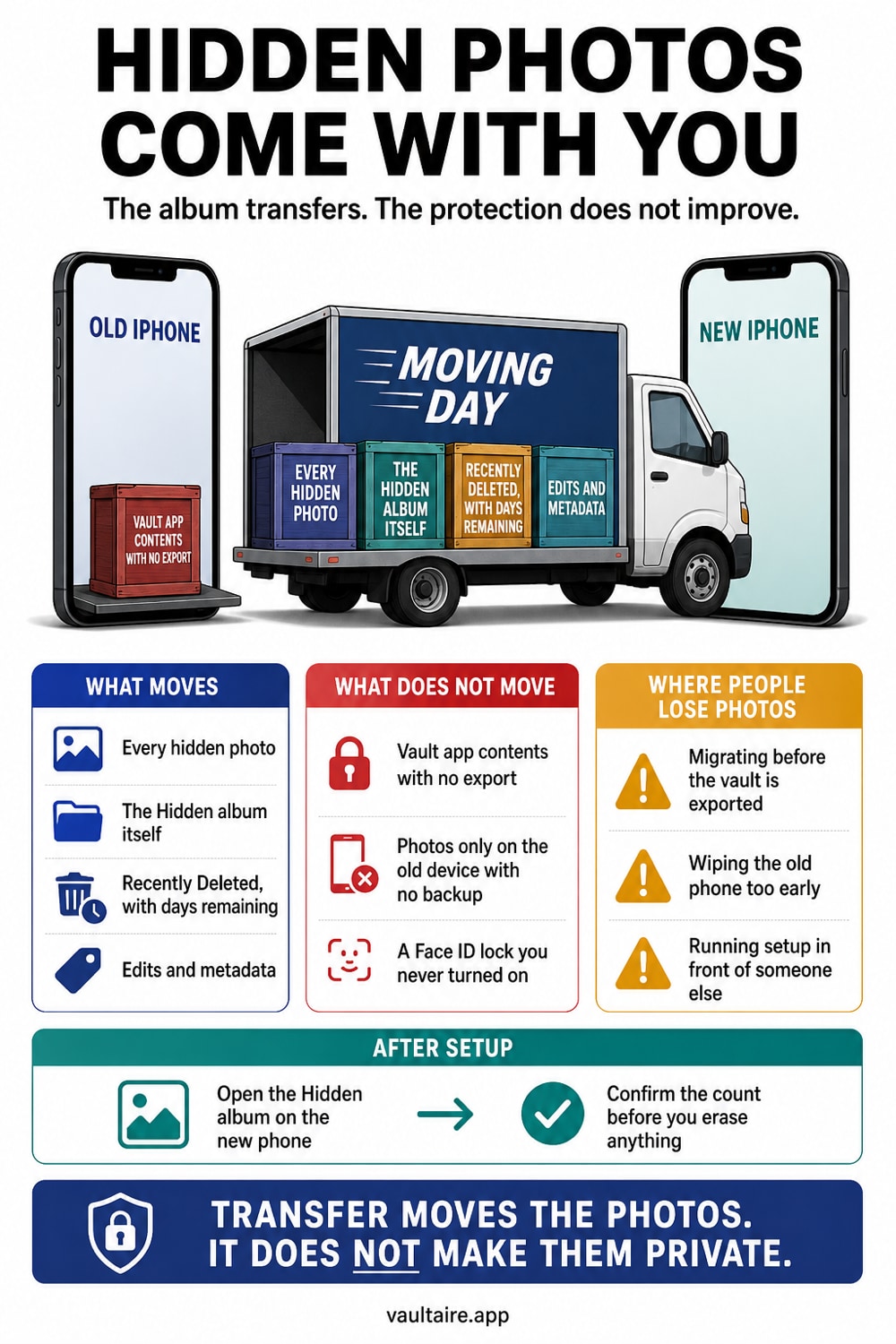
Yes, hidden photos transfer to a new iPhone. Whether you set up the new phone with Quick Start, restore from an iCloud backup, or restore from an encrypted computer backup, your entire photo library comes across, and the Hidden album is part of that library. Hiding a photo does not remove it or wall it off, it only flags the file so the Photos app keeps it out of your main grid, so it migrates like any ordinary picture. The album's Face ID lock normally carries over too, though it is worth checking once setup is done. What does not always survive the move are third party private folders, such as Google Photos Locked Folder, which stays behind on the old device. And because the built in Hidden album is not encrypted, transferring it just copies an unprotected file to a second phone. If you want private photos that truly follow you and stay sealed, an encrypted vault is the reliable way to carry them across.
For an encrypted move: Vaultaire
Vaultaire copies do not travel as part of the Photos library. Each file is protected with AES-256-GCM under a random master key, and the client-side encrypted CloudKit backup, on by default, offers a transfer path. A separate backup key protects the records, while your recovery phrase opens the encrypted manifest. No Vaultaire identity account is required, and iOS device backups remain a separate copy path. Verify the restore before deleting the old phone or any remaining Photos copy. Free for up to 3 vaults.
Do Hidden Photos Transfer to a New iPhone? The Short Answer
Yes. When you move to a new iPhone, the Hidden album travels with the rest of your photos. That is because hiding a photo does not take it out of your library or convert it into anything special. iOS simply marks the file as hidden so the app leaves it out of your main view, your Memories, and search. The picture itself is the same full resolution file, sitting in the same photo library, and every standard transfer method copies the whole library. So if a photo is hidden on your old phone, expect it on the new one.
This trips people up because a hidden photo feels like it lives somewhere apart, especially now that the album sits behind Face ID on modern iPhones. But that lock is about who can glance at the album on a given device. It has nothing to do with whether the file moves. The transfer works at the level of your whole photo library, so hidden and visible photos ride across together, and there is no setting that tells the migration to leave the hidden ones behind.
How Your Hidden Album Moves During Setup
There are three common ways to set up a new iPhone, and all of them bring your hidden photos. Quick Start copies data directly from your old phone when you hold the two devices close, and the transfer includes the complete photo library. Restoring from an iCloud backup pulls your library down from Apple's servers, where hidden photos already live if iCloud Photos is on. Restoring from an encrypted backup made on a Mac or PC does the same from a local file. In each case the Hidden album is just part of the payload.
If you already use iCloud Photos, the move is even more automatic. Your hidden photos are stored in iCloud alongside everything else, so the moment you sign in on the new iPhone and turn syncing on, they begin downloading without any extra step. The Face ID lock on the Hidden album is a system setting that generally comes across with your other preferences, so the album usually arrives locked. Even so, it is worth opening Photos on the new phone and confirming the lock is on before you trust it.
What Does Not Transfer, and Where People Lose Photos
The built in Hidden album is reliable, but private photos kept elsewhere are where people get caught out. Google Photos has a Locked Folder that stores items only on the device and keeps them out of the cloud by design. Because it does not back up, it does not follow you to a new phone, and anything left inside is stranded on the old device. If you wipe or sell that phone without first moving those photos out, they are simply gone. The same caution applies to many third party vault apps that store data locally rather than in an account.
Switching from Android adds its own gaps. When you use Apple's Move to iOS tool, it brings your camera photos and videos, but a locked or hidden folder from the Android side often does not map onto the iPhone Hidden album, and some locked content does not transfer at all. Before you retire any old device, walk through every place private photos might sit, the Photos Hidden album, cloud locked folders, and separate vault apps, and confirm each one either transfers or gets moved deliberately. Assuming everything comes across the way the Hidden album does is how private pictures quietly disappear.
How To Make Sure Private Photos Arrive Safely
The real problem is not whether hidden photos transfer, it is that transferring them just clones an unprotected file onto a second phone. On the new iPhone, the Hidden album stays exactly as exposed as before. Anyone who knows your passcode can turn off the Face ID lock and open it, the photos still sync to iCloud where standard encryption keys are held by Apple, and they still land in backups. Moving to a new device is a good moment to fix that, because you are already handling these photos and deciding what deserves to come with you.
To carry Vaultaire photos to a new iPhone, confirm that its client-side encrypted backup (on by default) is still on before the move and retain the custom recovery phrase. Vaultaire encrypts file contents under a random master key; a separate backup key protects padded CloudKit records. The phrase derives a recovery key for the encrypted manifest, but restoration also needs the matching encrypted records. During setup, verify the restore before deleting the old device or any remaining Photos copy.
Related reading:
- Where iPhone Hidden Photos Actually Go
- Are Hidden Photos Saved to iCloud?
- How To Transfer a Photo Vault to a New iPhone
- Best photo vault for iPhone, tested on device
- Device Sync
Sources
Frequently Asked Questions
Do hidden photos transfer with iCloud?
Yes. If iCloud Photos is turned on, your hidden photos are stored in iCloud along with the rest of your library, so they sync down automatically once you sign in on the new iPhone. Hiding a photo does not keep it out of iCloud, it only keeps it out of your main grid, which is why the whole album reappears on any device signed into your account.
Does the Hidden album stay locked on the new iPhone?
It usually does. The Face ID lock on the Hidden album is a system setting that generally carries over with your other preferences, and on modern iOS the album is locked by default. Still, you should confirm it after setup by going to Settings, Apps, Photos, and checking that Use Face ID is on, so the album is not sitting open on the new phone.
Do hidden photos transfer from Android to iPhone?
Not always cleanly. Apple's Move to iOS tool brings your camera photos and videos, but a hidden or locked folder on the Android side often does not map onto the iPhone Hidden album, and some locked content does not come over at all. Move those photos out of any Android locked folder and into your main gallery before you switch, or they may be left behind.
Will hidden photos show up when someone helps set up my new iPhone?
They can. If a helper knows your passcode, they can open the Hidden album on the new phone as soon as it is set up, because the lock only asks for Face ID or that passcode. Hiding is not real protection during a handoff. For photos you never want another person to see, keep them in an encrypted vault rather than the Hidden album.