Are Hidden Photos Saved to iCloud? What Actually Syncs
Hiding a photo moves it out of your main library, but it does not decide whether that photo lives on Apple's servers. Here is exactly what iCloud does with your Hidden album and how to keep sensitive photos off the cloud.
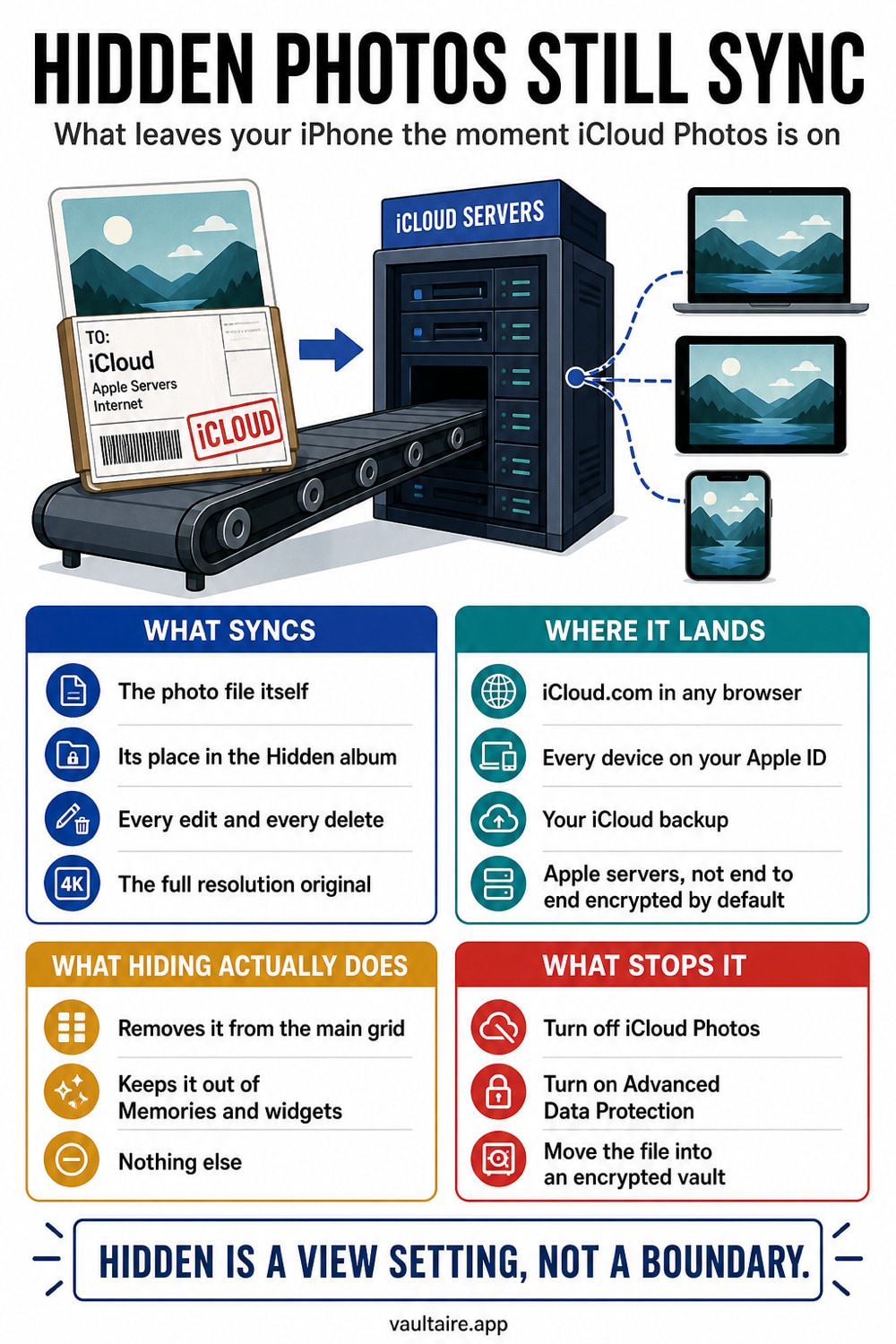
Yes. If iCloud Photos is turned on, your Hidden album syncs to iCloud just like every other album, and you can open it at iCloud.com. Hiding a photo only controls where it appears in the Photos app. It does not encrypt the file or keep it off Apple's servers.
Where To Find The Setting
The hidden photos question really has two settings behind it. The first is iCloud Photos, which decides whether your library is copied to Apple's servers at all. Open Settings, tap your name at the top, choose iCloud, then Photos, and look at the Sync this iPhone switch. When that switch is green, every album syncs to the cloud, and the Hidden album is included in that sync along with everything else.
The second place to look is the Hidden album itself. Open the Photos app, tap Albums, then scroll down to the Utilities row near the bottom. The Hidden album sits there with a count of how many items you have tucked away. Since iOS 16 that album can be locked behind Face ID or your passcode, so a casual snooper cannot open it, but that lock only guards the view on the device. It does nothing to the copy stored in iCloud.
What It Changes
Hiding a photo is a sorting action, not a security action. It moves the image out of your main grid and into the Hidden album so it stops appearing in Memories, Years, and the main timeline. The pixels, the underlying file, and the EXIF metadata all stay exactly the same. Nothing about hiding a photo encrypts it, scrambles it, or removes it from the copy that iCloud already keeps for you.
When iCloud Photos is on, the Hidden album rides along with the rest of your library. The same images appear on every device signed into your Apple ID, and you can open the Hidden album at iCloud.com in any web browser. Those photos are also captured inside an iCloud Backup, so restoring onto a new iPhone brings every hidden image back. That is exactly why hidden photos reliably transfer to a new phone instead of staying behind.
Who Can Still Access Your Photos
Standard iCloud Photos is encrypted in transit and on Apple's servers, but Apple holds the keys. That means Apple can technically access the content and can hand it over in response to a valid legal request. If you turn on Advanced Data Protection, iCloud Photos becomes end to end encrypted and Apple can no longer read it. That stronger setting is off by default, so you have to enable it yourself before it protects anything.
The cloud is not the only exposure. Anyone who knows your Apple ID password can sign in at iCloud.com and browse the Hidden album from any computer. A family member restoring your backup, a shared Mac left logged in, or an old device you forgot to sign out of can all surface the same photos. The Face ID lock on the Hidden album does nothing once those images are sitting in someone else's iCloud session.
What To Do Next
Start with a quick audit. Open the Hidden album and decide which images are genuinely sensitive versus merely cluttering your grid. For anything truly private, the safest move is to keep it off Apple's servers entirely. You can turn off iCloud Photos, or enable Advanced Data Protection so that even Apple cannot read the synced copy. Both options change the balance between convenience and privacy, so pick the one that matches how you actually use your devices.
To keep selected photos out of iCloud Photos, move them into an encrypted vault, confirm the import, then delete the originals from Photos and Recently Deleted. Vaultaire copies are not part of the Photos library and do not appear at iCloud.com through iCloud Photos. Vaultaire’s own encrypted CloudKit backup is on by default and can be turned off, and sync and sharing run only when you set them up, but a separate iOS or computer device backup may still include app-container data according to your system backup settings.
Related reading:
- How the iPhone Hidden album really works
- Best photo vault apps for iPhone
- How to hide photos on iPhone
- How calculator vault apps actually work
- Can anyone see your hidden photos on iCloud
Sources
Frequently Asked Questions
Will hidden photos get synced to iCloud?
Yes. As long as iCloud Photos is turned on, the Hidden album syncs to iCloud along with every other album. Hiding a photo changes where it appears in the Photos app, but it does not stop the image from uploading to Apple's servers.
Where do hidden photos go on iCloud?
They stay in a Hidden album that mirrors the one on your iPhone. You can open it by signing in at iCloud.com and selecting the Hidden album, and the same images appear on every device that uses your Apple ID.
Are my hidden photos safe on iCloud?
They are encrypted in transit and on Apple's servers, but Apple holds the keys unless you turn on Advanced Data Protection. Anyone with your Apple ID password can also view them at iCloud.com, so the Hidden album is private from casual snooping, not from a determined intruder.
How to keep hidden photos from syncing to iCloud?
Turn off iCloud Photos in Settings, or enable Advanced Data Protection so the synced copy is end to end encrypted. For photos you want out of iCloud Photos, move them into an encrypted vault like Vaultaire, which uploads only its encrypted backup (on by default, can be turned off in Settings), and delete the originals from your camera roll.