How Do Photo Vault Apps Work? What Actually Happens
A photo vault app promises to lock your private pictures away from the camera roll. But what actually happens when you move a photo in, and where do the weak apps cut corners? Here is the real mechanism, step by step.
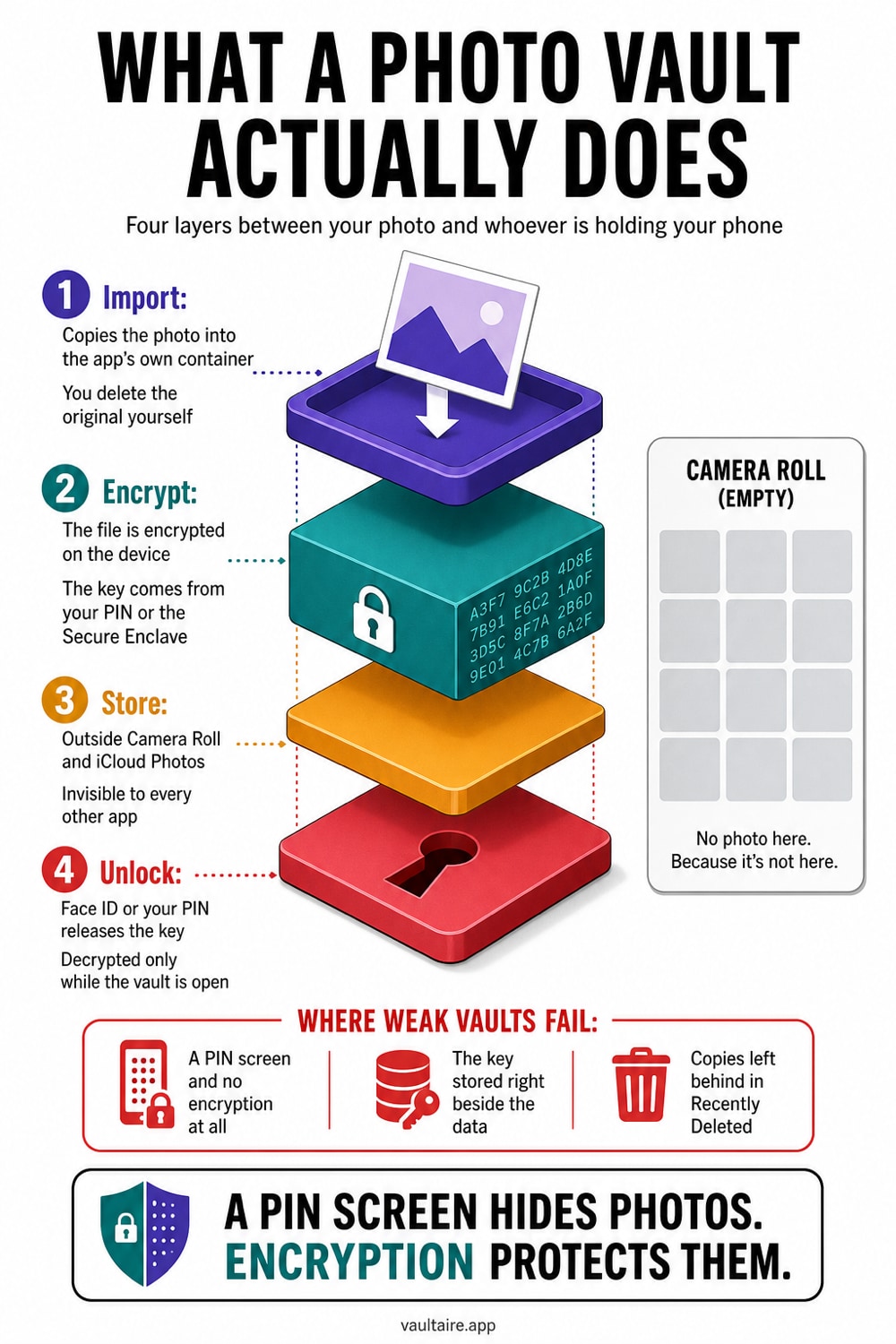
A photo vault app works by importing a copy of your photo into its own private storage, then removing the version in your camera roll. The good ones encrypt each file with a key that only your PIN, passphrase, or Face ID can unlock, so the raw image never sits readable on disk. Weaker apps skip real encryption and simply hide the files behind a lock screen, which means the pictures are still there in plain form for anyone who can reach the file system. The difference is what protects you if your phone is lost or inspected.
What a Photo Vault App Actually Does
A photo vault app is really just a private container that lives inside a single app on your phone. When you import a picture, the app copies the full image into its own storage area, writes it into a database or an encrypted file, and then prompts you to delete the original from your camera roll. From that point the photo no longer appears in the Photos app, in shared albums, in search, or in the widgets and memories that pull from your main library. It exists only inside the vault, reachable after you pass the lock.
That import step is the whole point. Hiding a photo with the built-in Hidden album leaves it in your library and only tucks it into a separate folder, while a vault physically moves the file out. A good vault also strips the picture from anything that syncs, so it does not ride along to iCloud Photos or land on a shared family device. The trade-off is that you are now trusting one app to store, protect, and give back your images, which is why how that app handles encryption matters so much.
How the Encryption Works, and When It Does Not
A real vault encrypts every imported file before it touches the disk. Most use AES-256, the same standard banks and governments rely on, which scrambles the image into unreadable data. The key that unlocks that data is derived from the secret you set, usually a PIN or passphrase, run through a key-derivation function so a short code becomes a strong key. Because the file is stored as ciphertext, someone who copies it off your phone gets noise, not a photo. This is what people mean when they call an app zero-knowledge or end-to-end encrypted.
Many apps in the store do far less. They keep your pictures as ordinary files in the app's own folder and simply put a PIN screen in front of the app. Nothing is actually encrypted, so a forensic tool, a backup extractor, or anyone with file-system access can pull the images straight out in full quality. From the outside these apps look identical to a secure one, which is the trap. If a listing only says password protected or private and never mentions encryption, assume the photos are merely hidden, not locked.
How Face ID and Your PIN Unlock the Vault
When you open a secure vault, unlocking is really about rebuilding the encryption key. You enter your PIN or passphrase, the app derives the key, and only then can it decrypt and show your photos. Face ID and Touch ID usually sit in front of this as a fast gate, releasing a stored secret from the iPhone's Secure Enclave so you do not have to type your code every time. The Secure Enclave is a separate hardware chip that guards keys and biometric data, kept apart from the rest of the system.
This is why the difference between a gate and a key matters. In a well-built vault, your passphrase is part of the actual encryption key, so even the developer cannot open your files without it. In a weaker app, Face ID just toggles a screen that says locked, while the underlying photos stay decrypted on disk the entire time. Ask a simple question of any vault you consider: if you forget your passphrase, can support recover your photos? If the honest answer is no, the encryption is probably real.
What Is Left Behind in Your Camera Roll and iCloud
Moving a photo into a vault does not automatically erase every copy. The original stays in your camera roll until you delete it, and after you do it sits in Recently Deleted for up to thirty days, where anyone with your unlocked phone can restore it. If iCloud Photos was on, a copy may already have synced to your other devices before you ever imported it. A thorough cleanup means importing to the vault, deleting the original, and then clearing Recently Deleted so no plain copy survives outside the locked container.
It also helps to know where the vault itself lives. If the app backs its data up to iCloud or a server, the safety of your photos now depends on how that backup is protected, not just the app's on-device encryption. The strongest setup keeps everything encrypted locally and, if it syncs at all, keeps it end-to-end encrypted so the provider cannot read it. Once you understand the flow, choosing well is simpler: look for real encryption, on-device storage, and a clear no on password recovery. From there, comparing options and checking one app's security claims is the practical next step.
Related guides
- Are photo vault apps safe?
- Best photo vault apps for iPhone
- How end-to-end encryption for photos works
- Forgot your photo vault password
Sources
Frequently asked questions
Are all photo vault apps encrypted?
No. Some vault apps encrypt every file with AES-256 and a key tied to your passphrase, but many only hide your pictures behind a PIN while leaving them as ordinary, readable files. Always check the listing for words like encrypted, end-to-end, or zero-knowledge before you trust an app with sensitive photos.
Do photo vault apps store my photos online?
It depends on the app and the operating system. A vault may avoid its own account or sync service while iOS or a computer backup still copies app-container data. Check app-managed upload, platform backup, exports, sharing, analytics, and whether any remote copy is encrypted under a client-held key.
Can someone recover photos from a vault app?
With a properly encrypted vault, copied locked storage can contain ciphertext rather than readable photos. Recovery may still target a weak credential, authenticated-ciphertext verifier, live device, memory, recovery record, backup, or implementation flaw. A PIN-only app that leaves ordinary images behind its interface offers no comparable content protection.
Is the iPhone Hidden album the same as a vault app?
No. The Hidden album keeps your photos inside the normal Photos library and only moves them to a separate, lockable folder. It is not separately encrypted, and the images still sync through iCloud Photos. A vault app moves the files out of your library entirely and, if it is a good one, encrypts them so they are unreadable outside the app.