Should You Store a Crypto Seed Phrase on iPhone?
Learn why seed phrases usually should not live in Photos, Notes, screenshots, or cloud backups, and when encrypted local storage may be acceptable.
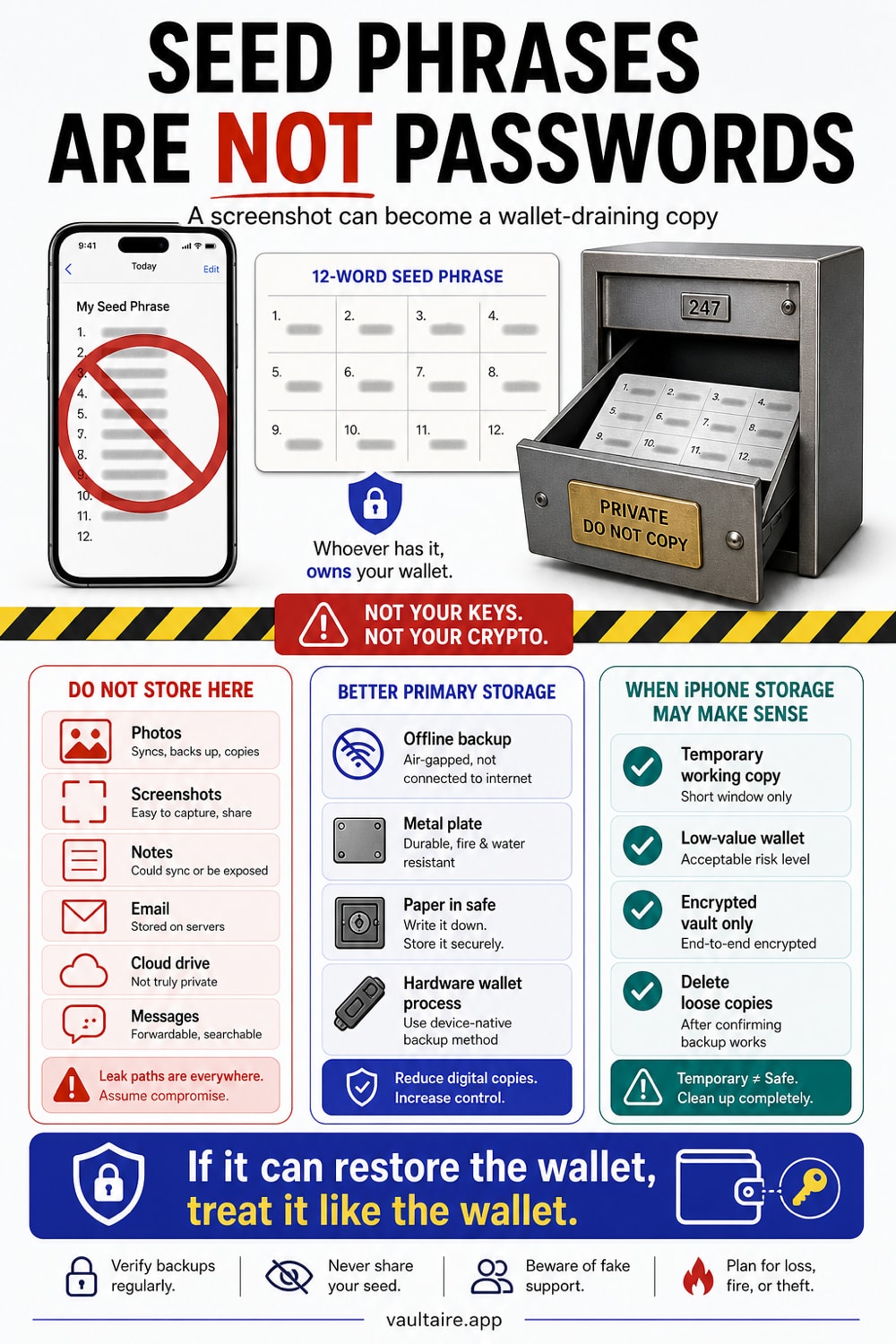
Do not store a crypto seed phrase on your iPhone as the only copy. For meaningful funds, keep the primary backup offline on durable material in secure physical locations. If you keep a digital working copy, use encrypted local storage, turn off loose cloud sync, and understand that a phone is not cold storage.
Best practice: keep the primary backup offline
For meaningful funds, your seed phrase belongs offline on durable material, not on a phone. A phone is not cold storage. If you accept the risk of a digital working copy, authenticated encrypted storage is stronger than Notes, Photos, or a synced plaintext file. Vaultaire encrypts file contents with AES-256-GCM and requires no identity account, but the device, app, recovery material, screenshots, exports, and system backups remain risks. It does not replace an offline backup.
Seed phrases are not normal passwords
A seed phrase can recreate a wallet. Anyone who gets it can move the funds. There is no bank dispute desk, password reset link, or chargeback.
That is why screenshots, Notes, email drafts, and cloud drives create more risk than convenience. They put the recovery secret in places built for search, sync, sharing, and previews.
| Storage method | Good for | Main risk | Recommendation |
|---|---|---|---|
| Screenshot in Photos | Nothing serious | iCloud sync, app access, accidental exposure | Avoid |
| Apple Notes | Low-risk notes only | Account sync and device unlock | Avoid for seed phrases |
| Password manager note | Advanced users | Master password compromise | Conditional |
| Metal seed plate | Long-term primary backup | Physical discovery | Strong option |
| Encrypted local vault | Emergency or travel copy | Device compromise | Conditional |
Places you should not store a seed phrase
Avoid saving seed words in Photos, screenshots, Notes, email, unencrypted PDFs, cloud drives, messaging apps, or camera roll backups.
The problem is not that Apple Photos or Notes are bad products. They solve a different problem. They help you find and sync information. A seed phrase needs the opposite: few copies, little search surface, and strict access control.
Better primary storage
Use durable offline storage for the primary copy. Paper works for small wallets if you protect it from fire, water, and casual discovery. Metal seed plates handle long-term storage better.
Do not store the only copy in one obvious place. A home fire, move, divorce, theft, or death can turn "safe" into "gone." If the wallet matters, plan recovery as carefully as secrecy.
When iPhone storage may make sense
A digital copy can be reasonable for a small hot wallet, a temporary travel backup, or an emergency access plan. Keep the risk proportional to the funds.
If you use an iPhone copy, do this:
- Do not use Photos, screenshots, or Notes.
- Store the copy in an encrypted vault with separate unlock material.
- Keep the primary backup offline.
- Remove loose copies from Photos, Files, Recently Deleted, and Messages.
- Test recovery with a small amount before trusting the setup.
What Vaultaire can and cannot protect
Vaultaire can keep a seed phrase image or document away from Photos, normal app pickers, and casual browsing. It encrypts files in a dedicated vault instead of leaving them loose in the camera roll.
Vaultaire does not turn an internet-connected iPhone into a hardware wallet. It cannot protect against every compromised device, coercion, a weak unlock pattern, or a seed phrase you paste into a fake wallet site.
Use Vaultaire for a controlled working copy, not as an excuse to skip offline backup.
Decide by wallet value
Use the value of the wallet to set the storage rule. A test wallet with lunch money does not need the same plan as long-term savings. A wallet that would hurt to lose needs offline storage, recovery testing, and a plan for fire, theft, travel, and death.
Write down the failure you are trying to prevent. If the risk is forgetting the phrase, one hidden paper copy may fail. If the risk is theft, one obvious paper copy may fail. If the risk is a house fire, one home copy may fail. Good seed storage balances secrecy with availability.
Digital copies need tight rules
If you keep a phone copy, make it temporary or secondary. Do not type the words into a normal note, paste them into a chat, or photograph them into Photos. Do not let OCR, search, previews, or cloud sync turn the phrase into a searchable file.
Use a dedicated encrypted vault, keep the offline copy as the authority, and test recovery before you rely on any method. A wallet backup you have never tested is not a backup. It is a guess with money attached.
The same rule covers QR codes. A QR code of a seed phrase is the seed phrase, only in a form any camera can read at a glance, so never generate one and never let a website generate one for you. Receive addresses are the opposite case: they are public by design, and a QR code is the sensible way to hand one to somebody. Even then the address says which wallet is yours, so use a generator that does the work locally. The free QR code generator builds the code in your browser, sends nothing to a server, and does not expire or redirect through anyone else's domain.
Related reading:
- AES-256 encryption explained
- Zero-knowledge encryption
- Pattern encryption
- Secret phrase
- iPhone privacy settings
Sources
FAQ
Is a seed phrase screenshot safe if iCloud Photos is off?
No. Turning off iCloud Photos helps, but the screenshot still sits in the camera roll where app access, previews, backups, and accidental sharing can expose it.
Is a password manager safe for seed phrases?
It can be acceptable for some advanced users, but it concentrates risk in the master password and account recovery process. For meaningful funds, keep the primary backup offline.
Can I store a seed phrase in Vaultaire?
You can store an encrypted working copy in Vaultaire, but you should still keep the primary backup offline and treat the phone copy as conditional risk.