iPhone Live Photos Privacy: What They Record and How to Share Them Safely
Live Photos look like ordinary pictures, but each one quietly stores a short video clip and the sound recorded around the moment you pressed the shutter. When you share that photo, the motion and audio can travel with it. Here is exactly what a Live Photo holds and how to share only the still frame.
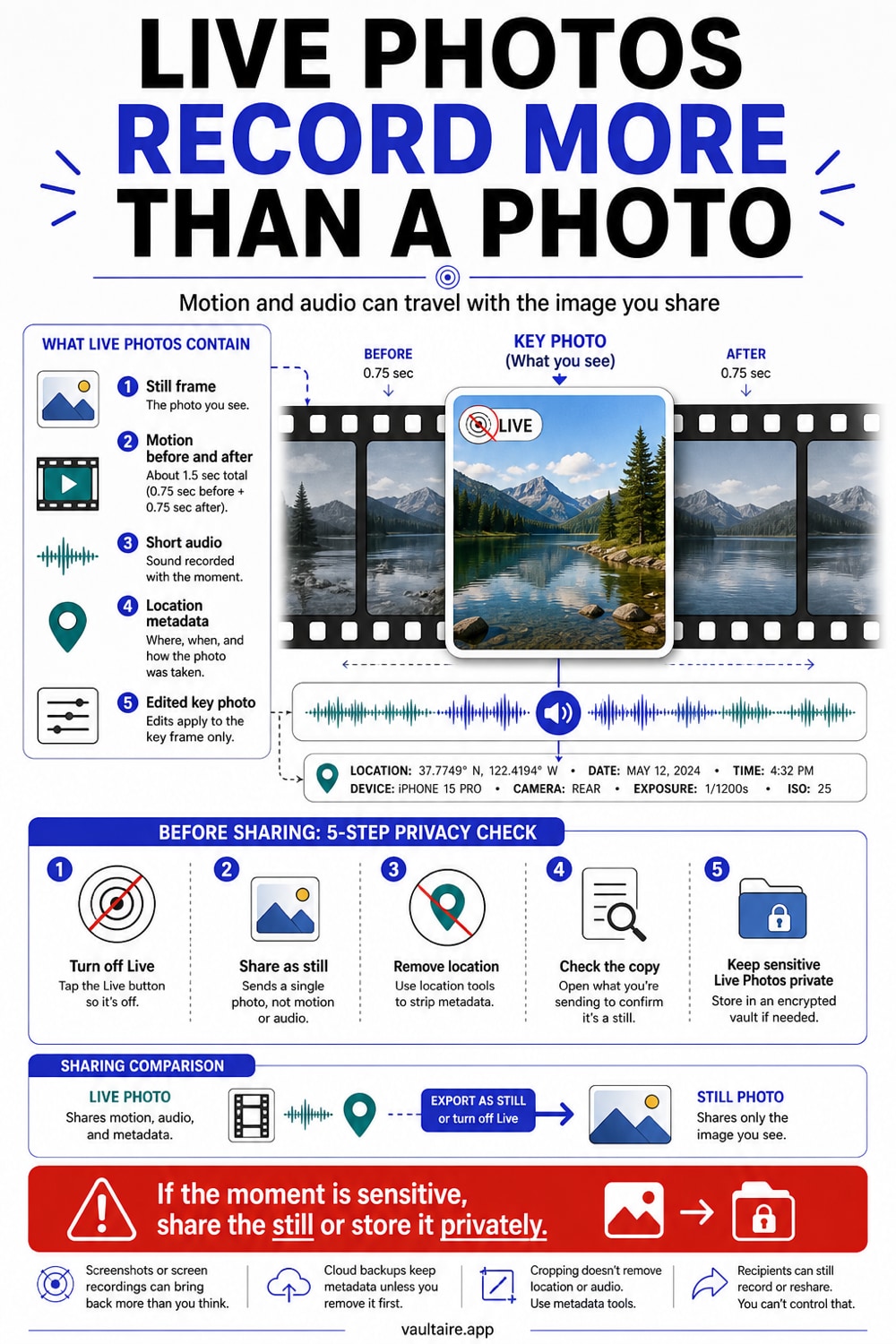
A Live Photo is not a single still. It bundles a roughly 3 second clip, about 1.5 seconds of video and audio before and after the frame you see, plus the location and time it was taken. That motion and sound stay attached when you AirDrop, message, or upload the photo, unless you turn Live off or convert it to a still first. To share safely, open the photo, tap the Live badge and switch it to Off, or use Duplicate as Still Photo, then share that copy. For photos you never want anyone to replay, keep them in an encrypted vault instead of the camera roll.
What a Live Photo actually contains
A Live Photo is a still paired with a short video. When you press the shutter, the camera keeps the roughly 1.5 seconds of video and audio it recorded just before, and captures about the same amount after. The result is a clip of around 3 seconds, with sound, wrapped around the photo you chose. Your iPhone stores the still and the motion as two linked files that move together.
Because the clip includes audio, a Live Photo can capture a conversation, a name said out loud, a television in the background, or anything else within earshot when you took the shot. Most people never play their Live Photos back, so they forget the sound is even there. It is, and it stays with the file wherever the file goes.
Where the motion and audio leak
The clip travels by default. AirDrop a Live Photo and the other person receives the full motion and audio. The same is true when you share into Messages, save to a shared album, or simply hand someone your phone to scroll. Whoever has the file can press and hold to replay everything you recorded around that moment.
Live Photos also carry the same metadata as any photo: the GPS location and the exact date and time. Some apps strip this when you upload and some do not. If you send or post a Live Photo without checking, you may be sharing where you were and what was said, not just what was in the frame.
How to share only the still
The quickest fix is per photo. Open the image in Photos, tap the yellow LIVE badge in the top left, and choose Off. Now when you share it, only the still goes out. To keep a permanent still copy, tap the three dots, choose Duplicate, then Duplicate as Still Photo, and share that version instead.
You can also stop Live Photos at the source. In the Camera app, tap the Live icon, the concentric circles, to turn it off for the next shot, and go to Settings, Camera, Preserve Settings and switch on Live Photo so the camera remembers your choice. When you share through the Photos share sheet, tap Options at the top to confirm whether the location and the Live clip are included before you send.
Keeping sensitive Live Photos private
Turning Live off before sharing protects the people you send to. It does not protect the original on your phone. Every Live Photo in your camera roll is one unlock away, motion and audio included, for anyone who picks up your device or scrolls past your shoulder.
For Live Photos you never want replayed, move them out of the camera roll entirely. Vaultaire imports a Live Photo as its still image only and keeps it behind a separate encrypted pattern, so that frame is not sitting in the main library waiting to be pressed and held. The motion and audio clip does not come with it, so delete the Live original from Photos once you no longer need the clip.
Related reading:
- Remove location data from iPhone photos
- Which apps can see your iPhone photos
- Share photos securely
- I handed my phone over and they swiped into my photos
Sources
- Apple Support: Take and edit Live Photos on your iPhone
- Apple Support: Share photos and videos on iPhone
- Apple Legal: Photos and Privacy
Frequently asked questions
Do Live Photos record audio?
Yes. A Live Photo captures roughly 1.5 seconds of video and sound before and after the frame you see, so anything within earshot when you took the shot is recorded. You can hear it by pressing and holding the photo to play it back.
Does the audio and video get shared when I send a Live Photo?
By default, yes. AirDrop, Messages, and shared albums all send the full motion and audio. To send only the picture, turn the Live badge off or duplicate the photo as a still before sharing, or use Options in the share sheet to exclude the Live clip.
How do I permanently turn a Live Photo into a normal photo?
Open the photo, tap the three dots, choose Duplicate, then Duplicate as Still Photo. The copy is a plain still with no motion or audio. You can then delete the Live original if you no longer need the clip.
Can someone see my Live Photos if they pick up my phone?
Yes. Anything in your camera roll opens the moment the phone is unlocked, and Live Photos replay their motion and audio with a press and hold. To keep specific photos private, move them into an encrypted vault like Vaultaire so they are not in the main library at all.