Can Someone See Your Recently Deleted Photos on iPhone?
Deleting a photo feels final, so it is reasonable to assume that once a picture is gone from your camera roll it is also gone from anyone else's reach. On an iPhone that is not quite how it works. A deleted photo spends thirty days in a folder called Recently Deleted, still on the phone and still recoverable, and the lock in front of that folder is thinner than it looks. Here is what really happens to a photo after you delete it, who can still see it during that month, and how to make sure the ones you want gone are actually private.
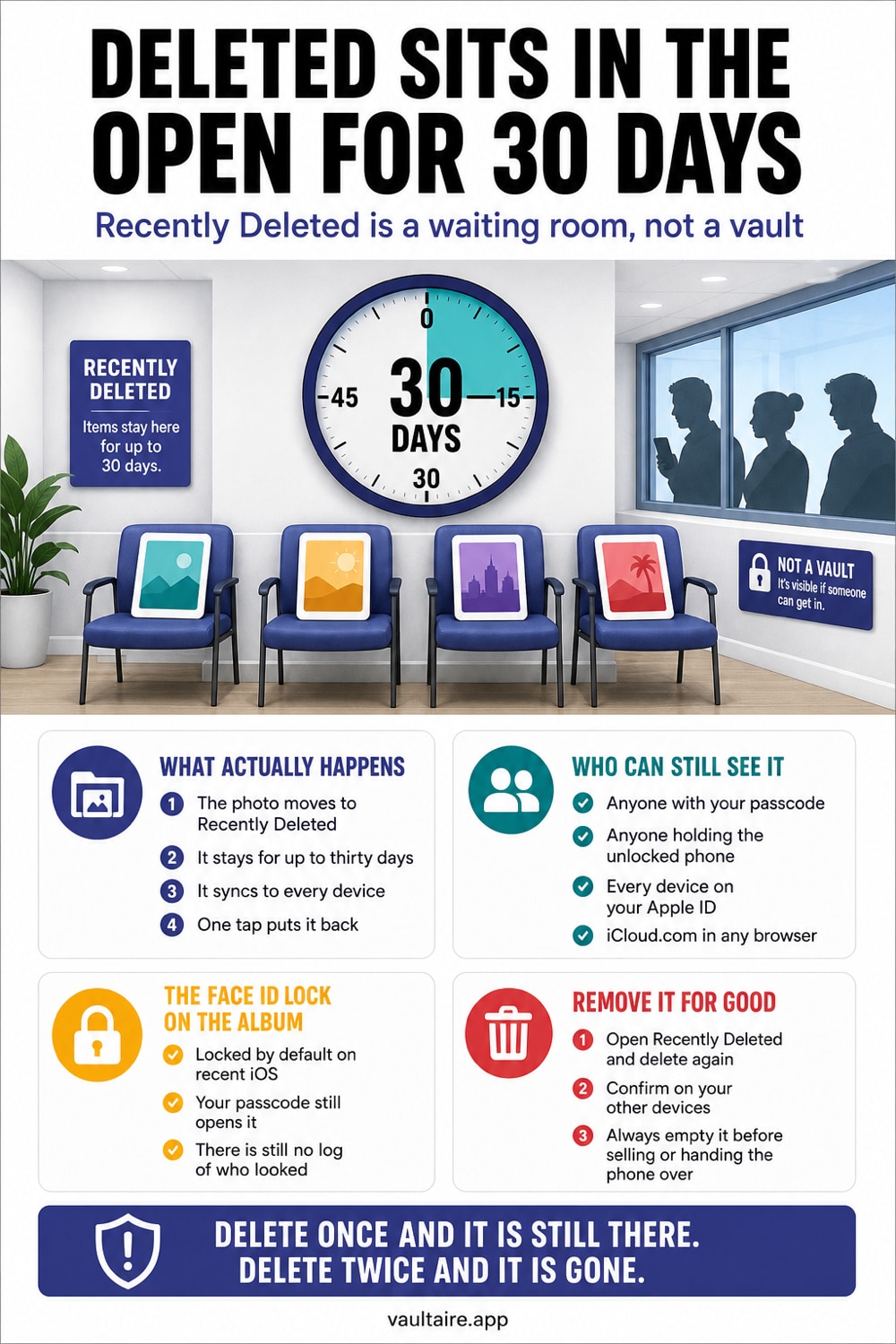
Yes, someone can see your recently deleted photos if they can unlock your iPhone. Deleting a photo moves it to the Recently Deleted album, where it stays for thirty days before iOS removes it automatically. During that time the photo remains on your device, counts against your storage, and syncs to iCloud if photo syncing is on. On current iPhones the album is locked behind Face ID by default, which stops a casual look, but the lock also opens with your passcode, so anyone who knows it can browse everything you have deleted. The files are not encrypted in any special way and still appear in your backups. To keep a deleted photo private, remove it from Recently Deleted right away instead of waiting out the timer, and keep genuinely sensitive pictures in an encrypted vault so they never pass through the delete cycle at all.
Can Someone See Your Recently Deleted Photos? The Short Answer
Yes, and more easily than most people expect. When you delete a photo on an iPhone, it does not vanish. It moves into a folder called Recently Deleted, where it sits for thirty days before iOS erases it for good. During that month the picture is still on your phone, still counts against your storage, and still syncs to iCloud if photo syncing is on. Deleting is really a slow delete with a grace period, not the clean break the word suggests.
On modern iPhones the Recently Deleted album is locked behind Face ID by default, so a stranger who picks up your phone cannot open it with a glance. That helps, but the lock only asks for your face or your passcode. Anyone who knows your passcode, a partner, a family member, or someone you hand the phone to, can open Recently Deleted and scroll through everything you thought you had gotten rid of. Because people tend to delete their most sensitive photos, that folder is often the most revealing place on the whole device.
What Recently Deleted Actually Does
Recently Deleted is a safety net, not a shredder. Its job is to save you from losing a photo you removed by accident, so Apple keeps every deleted item for thirty days and shows the number of days each one has left. You can recover anything in that window with a single tap, which is genuinely useful. The trade off is that the folder becomes a running archive of everything you have chosen to remove, held in plain view of anyone who can unlock the album.
If iCloud Photos is turned on, Recently Deleted also syncs. Delete a photo on your iPhone and it drops into the Recently Deleted album on every device signed into your account, from an iPad to a Mac to iCloud on the web. The thirty day countdown is shared too, so the item disappears everywhere at the same time. The upside is consistency. The downside is that a photo you deleted on one device is still sitting, recoverable, on the others until the timer runs out.
Why Deleted Does Not Mean Private
The core misunderstanding is treating deletion as a privacy tool. Sending a photo to Recently Deleted changes where it appears, not how protected it is. The file is not encrypted in any special way while it waits out its thirty days. It lives in the same photo library, it is covered by the same standard iCloud encryption where Apple holds the keys, and it is included in your device and iCloud backups. Removing a photo from your main grid does nothing to seal the underlying file.
This matters most at the moments when your phone leaves your hands. If you sell or trade in a device without emptying Recently Deleted, the next thirty days of your deleted photos can ride along until the folder clears, and a full erase is the only reliable way to prevent it. If someone with your passcode goes looking, Recently Deleted is the first place that rewards them. Treating the folder as private is the gap that turns a routine cleanup into an exposure.
How To Actually Keep Deleted Photos Private
For photos you want truly gone, do not rely on the thirty day timer. Open Photos, go to the Recently Deleted album, select the sensitive items, and choose Delete to remove them permanently instead of waiting a month. Keep the album's Face ID lock switched on under Settings, Apps, Photos, so casual snooping is blocked, and remember that the lock stops a glance but not someone who has your passcode. When you are clearing a phone before selling it, empty Recently Deleted and then erase the device fully.
The more durable fix is to move the pictures that matter into Vaultaire and accept its offer to delete the Photos originals. They go to Recently Deleted, so empty it too. Vaultaire protects file contents under a random master key and derives the vault key from a drawn pattern. Vault copies do not enter iCloud Photos, but Vaultaire backup (on by default, can be turned off) and any sync or share you set up place client-side encrypted records in CloudKit. A locked vault creates a separate cryptographic boundary from the Photos deletion cycle.
Related reading:
- How iPhone Photo Recovery After Deleting Works
- Where iPhone Hidden Photos Actually Go
- Clear Private Photos Before Selling Your iPhone
- Free and paid iPhone vault apps compared
- Secure Camera
Sources
Frequently Asked Questions
How long do photos stay in Recently Deleted on iPhone?
Thirty days. When you delete a photo or video it moves to the Recently Deleted album and stays there for up to thirty days, with each item showing the number of days it has left. After that iOS removes it automatically. You can recover anything during that window, or delete it permanently right away if you do not want to wait for the timer.
Does Recently Deleted sync to iCloud?
Yes, if iCloud Photos is turned on. A photo you delete drops into the Recently Deleted album on every device signed into your account, and the thirty day countdown is shared across all of them. Recovering or permanently deleting the item on one device applies everywhere, so the photo is only truly gone once it clears from the folder on the account.
Can someone see my Recently Deleted photos if they have my passcode?
Yes. The Face ID lock on the Recently Deleted album also accepts your passcode, so anyone who knows it can open the folder and scroll through what you deleted. The lock is meant to stop a casual glance, not someone you have given your passcode to. For photos you never want another person to find, an encrypted vault is safer than trusting the album lock.
Are Recently Deleted photos permanently gone after I delete them from the album?
They are removed from view and from your library, but permanent deletion is not always instant at the storage level, and if iCloud Photos is on it can take time to clear across your devices. For a phone you are selling or giving away, empty Recently Deleted and then erase the device completely, which is the reliable way to make sure nothing can be recovered.