


Format method checked
What this HDR image converter creates
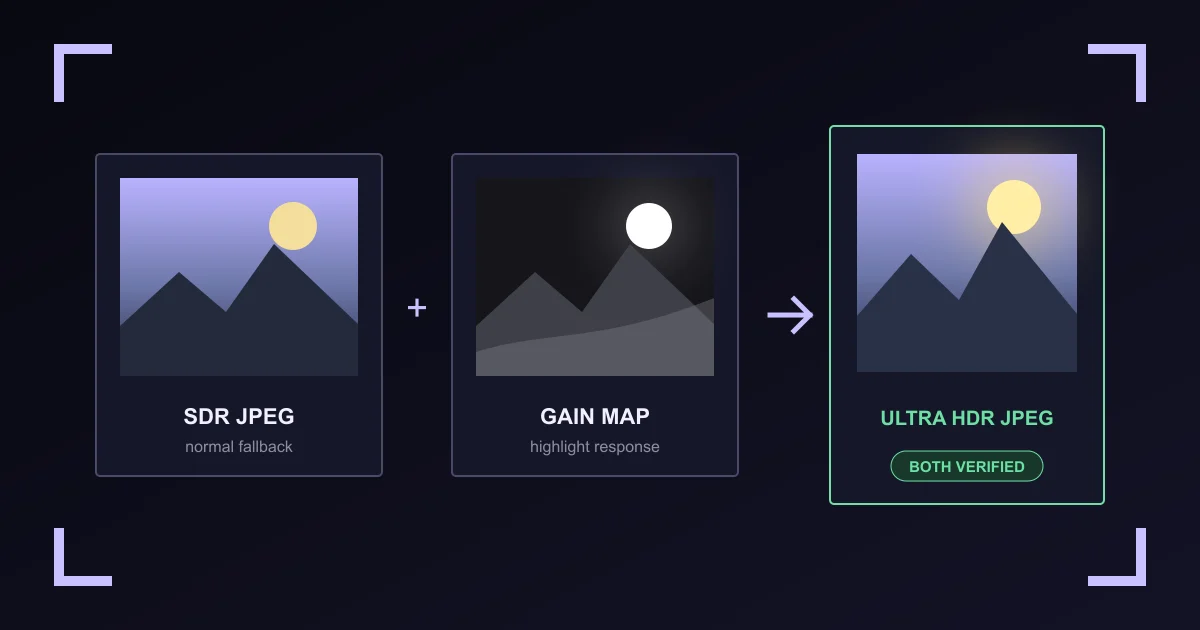
The output is a backward-compatible Ultra HDR JPEG. Its first image is a normal SDR rendition. A second, smaller JPEG stores a gain map. Required XMP values describe the map, while an MPF index points a compatible reader to both images.
Ultra HDR is one file with two renditions
A normal JPEG reader displays the SDR base image and ignores the added data. A compatible HDR reader combines that base with the gain map according to the display's available headroom.
The package follows the Android Ultra HDR v1 format. Google's libultrahdr reference implementation documents the same gain-map model.
What SDR to HDR means here
A standard JPG holds SDR pixels. This converter keeps those pixels as the base rendition and adds a gain map, so a compatible display can push existing highlights above normal white. It does not invent captured range, and it is not a raw workflow or a multi-exposure HDR merge.
The page picks this direction only when the file has no gain map. A file that has one goes the other way.
How HDR to SDR works here
An Ultra HDR JPEG already contains its SDR answer: the base rendition that normal readers display. The converter cuts the file at the end of that rendition, decodes it, and writes it out as a plain JPEG with no gain map, no MPF index, and no Ultra HDR XMP.
Nothing is tone mapped. A tone-mapped result would depend on the browser and the display, and two runs could differ. Reading the stored base rendition gives the same SDR pixels every time.
Which HDR profile should I use?
Natural is the restrained choice for photos. Glow gives luminous details more range. Graphic keeps the response selective around bright, hard-edged elements.
The recommendation uses luminance statistics, not object or face recognition. The profile changes gain-map values; it does not alter the source dimensions.
What the browser can verify
Before download, Vaultaire parses both JPEG boundaries, checks the MPF image sizes and offsets, reads required XMP gain-map numbers, decodes both embedded images, and compares the SDR pixels with the intended fallback. For an SDR output it also proves the new file declares no gain map at all.
That proves the local file has the expected structure and decodable images. It does not prove that every browser, social network, editor, or display will preserve or render Ultra HDR.
Privacy, transparency, and metadata
The file stays between this page and a same-origin worker. Fixed analytics events record actions, never image bytes, filenames, dimensions, profiles, gain maps, or outputs.
Transparent input is rejected because the SDR JPEG base has no alpha channel. Supported source EXIF, GPS, XMP, IPTC, copyright, origin, and C2PA records are not copied. Required Ultra HDR XMP and MPF data are added to the output.
HDR image converter FAQ
What is an Ultra HDR image?
It is a JPEG with a normal SDR base image, a second JPEG gain map, and metadata that explains how a compatible HDR reader can apply the map.
How do I convert a JPG to HDR?
Choose one opaque JPG, PNG, or WebP on this page, pick Natural, Glow, or Graphic, then create the file. The download is an Ultra HDR JPEG that a normal reader still opens as an ordinary picture.
Is this SDR to HDR converter free?
Yes. There is no account, no install, no watermark, and no size tier. Conversion runs in your browser, so no server cost is attached to a file.
Does it convert HDR to SDR?
Yes. Choose an Ultra HDR JPEG and the page finds its gain map, then writes the SDR base rendition as a normal JPEG with the gain map and its Ultra HDR metadata removed.
How do I convert an Ultra HDR photo to a normal JPG?
Choose the Ultra HDR file here. The page reads the base rendition already inside it, re-encodes that rendition as a plain JPEG, and checks that the download declares no gain map. No look or profile is offered, because the base rendition is the correct SDR result.
What file format does the HDR photo converter output?
Always a JPEG. A PNG or WebP source is converted to the Ultra HDR JPEG package, because the format defines the base image, gain map, XMP values, and MPF index as JPEG data.
Will it still look like a normal image?
Yes. Readers that do not support the gain map display the normal SDR JPEG rendition. A compatible HDR reader may show brighter highlights.
Will every display show the HDR effect?
No. The result depends on the device, display mode, brightness, browser or app, and whether the file survived editing or sharing with its gain map intact.
Can it turn a nearly black image into HDR?
No. The tool rejects images without enough measured highlight range. Use the image brightener when the job is to make a dark photo easier to see.
Will social networks preserve Ultra HDR?
Support changes by app, account, device, and upload path. Some services may re-encode the file and remove its gain map. Test the current publishing path on the target service before relying on the HDR rendition.
Does the converter remove photo metadata?
Supported source metadata is not copied. The converter must add Ultra HDR XMP gain-map values and an MPF index, so the output is not metadata-free.
Is my image uploaded?
No. The SDR fallback, gain map, package, SDR conversion, and verification are created inside your browser. Fixed analytics events contain action names, not the image or its details.