Do Photo Vault Apps Back Up to iCloud? Where Vault Photos Live
A photo vault app hides pictures from your Camera Roll, but that raises a fair question: if they are not in your photo library, are they backed up anywhere, or are they one broken screen away from gone?
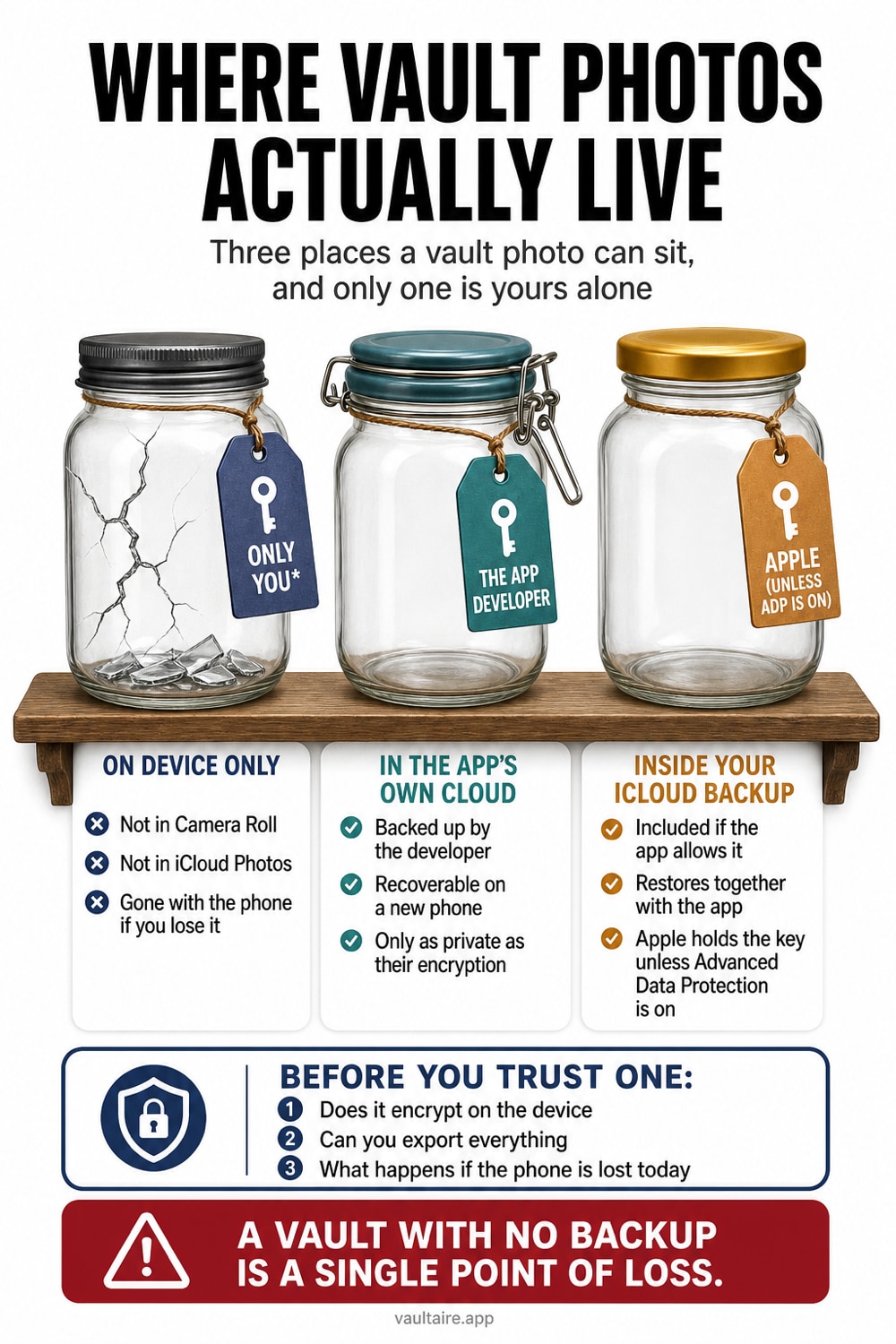
Most photo vault apps do not save to iCloud Photos. They keep encrypted copies in the app's own private storage, so whether those copies reach iCloud depends entirely on the app and your device backup settings. Some vault apps stay local only, which means a lost, erased, or reset phone takes the photos with it. Others ride along inside your iCloud device backup, which can bring them back but may leave them readable to anyone who restores that backup unless the backup itself is end to end encrypted.
Where photo vault apps actually store your pictures
When you move a photo into a vault app, it does not go to a separate cloud. The app moves the file into its own private storage area, a sandbox that only that app can open, and usually encrypts it there. That is why the picture disappears from your Camera Roll and does not show up in iCloud Photos, Shared Albums, or the stock Hidden album. The photo library and the vault are two different places, and the vault sits behind the app's passcode or Face ID rather than inside Apple Photos.
Because the vault lives in the app's own storage, it does not automatically sync across your devices the way iCloud Photos does. A copy on your iPhone is just that: one copy, on one device. Whether a second copy exists in the cloud depends on how the app is built and on your iCloud settings. So the honest answer to where your vault photos live is: in the app's container on this phone, plus wherever that app or your backups choose to send them.
Do they back up to iCloud by default?
Vault apps fall into three rough groups. Some store photos strictly on the device and mark their files so iOS skips them during backup, so nothing reaches iCloud and a wiped phone means the photos are gone. Some let the app's storage ride along inside your normal iCloud device backup, so the photos can return only through a full restore onto the same app. And some run their own cloud sync, either to the developer's servers or to your iCloud Drive, which may or may not be encrypted. The trap is that these behave very differently, yet the app rarely spells out which one you have.
This is why searches for photo vault recovery are so common. People assume a vault is a safe, so they delete the originals, switch phones, or reinstall the app, and only then learn the photos were never backed up. The mirror risk is exposure. If your vault rides inside a device backup that is not end to end encrypted, or the app uploads to a server without strong encryption, then someone who restores that backup or gains access to the account can reach the very photos you tried to hide.
What iCloud backup does and does not protect
A standard iCloud backup can include an app's stored data, so a vault's encrypted files may travel with it. By default, though, that backup uses encryption where Apple holds the keys, which keeps it safe from outsiders but not fully private from a subpoena or an account takeover. Turning on Advanced Data Protection changes this: it makes your iCloud backup and iCloud Drive end to end encrypted, so only your trusted devices can read the contents, including any vault data that rode along. iCloud Photos, by contrast, is not end to end encrypted unless you enable that setting.
A backup is also not the same thing as privacy. Restoring a backup copies everything back, so if you hand a restored device to someone, or share an Apple Account across a family, the vault can reappear where you did not expect it. Account recovery matters too: whoever can reset your Apple Account password may reach a standard backup. The takeaway is that iCloud can solve the losing your photos problem, but it only solves the exposing your photos problem when the backup itself is encrypted so that no one but you can open it.
How to keep vault photos safe and recoverable
Aim for a setup that survives a lost phone and stays private in the cloud. Prefer a vault that stores photos locally first and offers a backup that is end to end encrypted, so a copy exists off the device yet no one else can read it. If you rely on Apple's own backup, turn on Advanced Data Protection so the vault's files are encrypted to your devices only. Then keep your recovery key somewhere separate from the phone, and run a test restore so you know the photos actually come back and still ask for your passcode.
This is the gap Vaultaire is built to close. It keeps file contents encrypted under a random master key and, for its iCloud backup, which is on by default, protects padded CloudKit records with a separate device-independent backup key. The custom recovery phrase opens an encrypted recovery manifest, but restore still requires the matching encrypted records. Apple can observe account and service metadata while receiving no readable vault files or plaintext backup key from Vaultaire.
Related reading:
- 7 photo vault apps ranked by encryption
- Are photo vault apps safe?
- How iCloud Photos encryption works
- Cloud photo storage and privacy
- Device Sync
- Can anyone see your hidden photos on iCloud
Sources
Frequently asked questions
Do photos in a vault app show up in iCloud Photos?
No. Vault apps keep photos in their own private storage, not in your photo library, so they do not appear in iCloud Photos, Shared Albums, or the stock Hidden album. Any cloud copy comes from the app's own sync or from your device backup, not from iCloud Photos.
If I lose my iPhone, can I get my vault photos back?
Only if a backup exists. If the app stored the photos locally with no backup, a lost or erased phone takes them with it. If the vault was included in an iCloud device backup or the app's own cloud, you can restore it, so check the app's backup setting before you rely on it.
Are vault app photos included in my iCloud backup?
Sometimes. Many apps let their stored data ride along in the standard iCloud device backup, but some deliberately exclude it. The stored files are only readable to that app after a restore, and they are protected to your devices only if Advanced Data Protection is turned on.
Is an iCloud backup enough to keep my vault photos private?
Not on its own. A standard backup is encrypted with keys Apple holds, so a restore or an account takeover could expose the photos. Turn on Advanced Data Protection, or choose a vault with end to end encrypted backup, so only you can open the copy in the cloud.