Can the iPhone Hidden Album Face ID Be Bypassed?
The iPhone Hidden album can ask for Face ID, which makes it feel locked. It is not. The lock controls visibility, not encryption, and there are several easy ways past it. Here is exactly what it protects and what it does not.
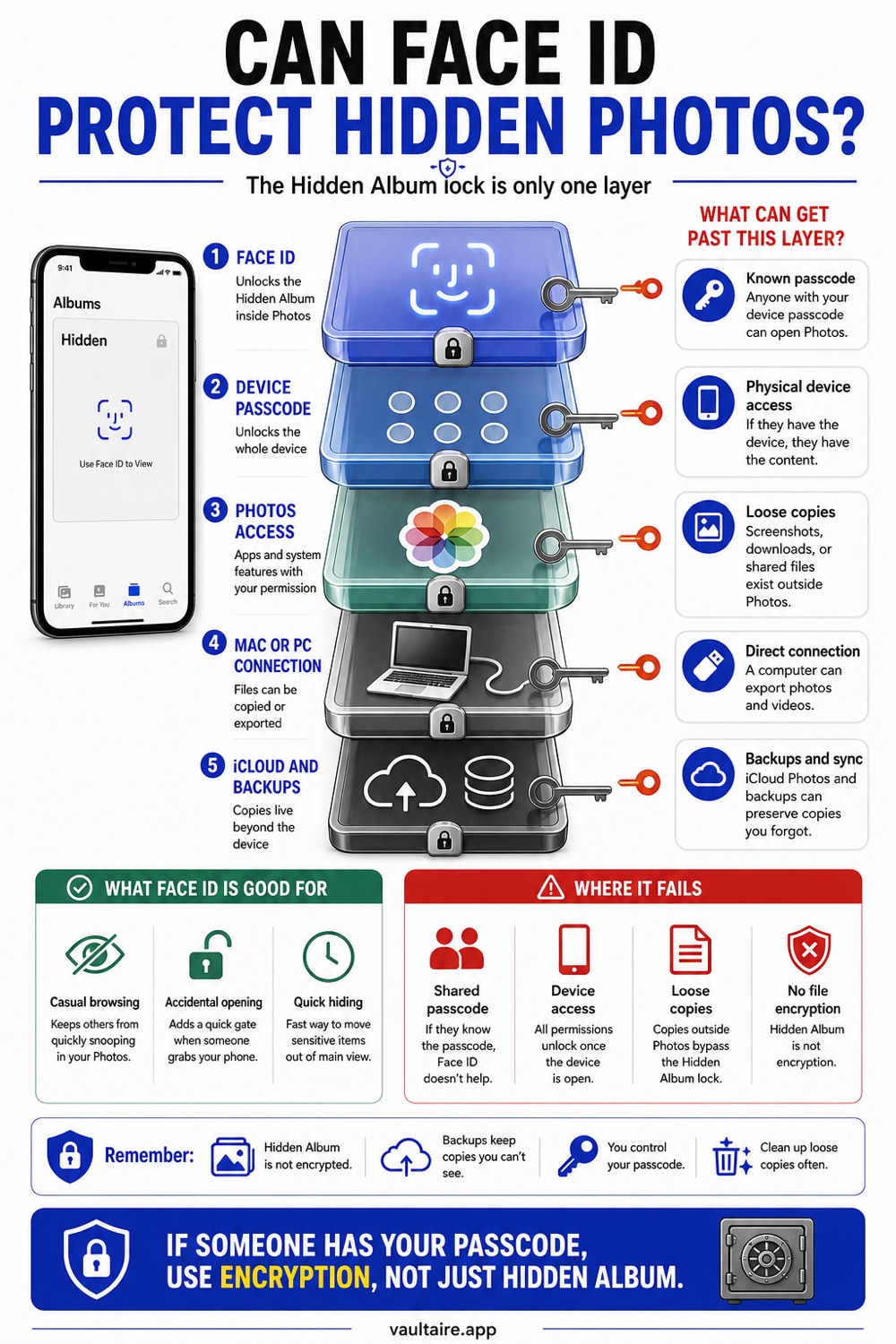
Yes, the Hidden album Face ID lock can be bypassed. It only controls whether the album opens, so anyone who knows your passcode can turn the lock off in Settings or unlock the album directly, and a Mac or PC can read the hidden photos over a cable. The photos are hidden, not encrypted. To keep a photo private even from someone with your passcode, you need an encrypted vault, not the Hidden album.
What the Hidden album lock actually is
When you turn on Use Face ID for the Hidden album, your iPhone asks for your face or passcode before it shows that album. That is the whole feature. It decides whether the album is visible, and it does nothing to the photos themselves. The images stay stored as ordinary files, exactly like the rest of your library, just tucked behind one extra tap.
This is the difference between hiding and encryption, and it is the heart of the matter. Encryption scrambles a file so it is unreadable without a key. Hiding only moves a readable file somewhere less obvious and optionally asks for a check before showing it. The Hidden album does the second thing. Once you understand that, the ways past it become obvious.
Who can get past it, and how
The simplest bypass is your passcode. Anyone who knows it can open Settings, tap Photos, and turn Use Face ID off, which makes the Hidden album visible to everyone again. They can also just unlock the album the normal way, since the passcode satisfies the same prompt your face does. A partner, family member, or anyone who has watched you type your code can do this in seconds.
The second bypass needs no passcode at all. Connect the iPhone to a Mac or PC, and the hidden photos show up in Finder, Image Capture, or a photo import tool like any other picture, because they are not encrypted. Repair shops and forensic tools reach them the same way. The Face ID prompt only exists inside the Photos app, so anything that reads the storage from outside never sees it.
What the Hidden album is good for
None of this means the feature is useless. For everyday privacy, it works well. If you hand your phone to a friend to show one photo, or a child is scrolling your camera roll, the Hidden album keeps the sensitive pictures out of the main grid and behind a quick check. That covers the most common situation, a casual glance by someone who is not trying to get in.
The mistake is trusting it for more than that. The Hidden album is a curtain, not a safe. It raises the effort slightly for a casual viewer and not at all for anyone with your passcode, a cable, or a repair tool. If the cost of a particular photo leaking is high, the Hidden album is the wrong place for it.
The fix that actually holds
When a photo has to stay private even from someone holding your unlocked phone, the answer is encryption, not hiding. An encrypted vault stores each photo as scrambled data that is unreadable without your key, so a passcode does not help an attacker, and a cable shows nothing but noise. The photo is protected by math, not by being tucked out of view.
Vaultaire is built for this. You draw a pattern on a five by five grid, and PBKDF2 derives the vault key that authenticates the encrypted index and unwraps its random AES-256 master key. Move the sensitive photos in, then delete the originals from Photos and Recently Deleted. There is no identity account, and app-managed CloudKit copies are created only when you enable backup, sync, or sharing. System device backups may still include encrypted local files. Someone holding an unlocked phone still needs an authenticated vault or recovery flow to obtain the keys, which is a stronger boundary than the Hidden album provides.
Related reading:
- How the Hidden photos album works
- How to password protect individual photos on iPhone
- Are photo vault apps safe
- App to hide pictures: 7 iPhone vaults tested
- Did Someone Open My Hidden Album? How To Tell On iPhone
Sources
- Apple Support: Hide photos on iPhone
- Apple Support: Import photos to your Mac or PC
- Apple Support: Set up and use Face ID
Frequently asked questions
Can someone open my Hidden album if they know my passcode?
Yes. The Face ID prompt also accepts your passcode, and anyone with the passcode can turn the Hidden album lock off entirely in Settings, Photos. The lock raises no real barrier against someone who knows your code, because it controls visibility rather than encrypting the files.
Are Hidden album photos encrypted?
No. Photos in the Hidden album are stored as ordinary, readable files. The Use Face ID setting only decides whether the album is shown inside the Photos app. The images themselves are not encrypted, which is why a computer can read them over a cable.
Can a Mac or PC see my hidden iPhone photos?
Yes. Connect the iPhone by cable and the hidden photos appear in Finder, Image Capture, or any import tool, because the Face ID prompt only lives in the Photos app and the files are not encrypted. Hiding a photo does not hide it from a connected computer.
How do I make hidden photos truly private?
Use encryption instead of hiding. Vaultaire protects file contents with AES-256-GCM under a random master key and uses a drawn pattern to derive the vault key. A copied, locked app container contains ciphertext, while a compromised device or open vault remains inside the threat model. Delete the Photos originals and empty Recently Deleted after confirming the import.