iPhone Keychain vs Vault App: What Each Protects
iCloud Keychain and a vault app both keep things private on your iPhone, but they protect completely different things. One holds your passwords, the other holds your photos and files. Here is what each does and when you need both.
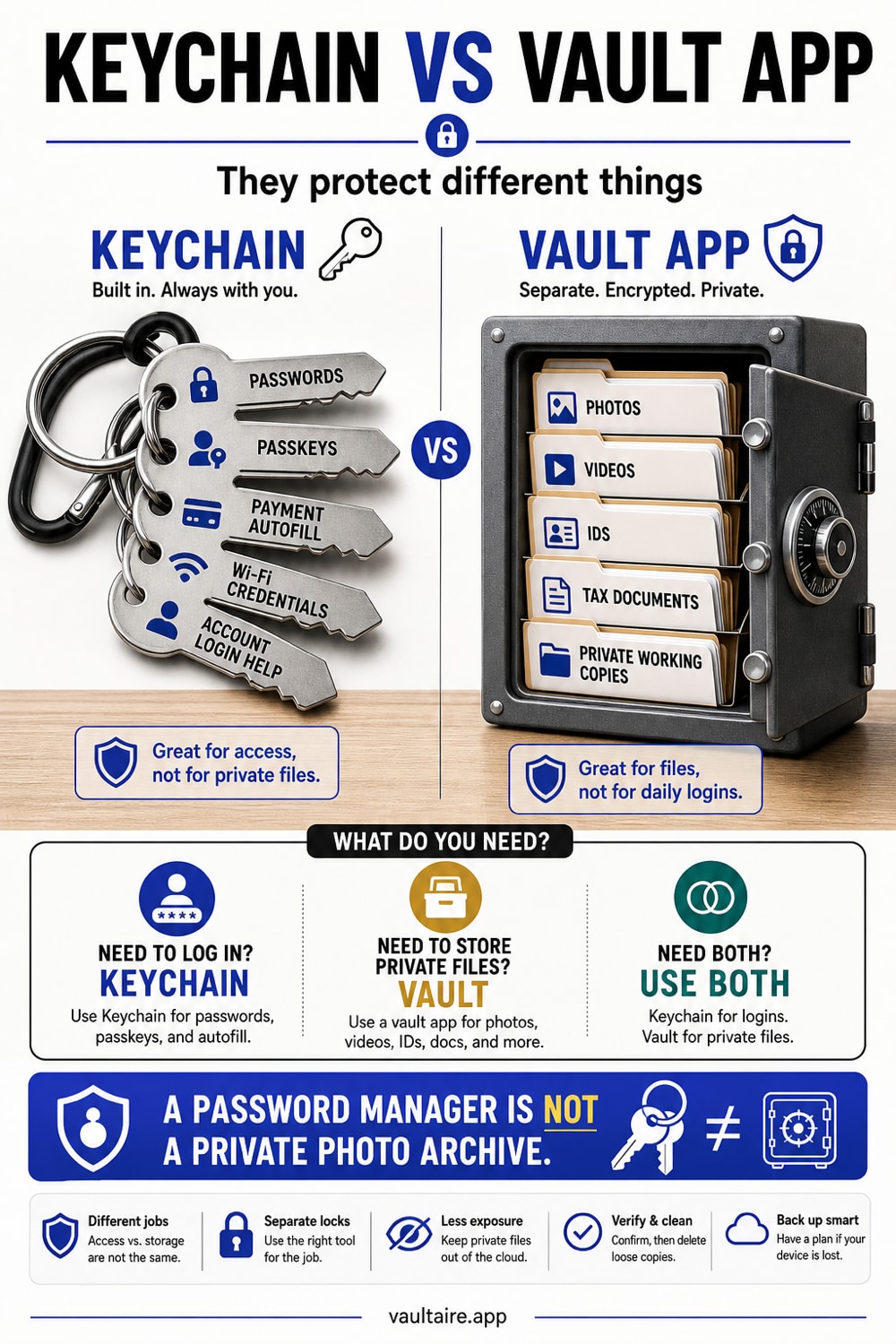
iCloud Keychain is a password manager. It stores your logins, passkeys, Wi-Fi passwords, and verification codes, encrypted and synced through the Passwords app. It does not store photos, videos, or documents. A vault app does the opposite job, encrypting your sensitive files behind your own key. Use Keychain for credentials and a vault for private photos and files. Most people need both, because they cover different kinds of private data.
What iCloud Keychain actually stores
iCloud Keychain is Apple's built-in password manager, now surfaced through the Passwords app. It remembers your website and app logins, passkeys, Wi-Fi passwords, verification codes, and saved payment cards, and it fills them in for you across your iPhone, iPad, and Mac. Everything in it is encrypted and synced through your Apple Account, so it follows you from device to device.
The important word is credentials. Keychain is built to hold short secrets that unlock other things, not the things themselves. It is excellent at making sure you never reuse a weak password and never have to type a login by hand. That is the whole point of it, and it does that job very well.
What a photo vault stores
A vault app solves the other half of the problem. Instead of credentials, it holds your actual files, photos, videos, scans, and documents, and stores each one as encrypted data. You move the sensitive items in, the app locks them behind your own key, and you delete the originals from the Photos app. What is left is a set of files that are unreadable without you.
This is the part Keychain was never meant to cover. A passport scan, an intimate photo, a medical record, or a tax document is a file, not a password, so it needs a place that encrypts files. A vault is that place, and a good one keeps the key on the device so there is no account or cloud copy holding your data.
Keychain and a vault, side by side
Put simply, Keychain protects the keys to your accounts and a vault protects your private files. Keychain syncs through iCloud so your passwords are everywhere you sign in. A vault keeps your files locked on the device behind a gesture or passcode that only you know. One is about getting into other services, the other is about keeping your own content out of the wrong hands.
They do not compete, and neither replaces the other. Storing a photo in a password manager is not something Keychain offers, and trusting a vault to autofill your bank login is not what a vault is for. Trying to make one tool do both jobs leaves a gap, which is why the right answer is usually to use each for what it is built to do.
Which one you need
For passwords and passkeys, iCloud Keychain is already on your iPhone and is a strong choice, so there is little reason to look elsewhere unless you want a cross platform manager. For sensitive photos and files, you need a vault, because that is exactly the data Keychain does not touch. Most people are best served by using both at once.
Vaultaire is built for the file side of that pairing. You draw a pattern on a five by five grid, and PBKDF2 derives a vault key that authenticates the encrypted index and unwraps a random AES-256 master key. Move your private photos and documents in, then delete the originals. There is no identity account, and app-managed CloudKit copies are created only when you enable backup, sync, or sharing. System device backups may still include the encrypted local files. Keychain protects device-bound recovery state, while a locked vault keeps file contents encrypted under the master key.
Related reading:
- iPhone Notes lock versus a photo vault
- Vault app for iPhone: 7 tested for real encryption
- Are photo vault apps safe
- How to store tax documents on iPhone
Sources
- Apple Support: Set up iCloud Keychain
- Apple Support: Use the Passwords app on iPhone
- Apple Platform Security: iCloud Keychain overview
Frequently asked questions
Can iCloud Keychain store photos?
No. iCloud Keychain stores passwords, passkeys, Wi-Fi passwords, verification codes, and payment cards. It does not hold photos, videos, or documents. To keep files private you need an encrypted vault, which is built to lock files rather than credentials.
Is iCloud Keychain a vault?
Not in the file sense. iCloud Keychain is a password manager. It encrypts and syncs your credentials, but it has no place to put a photo or a document. A vault app is what encrypts those files, so the two tools serve different jobs.
Do I still need a vault if I use iCloud Keychain?
Yes, if you have sensitive photos or files. Keychain protects your logins, but it cannot store the files themselves. A vault encrypts your private photos and documents, which is the data Keychain leaves uncovered. Most people use both at the same time.
Can a vault app store my passwords?
Some vaults can hold secure notes, but a dedicated photo vault is focused on encrypting photos, videos, and documents. For passwords and passkeys, iCloud Keychain is purpose built and autofills them for you, so it is the better tool for credentials.