How to Tell if Someone Went Through Your iPhone
You hand your phone to someone for a second, or you leave it on a table, and later you get that nagging feeling that they looked. iPhone does not keep a tidy log of who opened what, so you cannot just check a list. But people leave traces, and a few quick checks usually tell you what happened.
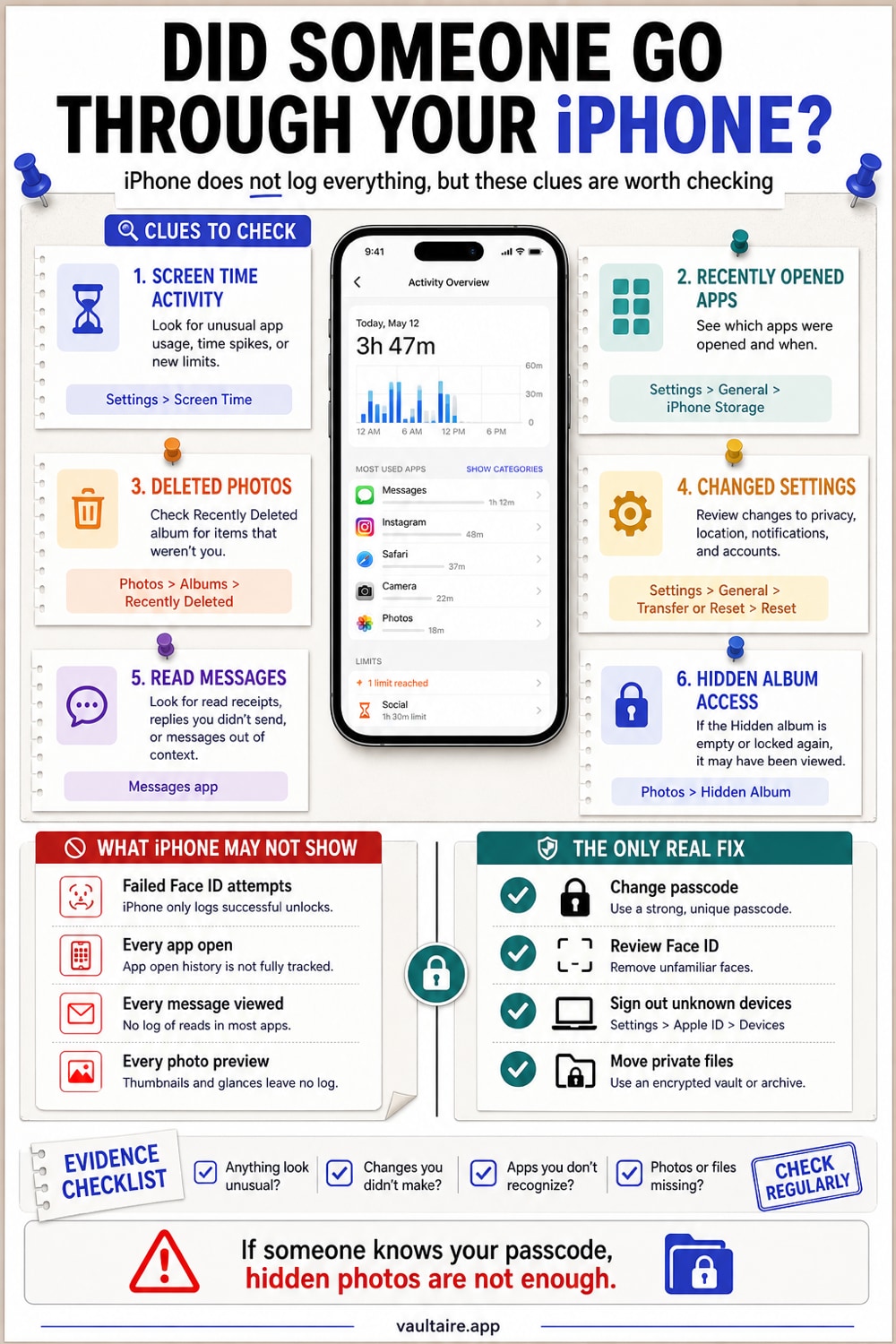
iPhone does not record a plain list of who unlocked it or what they opened, so there is no single screen that proves someone went through your phone. What you can check are the side effects a snooper leaves behind: photos sitting in Recently Deleted you did not delete, apps left open in the app switcher, messages marked as read that you never opened, and Screen Time activity during a window you were away. None of these is proof on its own, but together they tell the story. The only reliable fix is to stop relying on detection and keep anything private in an encrypted vault, so it does not matter who picks up your phone.
What iPhone actually records, and what it does not
There is no built-in log on iPhone that shows who unlocked the device or which apps they opened. People search for one constantly, and it does not exist. So forget about finding a clean access history. You are looking for side effects instead.
iOS also does not show you a list of failed Face ID or passcode attempts. The phone counts them internally and locks itself after enough failures, but it does not surface that count anywhere you can read. So a snooper who never triggered a lockout leaves no record of trying.
The signs worth checking
Recently Deleted is the most useful one. If someone went looking through your photos and deleted anything to cover their tracks, it lands in Photos, Recently Deleted, and stays there for 30 days. Anything there you did not delete yourself means someone else was in your camera roll.
The app switcher is the next tell. Swipe up and hold, and look at what is open and where each app is parked. A Messages thread, a photo, or an email left open on a screen you never navigated to is a strong sign. So is finding an app open that you rarely use.
Then check for messages marked as read that you do not remember opening, and notifications that were cleared without you clearing them. Snoopers open things, and opening a message marks it read. A sudden gap in your notifications can mean someone swiped them away.
Use Screen Time to see activity while you were away
Open Settings, Screen Time, See All App and Website Activity. This shows usage broken down by app and by hour. If you know you were asleep or in a meeting and the chart shows your phone actively used during that window, someone was on it.
It will not name the person, but it turns a vague suspicion into a specific time. Match that hour against where you were and who had access, and the picture usually becomes clear.
The only fix that actually works
Detection always comes after the fact. By the time you spot the signs, they already saw what they saw. The real fix is to make snooping pointless: keep anything private somewhere it cannot be opened even with your unlocked phone in hand.
The iPhone Hidden album helps with casual concealment, but it stays inside the Photos access model. An encrypted vault is different. Vaultaire protects imported photos under a random AES-256-GCM master key and opens through a separate drawn pattern. The locked interface does not list vaults, but app-container inspection can detect encrypted storage and estimate how many vaults you have, because the number of storage arenas bounds it. It conceals content from casual browsing; it does not make the app or vault count forensically invisible.
Related guides
Sources
- Apple Support: Recover deleted photos and videos
- Apple Support: Use Screen Time on your iPhone
- Apple Support: Hide photos on your iPhone, iPad, and Mac
Frequently Asked Questions
Does iPhone log when someone opens it?
No. iPhone does not keep a readable log of unlocks or which apps were opened. You have to infer it from side effects like Recently Deleted, the app switcher, and Screen Time activity during a time you were away.
Can I see failed Face ID or passcode attempts?
Not directly. iOS counts failed attempts internally and locks the phone after enough of them, but it does not show you that count anywhere. A snooper who did not trigger a lockout leaves no visible record of trying.
How do I know if someone read my messages?
Look for conversations marked as read that you never opened, and for notifications that were cleared without you clearing them. Opening a message marks it read, so a thread you do not remember opening is a sign someone else did.
Does Recently Deleted show if someone deleted my photos?
Yes, and it is one of the best checks. Deleted photos stay in Photos, Recently Deleted for 30 days before they are gone for good. Anything there you did not delete yourself means someone was in your camera roll.
Can someone get into my Hidden album?
Often, yes. The Hidden album can be locked with Face ID, but it is not encrypted and the photos are included in backups. Anyone who can use your unlocked phone, or compel your Face ID, can reach it. For real protection you need an encrypted vault with its own passcode.
How do I stop people from going through my phone?
Set a strong passcode, do not share it, and move anything private into an encrypted vault that needs its own separate code to open. That way it does not matter if someone borrows or grabs your phone, because the private content is unreadable without the vault key.