Best Free App to Hide Pictures and Videos on iPhone
You want one free app that hides your videos as well as your photos. Most free options take both, but they differ in what protects the files, how many videos the free plan accepts, and whether a backup exists if you lose the phone.
Short answer
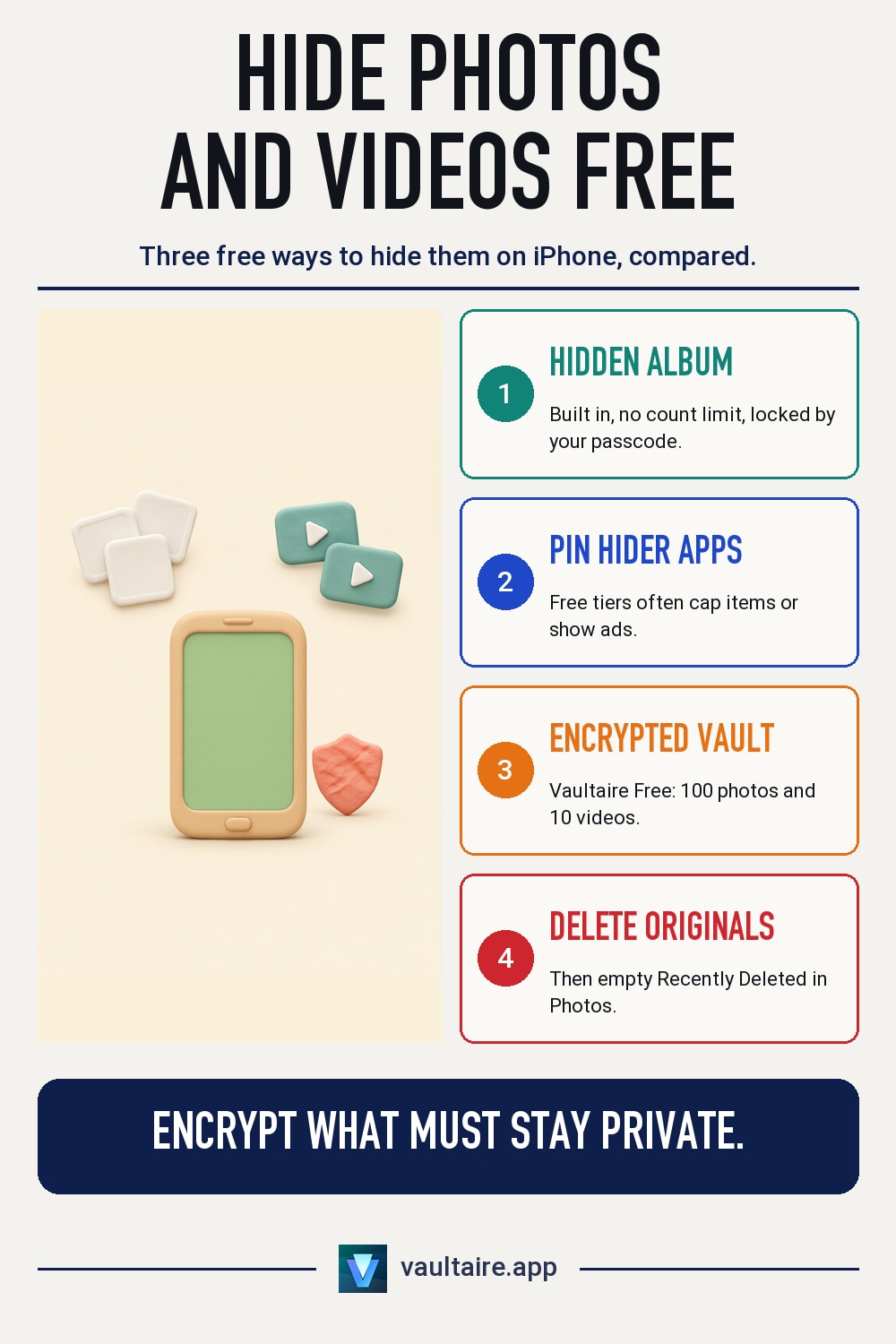
For a free app that hides both pictures and videos on iPhone, use an encrypted vault such as Vaultaire, whose free plan holds 100 photos and 10 videos, encrypts them with AES-256-GCM and includes an encrypted iCloud backup. If you have more videos than that and only need them out of the main library, Apple's built-in Hidden album is free and has no count limit.
The Verdict: What To Use
The best free choice depends on who you are hiding the files from. If you only want photos and clips out of the main grid, so they do not appear when you hand someone your phone, the Hidden album in Apple's Photos app does that at no cost. Since iOS 16 it locks with Face ID, Touch ID or your passcode, and it holds as many photos and videos as your storage allows. The app adds no encryption of its own, so anyone who knows your passcode can open the album.
If you want the files themselves unreadable without a secret that only you know, pick an encrypted vault. Vaultaire's free plan encrypts each photo and video with AES-256-GCM and opens with a pattern you draw, not with your phone passcode. It holds 3 vaults, 100 photos and 10 videos across all vaults, and the encrypted iCloud backup is part of the free plan. Ten videos covers a small set of private clips. A camera roll full of videos needs Pro or a second method next to it.
How The Options Compare
Free options fall into three groups. The Hidden album is built in and has no count limit. PIN hider apps from the App Store put files behind a code or a disguised icon, and their free tiers often cap the number of items, show ads or keep features for a subscription. Some of these apps encrypt the files and some only move them into a folder the app guards with a PIN, so read each listing and its privacy label before you import anything.
Videos are where the free tiers part ways. A video is larger than a photo, it has sound, and the app has to play it back smoothly. Vaultaire sets no file size limit, so a long clip counts as one of the 10 free videos, the same as a short one. Both its free and paid plans keep an encrypted backup in your own iCloud account. It is on by default, runs every 24 hours and uses Wi-Fi only unless you change that, so a lost phone does not have to take the vault with it.
Tradeoffs To Weigh
Each free option asks you to give something up. The Hidden album costs nothing and takes every video you have, but its lock is your phone passcode, and with iCloud Photos turned on the hidden items sync to your other Apple devices with the rest of your library. A PIN hider app may add a disguised icon or a decoy screen, but a free tier that shows ads or keeps files on its own servers asks you to trust a company you may know little about.
An encrypted vault asks you to remember a secret. Vaultaire has no Face ID or passcode unlock, and it has no Vaultaire account, email or sign-up, so there is no email reset for a forgotten pattern. The free plan also stops at 10 videos. When you reach that limit, keep the most private clips in the vault and leave the rest in the Hidden album, or move to Pro if every clip needs the same protection.
What To Do Next
Start by sorting your files. Pick the photos and videos that would cause real harm if someone saw them, and count the videos. If they fit in 100 photos and 10 videos, install Vaultaire, draw a pattern you have not used anywhere else, and import the files through the photo picker. After every item reaches the vault, the app offers to delete the originals from Photos. Accept it, then empty Recently Deleted, because Photos keeps deleted items there for 30 days.
Move the clips that only need to stay out of sight into the Hidden album: select them in Photos, tap the More button, then tap Hide. Check that Use Face ID is on in Settings > Photos (Settings > Apps > Photos on iOS 18 and later) so the album stays locked. If your private videos outgrow the free plan, Vaultaire Pro adds room for more files, and in the United States the yearly plan costs $19.99.
Free ways to hide pictures and videos on iPhone
| What you get free | Photos Hidden album | Free PIN hider apps | Vaultaire Free |
|---|---|---|---|
| Photo and video limit | No count limit | Varies; many cap items or show ads | 100 photos and 10 videos across all vaults |
| What locks it | Face ID, Touch ID or passcode | An app PIN, often with Face ID | A pattern you draw |
| Files encrypted by the app | No, protected by your passcode like the rest of Photos | Some encrypt, some only hide | Yes, AES-256-GCM |
| Backup | iCloud Photos, if turned on | Varies, sometimes the maker's servers | Encrypted iCloud backup, on by default |
| Account | Your Apple ID | Often an email sign-up | No Vaultaire account |
Related reading:
- How to hide videos on iPhone
- Hidden photos on iPhone, explained
- Best photo vault apps for iPhone
- Secret folder on iPhone
Sources
Frequently Asked Questions
Is there a secret app to hide photos?
Yes. Photo vault apps hide photos behind a code, a pattern or a disguised icon. The ones worth trusting encrypt the files, so they stay unreadable without your secret even if someone gets into the phone. Vaultaire encrypts every photo and video with AES-256-GCM and opens with a pattern you draw.
What are some good hidden apps for iPhone?
Look for an app that encrypts files, states what it collects on its App Store privacy label, and keeps a backup you control. A tested list of photo vault apps that compares free limits, prices and data collection is a good place to start. For both photos and videos at no cost, Vaultaire's free plan holds 100 photos and 10 videos.
Is there a secret photo folder on iPhone?
Yes. The Photos app has a Hidden album under Utilities, and since iOS 16 it locks with Face ID, Touch ID or your passcode. It takes photos and videos out of the main library, but anyone with your passcode can open it, and with iCloud Photos on it syncs to your other devices.
Which app can I use to hide my photos and videos?
Use Apple's Hidden album to take files out of view for free, or an encrypted vault when the files must stay unreadable. Vaultaire keeps photos and videos in an encrypted vault and backs them up, encrypted, to your own iCloud account. Its free plan holds 100 photos and 10 videos, and Pro adds room for more.