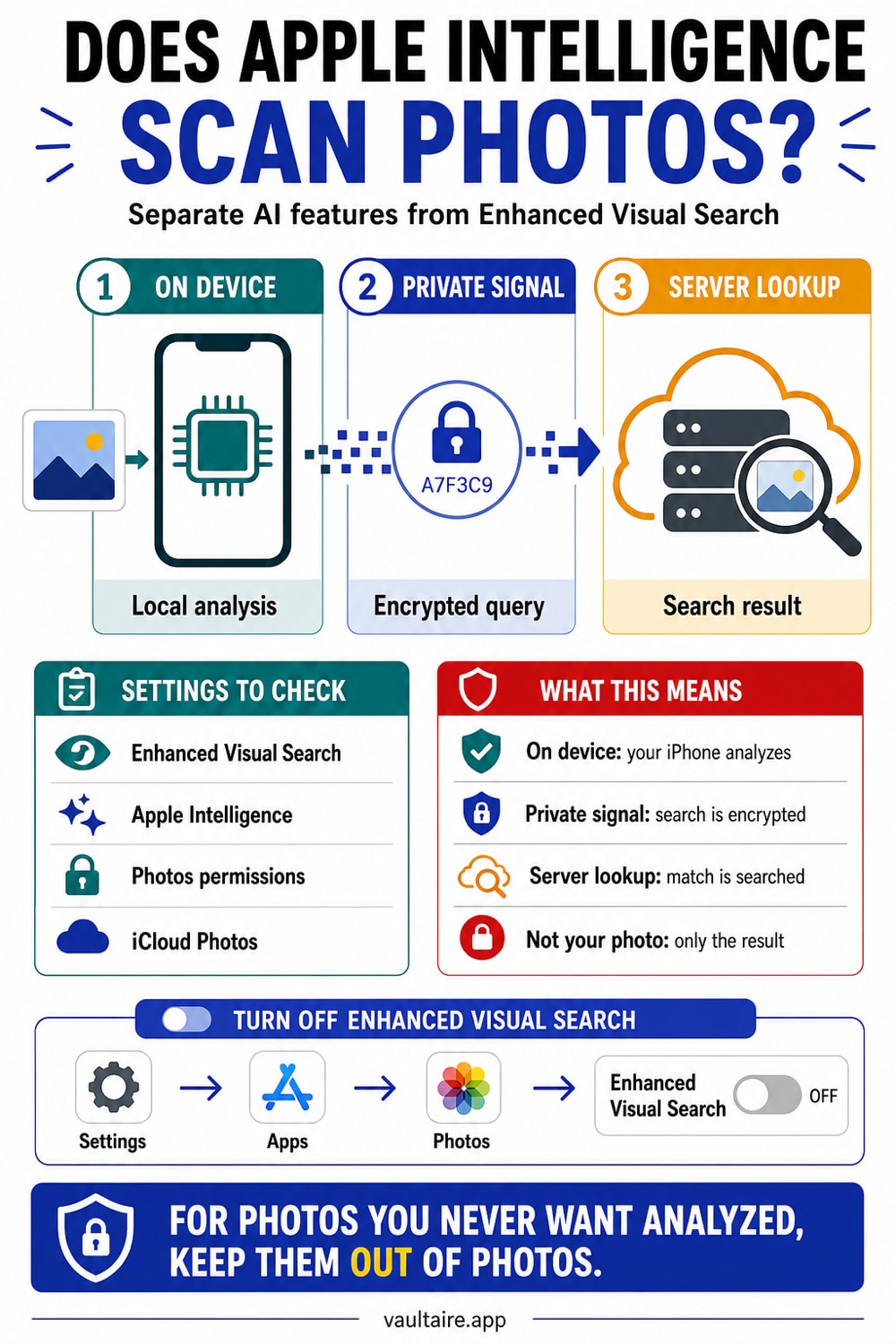
Does Apple Intelligence Scan Your Photos?
Since iOS 18.1 (October 2024), Apple's Photos app sends encrypted data about your photos to Apple's servers by default via Enhanced Visual Search. The photo itself never leaves. An encrypted mathematical fingerprint of landmark regions in your photos does. Apple cannot read it - but it does leave your device.
Apple Intelligence itself processes most photo tasks on-device. Separately, a Photos app feature called Enhanced Visual Search has been on by default since iOS 18.1 (October 2024) and sends encrypted vector embeddings of landmark regions in your photos to Apple's servers. The embeddings are encrypted using homomorphic encryption before they leave your device. Apple cannot reconstruct your photos from them, but data about your photos does leave your device. You can turn Enhanced Visual Search off in Settings, under Apps, then Photos.
What Enhanced Visual Search actually does
Enhanced Visual Search is a feature in the Photos app, introduced in iOS 18.1 and macOS 15.1 in October 2024. It lets you search your photo library for landmarks and points of interest by name. Type "Eiffel Tower" and Photos finds every photo containing it, whether or not the photo has GPS data attached. That is genuinely useful for anyone with years of unsorted travel photos.
To do this, your iPhone needs to match the landmarks in your photos against a global database Apple maintains on its servers. That process requires your device to send something about your photos outward. What it sends, how it protects it, and whether you consented to it are the three questions worth asking.
Enhanced Visual Search is separate from Apple Intelligence, Apple's broader generative AI system. The two have different technical architectures and different privacy postures. That distinction matters and is covered below.
What leaves your device: the three tiers of "private"
This is where most coverage goes wrong, in both directions. The architecture has three meaningfully different tiers, and conflating them makes it impossible to make an informed choice.
Tier 1 is application-local processing: the feature itself sends no content to a server. That is narrower than proving that no copy can leave through operating-system backup, sync, export, analytics, or another app. “Zero knowledge” describes a provider-key claim in marketing; it does not literally mean zero network or metadata flow.
Tier 2 is encrypted off-device, which is Enhanced Visual Search's model. Data about your photos leaves the device, but it is protected before it goes. The protection is more sophisticated than most write-ups suggest.
Tier 3 is cloud processing with privacy guarantees - Apple Intelligence's Private Cloud Compute. Requests are processed on Apple's server infrastructure with architecture-level guarantees that data is not stored and is not readable by Apple. A different system from EVS, covered below.
Here is the exact mechanism for Enhanced Visual Search, per Apple's ML Research blog published October 24, 2024. First, an on-device ML model examines your photos and identifies regions that might contain a landmark. For each region, the device generates a vector embedding - a numerical fingerprint of the visual pattern, not the photo itself. That embedding is encrypted using homomorphic encryption (specifically the BFV scheme). Homomorphic encryption means Apple's servers can run calculations against the encrypted data without decrypting it. The servers never hold a key to your query.
The encrypted query travels to Apple's servers via an Oblivious HTTP (OHTTP) relay operated by a third party. The relay strips your IP address before the request reaches Apple, so Apple cannot link any query to your device or your account. To further obscure the real request, your device sends fake dummy queries alongside it. The server cannot distinguish which query is genuine. The servers return an encrypted result. Your device decrypts it locally. The server discards everything.
The photo itself is never sent. The pixels are never sent. An encrypted mathematical representation of one region of one photo is sent, and Apple cannot read it. That is genuinely sophisticated. It is also on by default, which is a separate question.
The cryptography is real, and it still was not opt-in
The technical objection to Enhanced Visual Search is not that Apple built a backdoor. The objection is that Apple shipped it as the default, activated it on hundreds of millions of phones in October 2024, and provided no meaningful notification until privacy researchers noticed in late December 2024.
The homomorphic encryption plus differential privacy plus OHTTP relay stack is real, documented, and more rigorous than most cloud privacy implementations. Apple published the technical paper behind it. The cryptography deserves to be acknowledged before the consent argument is made.
But impressive cryptography and informed consent are separate things. Most users will never find the setting to change the default. Most users did not know the feature existed until it was already running. And the feature processes every photo on your device, not only the ones in iCloud, regardless of whether you use iCloud at all. You do not have to trust a cloud service to be affected.
There is a name for this in privacy policy: opt-out instead of opt-in. The practical consequence is that the default is almost always the outcome for most people.
The January 2025 discovery
The privacy debate surfaced publicly in late December 2024 and early January 2025, when developers and security researchers discovered the feature was already running on their devices.
On January 1, 2025, Michael Tsai documented the issue publicly. On January 3, 2025, The Register picked it up. Developer Jeff Johnson stated the problem plainly: "My objection to Apple's Enhanced Visual Search is not the technical details specifically, which are difficult for most users to evaluate, but rather the fact that Apple has taken the choice out of my hands and enabled the online service by default."
Matthew Green, a cryptographer at Johns Hopkins, said: "It's very frustrating when you learn about a service two days before New Years and you find that it's already been enabled on your phone."
Neither objection disputes the encryption. Both object to the same thing: the decision was made for you. That is the consent argument in its plainest form.
Apple Intelligence vs. Enhanced Visual Search: two different systems
These get conflated in most coverage. They work differently and have different privacy postures.
Enhanced Visual Search is a Photos app feature with its own standalone privacy architecture - homomorphic encryption, differential privacy, and an OHTTP relay. Apple published its technical paper in October 2024. It is separate from the Apple Intelligence marketing umbrella.
Apple Intelligence is Apple's branding for its generative AI system: Writing Tools, summaries, Smart Reply, image generation, and Siri upgrades. For simpler tasks, Apple Intelligence uses on-device models that process data entirely on your device, without any network request. For tasks requiring more computational power, it uses Private Cloud Compute.
Private Cloud Compute uses Apple silicon servers with hardware protections similar to the iPhone's Secure Enclave. Apple claims stateless processing - your request is handled and discarded, not stored - and that Apple's own engineers cannot access the data being processed. The system is designed to be independently verifiable by security researchers through published transparency logs. Those are meaningful commitments, and they are architecturally different from a traditional cloud service.
But Private Cloud Compute is still Tier 3, not Tier 1. Your data leaves your device. It is processed by hardware Apple controls. Apple's privacy promises for it are strong for a cloud system. They are not the same as local-only processing.
Apple Intelligence can access your photo library for on-device tasks like creating memories or answering questions about your photos. That processing stays on device. Apple's legal privacy page for the intelligence engine states that data sent to Private Cloud Compute is not stored or made accessible to Apple, and that only minimal metadata is collected, not content. What Apple Intelligence does not do is send your raw photos to train AI models. Apple's Photos legal privacy page states: "Apple does not access your photos or videos, and does not use them for research and development."
How to turn Enhanced Visual Search off
These steps were verified against Apple's official support article (KB 122033) and multiple third-party sources. The path below was confirmed for iOS 18 and iOS 18.1. Apple reorganizes Settings periodically. If you are on iOS 19 or a later version and do not see Apps at the top level of Settings, search for Enhanced Visual Search in the Settings search bar.
On iPhone or iPad: open Settings, tap Apps, tap Photos, scroll to the bottom, and toggle Enhanced Visual Search off.
On Mac: open the Photos app, go to Photos, then Settings (or press Command and comma), click General, and uncheck Enhanced Visual Search.
Turning it off stops future queries. It does not delete any data already sent to Apple's servers. Apple's policy is that data is discarded after processing, but that claim is not independently verifiable.
As of the publication of this article, Enhanced Visual Search is assumed to still be on by default in the current iOS version, consistent with the behavior at launch in October 2024. No primary source from 2026 has confirmed a change to that default. Verify by checking the Photos settings on your device.
Where Vaultaire fits
The question of which privacy model you need is ultimately a question about architecture, not features. This piece raises a specific distinction: which category of protection do you actually require?
If your concern is that a third party might breach Apple's servers and correlate your photos with your identity, the Enhanced Visual Search architecture addresses that directly. Encrypted embeddings, an OHTTP relay, no IP linkage - the risk model it is designed to defeat is meaningful. The cryptography is real.
If your concern is that any data about your photos leaves your device at all - because you keep sensitive files, because you cross borders, because you do not want any company making any decisions about your photos on any server - that model does not give you what you need.
Vaultaire can operate without its CloudKit backup, sync, or sharing features and requires no Vaultaire identity account or content server. A pattern and device salt derive the local vault key, which opens an encrypted index and unwraps a random master key for AES-256-GCM file and metadata protection. Encrypted recovery data remains in Keychain. App analytics and crash diagnostics are enabled by default and can be turned off with “Share errors anonymously” in Settings. Separate iOS or computer device backups are controlled by the platform and must also be reviewed when the requirement is that no vault copy leave the phone.
Disclosure: we make Vaultaire. That shapes where this piece ends up. Read it skeptically. Every technical claim is sourced.
Related reading:
- Are iCloud photos end-to-end encrypted?
- Zero-knowledge encryption, explained
- What cloud photo storage privacy policies really say
- Are photo vault apps safe?
- Pattern-based encryption: how the key hierarchy works
Sources
- Apple Support KB 122033: About Enhanced Visual Search in Photos
- Apple ML Research: Combining Machine Learning and Homomorphic Encryption in the Apple Ecosystem (October 24, 2024)
- Apple Legal: Photos Privacy
- Apple Legal: Apple Intelligence and Privacy
- Apple Security Research: Private Cloud Compute - A new frontier for AI privacy in the cloud
- The Register: Apple opts everyone into having their Photos analyzed by AI (January 3, 2025)
- Michael Tsai: Privacy of Photos.app's Enhanced Visual Search (January 1, 2025)
- 9to5Mac: How Enhanced Visual Search on iPhone upgrades the Photos app and protects your privacy (January 14, 2025)
Frequently Asked Questions
Does Apple Intelligence scan my photos?
Apple Intelligence can access your photo library for on-device tasks like creating memories or answering questions about your photos - that processing stays on your device. For computationally intensive requests, some data goes to Private Cloud Compute, where it is processed without being stored per Apple's documentation. Separately, Enhanced Visual Search, a Photos app feature active since iOS 18.1, sends encrypted data about your photos to Apple's servers by default to identify landmarks. These are two distinct systems.
Is Enhanced Visual Search sending my actual photos to Apple?
No. Enhanced Visual Search sends encrypted vector embeddings - mathematical representations of landmark regions in your photos - not the photos or pixels themselves. The embeddings are encrypted using homomorphic encryption before leaving your device. Apple's servers process them without decrypting them. Your IP address is hidden via an OHTTP relay operated by a third party. Apple cannot reconstruct your photo from the data it receives.
What does Enhanced Visual Search actually send to Apple?
It sends an encrypted vector embedding: a numerical fingerprint of a potential landmark region in your photo. The embedding is encrypted with the BFV homomorphic encryption scheme before it leaves your device. Dummy queries are sent alongside it so the server cannot identify the real one. Your IP address is stripped by an OHTTP relay before the request reaches Apple. The photo itself, and the pixels, are never sent.
How do I turn off Enhanced Visual Search?
On iPhone or iPad: open Settings, tap Apps, tap Photos, scroll to the bottom, and toggle Enhanced Visual Search off. On Mac: open Photos, go to Photos then Settings, click General, and uncheck Enhanced Visual Search. This path was confirmed for iOS 18 and iOS 18.1. If you are on a later iOS version and cannot find it, search for Enhanced Visual Search in the Settings search bar.
Is Apple Intelligence private?
Apple Intelligence uses on-device models for most tasks, so no data leaves your device for those requests. For complex tasks it uses Private Cloud Compute, where Apple claims stateless processing and no data storage. PCC is designed to be independently verified by security researchers. Those are strong guarantees for a cloud system - stronger than most cloud services offer. They are not the same as local-only processing, where data never leaves the device at all.
Does Apple use my photos to train its AI?
Apple's legal privacy page for Photos states: "Apple does not access your photos or videos, and does not use them for research and development." This covers both the Photos app and Apple Intelligence. The encrypted embeddings that Enhanced Visual Search sends cannot be used for training because they are encrypted with a key Apple does not hold and cannot recover.
What is homomorphic encryption, and why does it matter here?
Homomorphic encryption is a cryptographic method that lets a server run calculations on encrypted data without decrypting it. For Enhanced Visual Search, your device encrypts the vector embedding before sending it. Apple's servers match it against a landmark database and return an encrypted result - without ever seeing the unencrypted query. It is more rigorous than standard encryption-in-transit, because the server genuinely cannot read the data it is processing.