Are iCloud Photos End-to-End Encrypted?
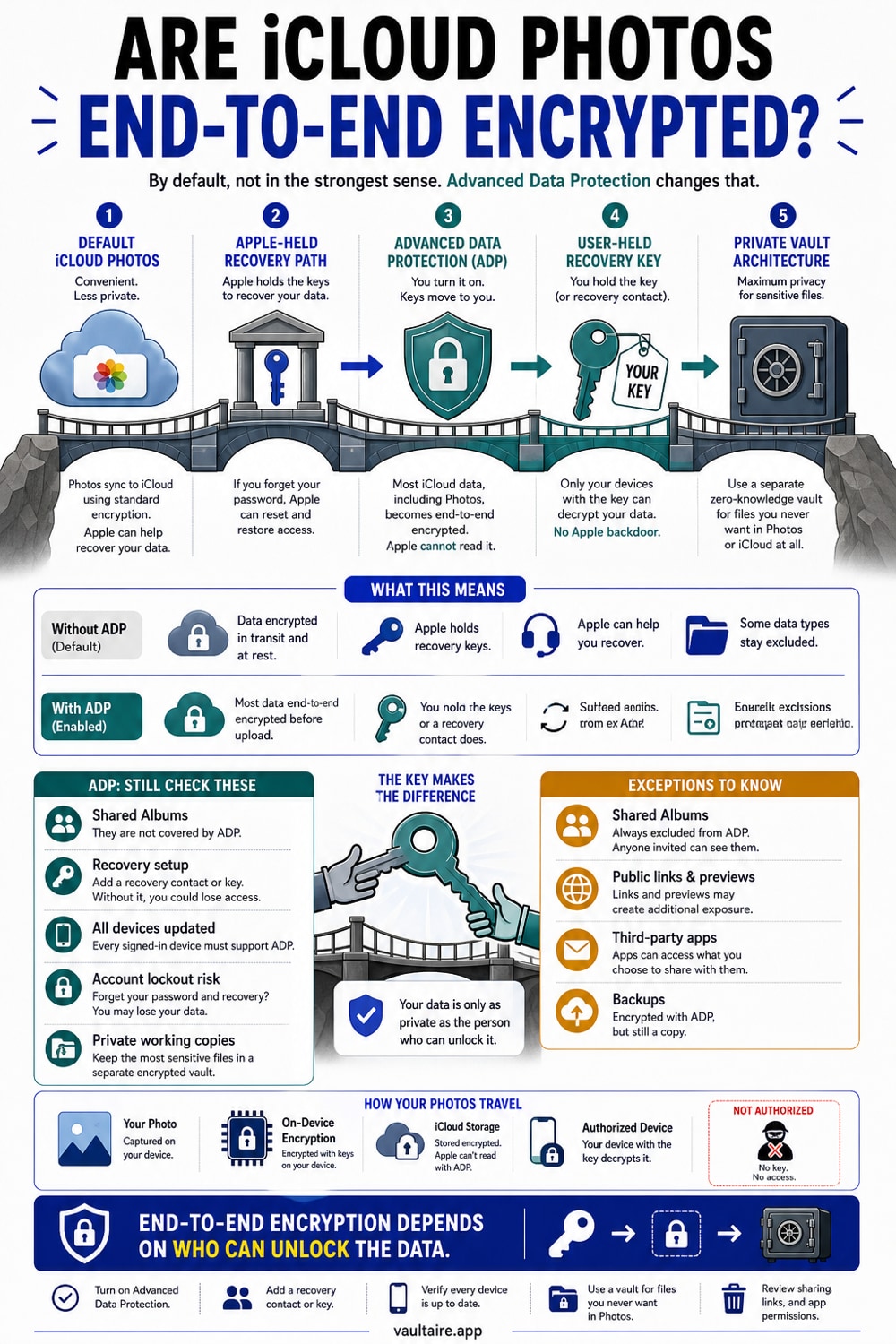
By default, iCloud Photos are not end-to-end encrypted. Apple stores them using encryption keys it controls and can decrypt them when legally required. Enabling Advanced Data Protection changes that: your trusted devices hold the keys, Apple does not. ADP is opt-in, off by default, and requires recovery setup before you can turn it on.
iCloud Photos are encrypted - but under standard data protection, Apple holds the encryption keys and can access your photos in response to a legal order or for account recovery. With Advanced Data Protection enabled, iCloud Photos become genuinely end-to-end encrypted: your devices hold the keys, Apple holds nothing. ADP must be turned on manually. It is not the default, and it was removed for UK users in February 2025 by a government demand Apple could not legally refuse.
What 'encrypted' means when Apple holds the keys
iCloud does encrypt your photos. That statement is true and also misleading if you stop there.
Under standard data protection - the default for every Apple account - your photos are encrypted in transit and stored in an encrypted format on Apple's servers. The encryption is real. What the fine print says is that Apple holds the encryption keys in hardware security modules in its own data centers. Apple's support documentation puts it plainly: the keys can be accessed by Apple servers, and Apple can help you recover your data if you lose access to your account.
That architecture has a name: server-side encryption. The vendor encrypts the data, and the vendor holds the key. It protects your photos against someone breaching the storage layer without credentials. It does not protect them against Apple itself, against a legal order served to Apple, or against a breach of the key management systems. When journalists and researchers describe iCloud as a target for law enforcement requests, this is the mechanism they are describing. The data is retrievable because Apple can retrieve it.
This is not a hidden flaw. Apple publishes it in its iCloud data security overview. It is the deliberate trade for account recovery: you can get your photos back after losing your device precisely because Apple can decrypt them on your behalf.
Fifteen iCloud data categories are end-to-end encrypted under standard protection, including Passwords and Keychain, Health data, and a handful of others. iCloud Photos, iCloud Backup, Notes, and most of the rest are not.
Advanced Data Protection: when iCloud Photos become genuinely end-to-end encrypted
Advanced Data Protection for iCloud, which Apple announced on December 7, 2022, changes the key custody model for most of your iCloud data. When ADP is on, your trusted devices hold the encryption keys, not Apple. The number of data categories protected with end-to-end encryption rises from 15 to 25, and iCloud Photos is one of the additions.
A note on that category count: Apple's original December 2022 announcement stated coverage expanded from 14 to 23 categories. Current Apple Support pages state 25. Apple has expanded ADP coverage since launch. This article uses 25 as the current figure from live Apple Support documentation, and notes the discrepancy for accuracy.
Ivan Krstić, Apple's head of Security Engineering and Architecture, described it at launch: Advanced Data Protection is Apple's highest level of cloud data security, giving users the choice to protect the vast majority of their most sensitive iCloud data with end-to-end encryption so that it can only be decrypted on their trusted devices.
That description is accurate. With ADP enabled, Apple does not hold the keys needed to decrypt the photos in your personal library. Apple may still be able to provide encrypted data and associated account or service metadata in response to a valid legal demand; the point is that it cannot turn the protected photo ciphertext into plaintext. Shared Albums and other excluded categories use a different protection model.
ADP is a real privacy improvement. With it on, iCloud becomes genuine end-to-end encrypted photo storage. If you use iCloud for photos you want kept private and you are not in the UK, enabling ADP is worth the setup overhead.
What ADP still does not protect
The coverage is broad but not total. Three categories remain outside end-to-end encryption even with ADP on.
Mail, Contacts, and Calendar. Apple's rationale is interoperability: these services exchange data with external systems - email servers, CalDAV providers, CardDAV services - and standard encryption is required for that exchange to function. Apple encrypts this data, but holds the keys.
Shared Albums in Photos. An album shared with other people or published with an 'anyone with the link' URL is accessible on the web. That access requires Apple to be able to serve the content, which requires server-side keys. The photos in your personal library are end-to-end encrypted with ADP on; the same photos in a shared album are not.
iWork collaboration. Real-time editing of shared Keynote, Numbers, and Pages documents goes through Apple's servers for mediation. That coordination requires server access to the content.
These are not Apple being careless. They are the architectural cost of features that require a server in the middle. If you want end-to-end encrypted photos, keep them out of Shared Albums.
How to check whether ADP is on, and how to enable it
ADP is not on by default. To check: open Settings on your iPhone, tap your name at the top, tap iCloud, scroll to the bottom and tap Advanced Data Protection. If you see 'Advanced Data Protection is on,' it is enabled. If you see a prompt to turn it on, it is not.
Enabling it requires two things Apple will ask for before the toggle does anything: two-factor authentication on your Apple account, and at least one recovery method - either a recovery contact (another person with an Apple device) or a recovery key (a 28-character string you store somewhere safe). This is mandatory, not optional. Apple cannot help you recover end-to-end encrypted data if you lose access, so you must provide your own recovery path before ADP will turn on.
Enabling ADP on one device enables it for your entire Apple account across all compatible devices. It is account-wide. Devices must be running iOS 16.2, iPadOS 16.2, macOS 13.1, or later.
The durability question: what happened in the UK
In February 2025, Apple removed Advanced Data Protection from UK users. The proximate cause was a Technical Capability Notice issued by the UK Home Office under the Investigatory Powers Act, demanding that Apple provide access to encrypted user data stored in iCloud.
Rather than build a backdoor, Apple withdrew ADP for the UK. UK users who had already enabled ADP received alerts on February 21, 2025, instructing them to turn it off or risk losing access to their iCloud accounts. New UK users cannot enable ADP at all. The 15 categories encrypted by default remain protected; everything else - Photos, Backup, Notes, and the rest of the 25 ADP categories - reverted to standard (Apple-holds-the-keys) encryption for UK accounts.
The original notice reportedly demanded access to iCloud data for all global users. After significant pressure from US lawmakers and, according to reporting in August 2025, a statement from the US Director of National Intelligence that the UK had withdrawn the broader demand, the Home Office modified the order to cover UK users only. Apple subsequently dropped its legal challenge to the revised notice. The Investigatory Powers Tribunal dismissed the appeal on October 14, 2025, citing a 'change in circumstances.'
Apple's statement at that point: 'We are gravely disappointed that the protections provided by ADP are not available to our customers in the UK, given the continuing rise of data breaches and other threats to customer privacy.'
As of June 2026, ADP remains unavailable to UK users per Apple's own support page at support.apple.com/en-gb/122234. Privacy International and Liberty have active legal challenges against the Home Office's surveillance orders scheduled into 2026, but those cases seek to challenge the orders, not to restore ADP as a near-term outcome. Whether ADP will return to the UK is an open question with no confirmed answer as of this writing.
The UK case is relevant to users everywhere for one reason: it is a documented proof of concept. A government can force a platform-level toggle off for an entire country's users without those users being individually targeted or notified. The mechanism - a secret notice under a national security law - is not unique to the UK. The Investigatory Powers Act has equivalents in other jurisdictions. The point is not to alarm; the point is that 'the platform promises end-to-end encryption' is different from 'the platform's ability to deliver end-to-end encryption is legally durable.' Those are two separate claims.
Where Vaultaire fits: a different architecture
Vaultaire is a different architecture, not a replacement for everything ADP does.
ADP is platform-level, account-bound, and cloud-coupled. The data still lives in iCloud; the innovation is that Apple no longer holds the key. You get iCloud's sync, multi-device access, and backup, with the key custody moved to your devices. That is a good trade for most people.
Vaultaire is local-first. Your vault files leave the iPhone only as client-side encrypted copies, through the backup, sync, and shares described below. A pattern drawn on the 5x5 grid and a device-wide salt pass through PBKDF2-HMAC-SHA512 to derive the local vault key. That key authenticates the encrypted index and unwraps a separate random master key used for AES-256-GCM file encryption. Recovery fields are kept in an AES-GCM-encrypted Keychain database rather than being absent from device storage.
For encrypted iCloud backup, which is on by default and can be turned off, Vaultaire derives a separate device-independent backup key from the pattern and encrypts padded CloudKit records on the device. Apple receives ciphertext, record and transfer metadata, and an encrypted recovery manifest, not a plaintext backup key. The recovery phrase, a generated nine-word phrase or a custom one of at least six words, derives another key that can open that manifest when the matching encrypted records remain available.
The provider boundary is specific: Vaultaire does not operate a service holding a plaintext vault or backup key. A provider breach can still expose ciphertext and service metadata, while the client, iOS, Keychain, recovery credentials, and an unlocked device remain part of the trust model.
The difference from ADP is where control lives. With ADP and iCloud Photos, your library is synced across devices and recoverable through Apple's configured recovery model. Vaultaire's encrypted CloudKit backup is on by default and can be turned off in Settings, sync and sharing run only when you set them up, and its CloudKit restoration depends on your pattern or the custom recovery phrase plus the corresponding encrypted records. Separate iOS or computer device backups are controlled at the operating-system level. Vaultaire has no Wraxle-held fallback key.
Neither model is strictly superior. ADP adds end-to-end protection to supported iCloud categories while retaining iCloud sync and recovery. Vaultaire needs no identity account, and its client-side encrypted CloudKit backup is on by default because a single device is too brittle; you can turn it off in Settings. Neither choice removes the endpoint, recovery path, metadata, operating-system backup settings, or client implementation from the threat model.
You can use both. Most people who use Vaultaire still use iCloud Photos for their everyday library, with ADP enabled.
Related reading:
- End-to-end encryption for photos, explained
- Does Apple Intelligence scan your photos?
- Zero-knowledge encryption, explained
- Encrypted iCloud backup: encrypted before it leaves your phone
- What cloud photo storage privacy policies really say
Sources
- Apple Support: iCloud data security overview
- Apple Support: How to turn on Advanced Data Protection for iCloud
- Apple Platform Security: Advanced Data Protection for iCloud
- Apple Newsroom: Apple advances user security with powerful new data protections (December 7, 2022)
- Apple Support UK: Apple can no longer offer Advanced Data Protection in the United Kingdom to new users
- Privacy Guides: The UK Government Forced Apple to Remove Advanced Data Protection (February 28, 2025)
- Digit.fyi: Apple backdoor encryption appeal case dismissed (October 2025)
- Privacy International: PI Apple TCN Challenge
Frequently Asked Questions
Are iCloud Photos end-to-end encrypted by default?
No. Under standard data protection, Apple stores iCloud Photos using encryption keys it controls in its own data centers. Apple can decrypt your photos when required: for account recovery, and in response to valid legal orders. Only 15 iCloud data categories are end-to-end encrypted by default; Photos is not one of them.
What does Advanced Data Protection actually do for my photos?
With ADP enabled, iCloud Photos join the 25 iCloud data categories that use end-to-end encryption. Your trusted devices hold the keys, not Apple. Apple cannot read your photos, cannot hand them over in response to a legal order for iCloud data, and cannot recover them if you lose your account. Recovery is your responsibility - that is why ADP requires setting up a recovery contact or recovery key before it activates.
Can Apple see my iCloud photos?
Under standard data protection: yes, Apple can access and decrypt iCloud Photos when required. Under Advanced Data Protection: no, Apple holds no key to your end-to-end encrypted data. The 15 default categories - including Health and Keychain passwords - are always inaccessible to Apple regardless of ADP status.
How do I turn on Advanced Data Protection?
Open Settings, tap your name, tap iCloud, scroll to the bottom, and tap Advanced Data Protection. You will need two-factor authentication enabled and at least one recovery method set up first - either a recovery contact or a recovery key. Devices must be on iOS 16.2 or later. Enabling it on one device activates it for your entire Apple account.
What data is not covered by Advanced Data Protection?
Mail, Contacts, and Calendar are not end-to-end encrypted even with ADP on, because they need to exchange data with external servers. Shared Albums in Photos are also not end-to-end encrypted: they are accessible on the web. iWork real-time collaboration documents are not covered either. Anything shared 'with anyone with the link' is outside ADP's protection.
Can the government access my iCloud photos through Apple?
Under standard data protection, yes: a valid legal order served to Apple can result in your photos being handed over. With ADP enabled, Apple holds no key to hand over. The UK case from February 2025 showed that a government can also force a platform to disable ADP for an entire country, moving users from end-to-end protection back to standard protection without their individual consent.
What is an iCloud photo vault?
The phrase describes using iCloud Photos as a place to store sensitive photos. With ADP on, iCloud Photos function as genuine end-to-end encrypted cloud photo storage. The practical limit is that this is still account-bound: access requires your Apple account, and the encryption's durability depends on Apple's ability to maintain it under legal pressure in your jurisdiction.
Is there a way to store photos that Apple cannot access?
Yes, two ways. First, Advanced Data Protection keeps the decryption keys for protected iCloud Photos away from Apple. Second, a local vault can keep files off cloud storage, or encrypt them on-device before any upload. Apple may still hold account, service, and ciphertext metadata, but not a plaintext content key for those protected files.