7 Best Photo Vault Apps for iPhone in 2026 (Free and Paid)
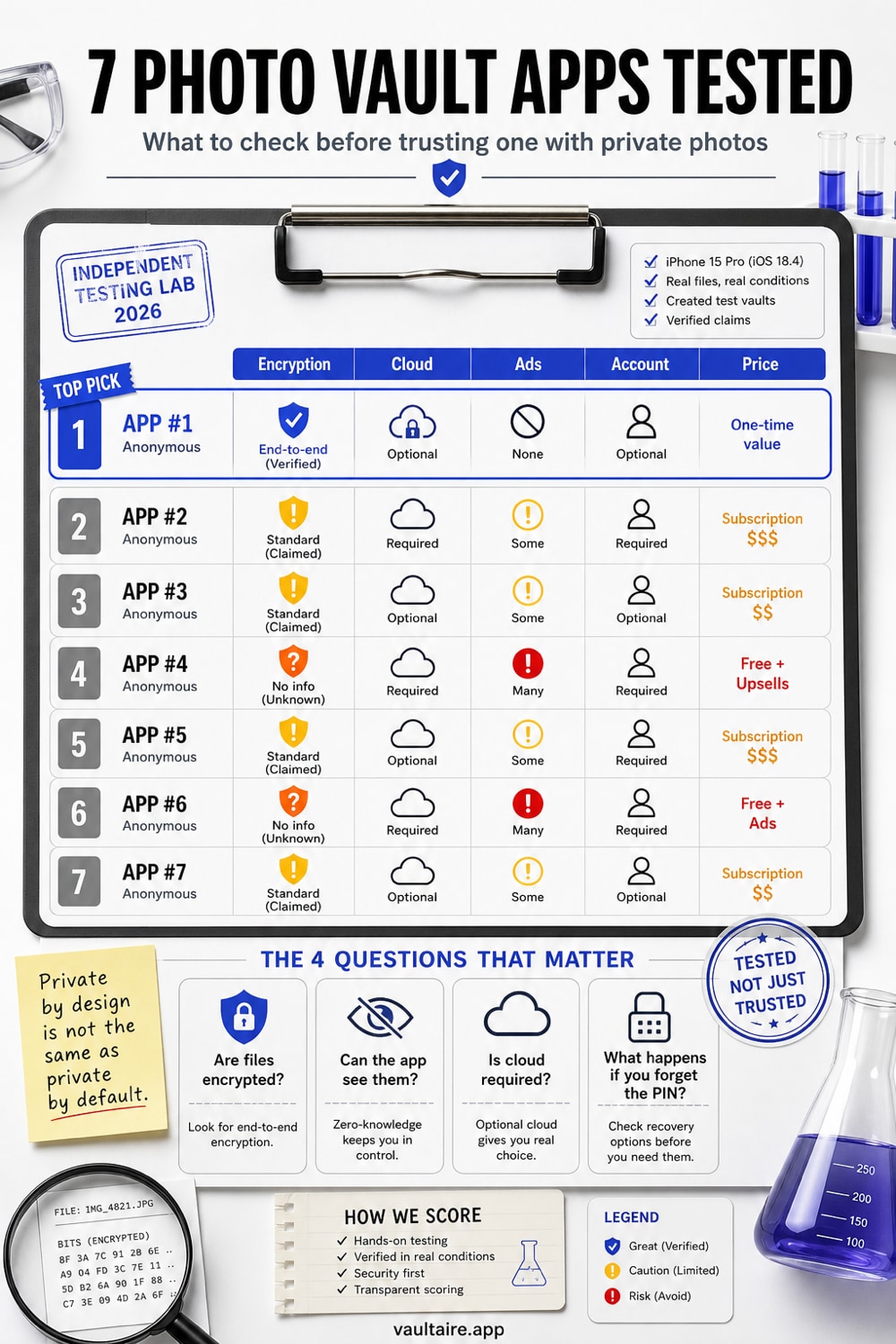
We tested 7 iPhone photo vault apps, free and paid. Only one encrypts files on the device; two claim encryption we could not verify and four have none. Apps last checked June 2026.
Most photo vault apps on the App Store are PIN screens in front of unencrypted files. We downloaded seven of the most popular options, stored test photos in each one, and checked whether the files were actually encrypted or just hidden from the interface. We also read every privacy policy and documented exactly what data each app collects.
The results: Vaultaire is the only app in this roundup whose published model combines AES-256-GCM file encryption, a random content master key, a separate pattern-derived unlock key, and no Wraxle-held plaintext decryption key. Some competitors document only a PIN gate or do not publish enough key-management detail to support the same claim. Local inspection is a useful check, not an independent cryptographic audit.
Quick Answer: Which Photo Vault App Should You Use?
Best overall: Vaultaire combines local AES-256-GCM file encryption, no identity-account requirement, no ads, and a documented provider-key boundary. Copied, locked storage contains ciphertext rather than ordinary photos, while the credential, recovery records, device state, metadata, system backups, and running client remain part of the threat model.
Best for casual hiding only: Apple's Hidden Album or a PIN-only vault app is enough if your only concern is someone briefly scrolling your unlocked phone. Do not treat those options as encryption. They hide the interface, not necessarily the file.
Best if you need cloud albums and recovery: Keepsafe and Private Photo Vault are more mature organizers, but their cloud and account flows change the threat model. Read the reset, backup, and privacy-policy details before trusting them with sensitive photos.
June 2026 refresh: we rechecked the live App Store positioning before updating this page. The market still mixes very different claims under the phrase "photo vault": PIN locks, Face ID gates, disguised calculators, cloud backup, and true local encryption. This guide ranks them by what matters for sensitive photos: whether the file itself becomes unreadable without your key.
For narrower buying questions, see our guides to full-resolution photo vault storage and offline photo vault apps with no account.
How We Ranked These Apps
Every app was evaluated on five criteria, weighted by importance to actual photo security:
- Encryption standard (40%). Does the app encrypt individual files? What algorithm? Can the files be read if someone extracts the device storage? We tested this by storing a photo, then checking the app's container files via a Mac connection.
- Privacy and data collection (25%). What does the privacy policy say? What does the App Store privacy nutrition label report? Does the app contain ads or share data with third parties?
- Account requirement (15%). Does the app require an email, phone number, or account creation? An account tied to a privacy app is itself a privacy liability.
- Feature set (10%). Backup options, sharing, file type support, camera integration.
- Pricing and value (10%). Free tier limitations, subscription costs, lifetime options.
We weighted encryption and privacy at 65% combined because that is the entire point of a vault app. An app that hides photos behind a PIN but leaves them unencrypted is not a vault. It is a folder with a lock screen.
Quick Comparison Table
| App | Encryption | Data Collection | Account Required | Ads | Price (Annual) |
|---|---|---|---|---|---|
| Vaultaire | AES-256-GCM for files and metadata | Minimal (opt-in analytics only) | No | No | $19.99/yr or $39.99 lifetime |
| Keepsafe | Claims encryption (server-side) | Email, device ID, usage data | Yes | Yes (free tier) | $23.99/yr |
| Private Photo Vault | None (PIN access only) | Device ID, usage analytics | No | Yes (free tier) | $19.99/yr |
| Calculator# | Limited (claims encryption) | Device ID, analytics | No | Yes | $29.99/yr |
| Secret Photo Vault | None confirmed | Usage analytics | Optional | Yes | $9.99/yr |
| Hide it Pro | None (PIN access only) | Device info, analytics | Optional | Yes | Free w/ ads |
| Safe Lock | None confirmed | Device ID, usage data | No | Yes | $14.99/yr |
1. Vaultaire -- Best Overall Encryption
Encryption: AES-256-GCM for files and metadata + PBKDF2/HMAC-SHA512 key derivation Data collection: Anonymous crash reports only, opt-in Account required: No Pricing: Free (3 vaults, 100 photos and 10 videos total) / $5.99/mo / $19.99/yr / $39.99 lifetime
Vaultaire is the only app in this list that encrypts every file individually with AES-256-GCM, the same authenticated encryption standard used by the US government for classified data (NIST SP 800-38D). Each file gets a unique initialization vector, so identical photos produce different encrypted outputs.
The key hierarchy matters here. You draw a pattern on a 5x5 grid of 25 dots. PBKDF2-HMAC-SHA512 combines that pattern with a device-wide salt for 600,000 iterations to derive a 256-bit vault key. The vault key authenticates the encrypted index and unwraps a separate random master key used for file encryption. Recovery information is stored in an encrypted Keychain database, not in plaintext files or a Vaultaire account. An unconfigured pattern shows an empty state, while AES-GCM authentication still provides a verification result for an examiner testing copied storage.
Encryption verification test: Encrypted Vaultaire payload bytes expose no readable image headers, EXIF fields, or JPEG signatures when copied for inspection. The surrounding container is not structure-free: encrypted index filenames, file counts, ciphertext sizes, timestamps, and storage use remain observable.
Vaultaire keeps vaults out of a visible picker and lets each configured pattern open a separate encrypted index. The current local format is not constant-size: it creates one vault_index_<fingerprint>.bin file per vault. An examiner with app-container access can count those files, although the filenames do not reveal vault names, patterns, or plaintext contents.
Pros:
- AES-256-GCM with per-file IVs and authenticated encryption
- Zero-knowledge architecture: the developer cannot access your data
- Pattern-separated vaults with no visible vault list
Cons:
- iOS only, no Android version
- Newer app with fewer App Store reviews than established competitors
- No folder organization within vaults (different vaults serve this purpose)
Verdict: Vaultaire treats authenticated encryption as the product, not an afterthought. Its random master key protects file contents, while the pattern-derived vault key authenticates the encrypted index and unwraps that master key. A copied, locked container exposes ciphertext and storage structure rather than readable photos. The tradeoffs are real: it is iOS-only, newer, less proven by user volume, closed source, unaudited, and its current index layout reveals local vault count.
Read our detailed comparison pages for Vaultaire vs each competitor
2. Keepsafe -- Most Popular, Cloud-Dependent
Encryption: Claims encryption for premium tier (server-side key management) Data collection: Email address, device identifiers, usage analytics, crash data Account required: Yes (email required) Pricing: Free (limited) / $23.99/yr / $107.99 lifetime
Keepsafe is the most downloaded photo vault app on the App Store, with over 369,000 ratings. It offers cloud backup, album organization, and a clean interface. The premium tier claims to encrypt photos.
The issue is the architecture. Keepsafe requires an email account and stores files on its servers. The company holds the encryption keys, which means Keepsafe (or anyone who compromises Keepsafe's servers) can technically access your photos. This is encryption for transport and storage, not zero-knowledge encryption. If Keepsafe receives a court order, they can comply.
Encryption verification test: Files stored in Keepsafe's local container show modified image files, but the encryption is tied to your account credentials managed by Keepsafe's servers. Deleting your account erases access, but the server-side key management means the company holds the capability to decrypt.
An email reset shows that an account recovery path exists, but it does not by itself prove whether the provider holds a plaintext content key; a service could reauthorize or rewrap keys through another design. Treat the reset flow as one part of the recovery model and look for a published key hierarchy before drawing a stronger conclusion.
Pros:
- Large user base and long track record (founded 2012)
- Cloud backup and cross-device sync
- Clean, polished interface with album organization
Cons:
- Requires email account, creating an identity link to your private photos
- Server-side key management means Keepsafe holds decryption capability
- Free tier contains ads and functionality restrictions
Verdict: Keepsafe is a capable photo organizer with access control. It protects against casual snooping: someone picking up your phone cannot see your photos without the PIN. It does not protect against Keepsafe itself, server breaches, or legal compulsion. If your threat model is a nosy roommate, Keepsafe works. If your threat model includes data subpoenas or targeted attacks, the server-side architecture is the weak point.
Vaultaire vs Keepsafe: detailed comparison
3. Private Photo Vault -- PIN-Only, No File Encryption
Encryption: None (PIN-based access control) Data collection: Device identifiers, usage analytics Account required: No Pricing: Free (limited) / $19.99/yr
Private Photo Vault is one of the oldest apps in the category, with nearly a million App Store ratings. It uses a PIN to gate access to the app. The photos behind that PIN are stored as standard image files.
Encryption verification test: Files stored in Private Photo Vault's container directory are readable JPEG and PNG files. Connecting the phone to a Mac and navigating to the app's document storage reveals the photos in their original format, with EXIF data intact. The PIN prevents access through the app's UI, but does not prevent access through the file system.
This is the critical distinction between access control and encryption. A PIN lock is a door. Encryption is a wall. Private Photo Vault offers a door.
Pros:
- Simple, straightforward interface
- No account required
- Large user base with extensive App Store reviews
Cons:
- No file-level encryption: photos are readable via file system access
- EXIF metadata preserved, revealing location and timestamp data
- Free tier contains ads
Verdict: Private Photo Vault hides photos from someone casually scrolling your camera roll. It does not protect them from anyone with technical knowledge, forensic tools, or even a Mac cable. If you need actual encryption, this is not it.
Vaultaire vs Private Photo Vault: detailed comparison
4. Calculator# -- Calculator Disguise, Limited Encryption
Encryption: Claims encryption for some content Data collection: Device identifiers, analytics Account required: No Pricing: Free (limited) / $29.99/yr
Calculator# disguises itself as a working calculator app. Enter a specific PIN and the calculator interface slides away to reveal the hidden vault. It is a clever piece of social engineering: someone browsing your home screen sees a calculator, not a vault app.
The security model relies on obscurity. If someone knows to look for calculator vault apps (and they are widely known at this point), the disguise fails. The app's privacy label shows data collection for analytics, and the encryption claims are vague. The App Store listing references encryption without specifying the algorithm or key management approach.
Encryption verification test: The disguise is effective at the UI level. At the file level, protection is inconsistent. Some stored files show signs of processing but lack the uniform randomness of properly encrypted data.
Pros:
- Calculator disguise is effective against casual inspection
- Functional calculator that does not raise suspicion
- Supports photos, videos, and documents
Cons:
- Security depends on obscurity, not cryptographic strength
- Encryption claims are vague with no algorithm specified
- Most expensive annual plan in this roundup at $29.99/yr
Verdict: Calculator# solves a specific problem: preventing someone from knowing a vault app exists on your phone. That is valuable against casual snooping. But disguise is not encryption. If someone knows to look for it (or uses forensic tools), the calculator costume does not help. At $29.99/year, it is also the most expensive option here for what amounts to a UI trick on top of limited cryptographic protection.
Vaultaire vs Calculator#: detailed comparison
5. Secret Photo Vault -- Basic Vault, Limited Security Model
Encryption: No confirmed file-level encryption Data collection: Usage analytics Account required: Optional (for cloud backup) Pricing: Free (limited) / $9.99/yr
Secret Photo Vault provides a passcode-locked container for photos and videos. The interface is functional but dated. The app supports basic album organization and a decoy PIN feature that opens a fake set of photos.
The decoy PIN is worth discussing. A decoy mode may leave configuration or storage evidence that an examiner can identify. Stronger deniability requires a constant-shape storage design in which real and dummy slots are indistinguishable without a secret. Vaultaire's current one-index-file-per-vault layout does not meet that stronger definition, even though its locked interface does not show a cross-vault list.
Encryption verification test: Files in Secret Photo Vault's storage show standard image file signatures. There is no evidence of per-file encryption.
Pros:
- Low annual price at $9.99/yr
- Decoy PIN feature for casual protection
- Simple, minimal interface
Cons:
- No file-level encryption confirmed
- Decoy mode is detectable by forensic tools (configuration flag)
- No recovery phrase mechanism
Verdict: Secret Photo Vault is an adequate PIN-locked folder. The decoy PIN is better than nothing for casual situations, but it is fundamentally different from cryptographic deniability. At $9.99/yr, the price is right for basic photo hiding. It is not encryption.
Vaultaire vs Secret Photo Vault: detailed comparison
6. Hide it Pro -- Android-First, iOS Afterthought
Encryption: None (PIN access control) Data collection: Device info, usage analytics Account required: Optional Pricing: Free (ad-supported)
Hide it Pro was built for Android and ported to iOS. The Android version has significantly more features and a larger user base. The iOS version feels incomplete by comparison, with a simpler interface and fewer options.
The app disguises itself as "Audio Manager" on Android. On iOS, it uses a less convincing disguise. The security model across both platforms is PIN-based access control without file-level encryption.
Encryption verification test: Files are stored in standard readable formats within the app container. The PIN prevents access through the app's UI but does not encrypt the underlying files.
The privacy policy is broad, collecting device information and usage data. The app is ad-supported on the free tier, which means third-party ad networks also receive data about your usage patterns, including the fact that you use a photo hiding app.
Pros:
- Free to use (ad-supported)
- Multi-format support (photos, videos, audio, documents)
- Good option if you also need Android support (Android version is stronger)
Cons:
- iOS version is clearly secondary to the Android product
- No file-level encryption on either platform
- Ad networks collect data about your usage of a privacy app
Verdict: Hide it Pro's best version is on Android. The iOS app gets the job done for basic photo hiding, but the ad-supported model creates an ironic situation: you are using a privacy app that shares data with advertising networks. If you need cross-platform and do not care about encryption, it works. If you are on iPhone specifically, there are better options on this list.
Vaultaire vs Hide it Pro: detailed comparison
7. Safe Lock -- Basic Feature Set
Encryption: No confirmed file-level encryption Data collection: Device identifiers, usage data Account required: No Pricing: Free (limited) / $14.99/yr
Safe Lock offers a PIN-locked vault with cloud backup and basic album organization. The feature set is similar to Private Photo Vault and Secret Photo Vault: a passcode gates access to the app, and the photos sit behind that gate.
Encryption verification test: Files in the app container are stored in recognizable image formats. The cloud backup feature uploads files to external servers, and the encryption status of those uploads is not clearly documented.
The cloud backup introduces a question the app does not clearly answer: where are the backups stored, who has the encryption keys, and what happens if those servers are breached? The app's privacy policy is vague on these points.
Pros:
- Cloud backup option for data recovery
- Simple, clean interface
- No account required for local use
Cons:
- No confirmed file-level encryption
- Cloud backup encryption status unclear
- Privacy policy lacks specifics on server-side data handling
Verdict: Safe Lock is a functional PIN-locked photo vault. The cloud backup is useful for recovery but introduces server-side risks that the app does not clearly address. If you want basic photo hiding with a backup option and do not need encryption, it works. If cloud security matters to you, the vague documentation is a concern.
Vaultaire vs Safe Lock: detailed comparison
The Encryption Test: What We Actually Checked
Here is the test we described for each app, explained in detail.
We installed each app on a test iPhone running iOS 17. We stored the same test photo in each vault. Then we connected the phone to a Mac and examined the app container files using standard file management tools. No jailbreak, no forensic software. Just what any Mac user could do.
What we looked for:
- File signatures. JPEG files start with
FF D8 FF. PNG files start with89 50 4E 47. If we found these headers in the app's storage, the files are not encrypted. - EXIF data. Unencrypted photos retain GPS coordinates, camera model, timestamps. Encrypted photos have no readable metadata.
- File size correlation. If the stored file is approximately the same size as the original photo, it is likely stored in its original format. Encrypted files with added IVs and authentication tags have different sizes.
- Randomness. Properly encrypted data is statistically indistinguishable from random bytes. Unencrypted image data has predictable byte distributions.
This is not advanced forensics. This is the minimum check anyone with a Mac and basic curiosity could perform.
Privacy Policy Comparison
We read each app's full privacy policy and cross-referenced it with the App Store privacy nutrition labels (the "App Privacy" section on each app's App Store listing).
| App | Data Linked to Identity | Data Used for Tracking | Third-Party Ad Networks | Privacy Policy Clarity |
|---|---|---|---|---|
| Vaultaire | None | None | None | Clear, specific |
| Keepsafe | Email, name | Device ID | Yes (free tier) | Detailed but lengthy |
| Private Photo Vault | None linked | Device ID | Yes (free tier) | Vague on specifics |
| Calculator# | None linked | Device ID | Yes | Moderate detail |
| Secret Photo Vault | None linked | Usage data | Yes | Brief |
| Hide it Pro | Optional email | Device info | Yes | Broad language |
| Safe Lock | None linked | Device ID | Yes | Vague |
The pattern is consistent: every app in this list except Vaultaire includes advertising in the free tier, which means ad networks receive data about your activity inside a privacy app. This is worth considering. You downloaded a vault app to keep something private. The app then tells an ad network that you use a photo vault.
Vaultaire starts in-app analytics and crash diagnostics only after consent. The documented event policy excludes vault contents, patterns, recovery phrases, structured filenames and file types, share IDs, vault IDs, transaction IDs, and receipts. It uses a pseudonymous install identifier for consented attribution and purchase joins, not a Vaultaire identity account or email.
Frequently Asked Questions
Do photo vault apps actually encrypt photos?
Most do not. The majority of photo vault apps on the App Store use a PIN or passcode to control access to the app's interface. The photos behind that PIN are stored as standard, readable image files. If someone connects the phone to a computer or uses forensic tools, the photos are accessible without the PIN. True encryption (AES-256-GCM, for example) transforms each file into data that is indistinguishable from random noise without the correct decryption key.
What is the difference between hiding photos and encrypting them?
Hiding means moving a photo out of your normal camera roll and into a separate location that requires a PIN to view through the app. The photo file itself is unchanged and readable. Encrypting means transforming the file mathematically so it cannot be read without the correct key. Hiding protects against someone casually scrolling your phone. Encryption protects against someone with file system access, forensic tools, or a Mac cable.
Is the iPhone Hidden Album safe enough?
The iOS Hidden Album (Settings > Photos > Hidden Album) hides photos from the main library and requires Face ID to view. It is adequate for preventing casual access. However, hidden photos are not encrypted, are included in device backups, and can be accessed by anyone who can compel your Face ID (law enforcement, border agents, or someone who holds the phone to your face). For photos that need cryptographic protection, a dedicated vault app with real encryption is necessary.
Can police access photo vault apps?
It depends on the app's architecture and the data sought. Vaultaire does not operate a service holding readable vault contents or plaintext decryption keys, so Wraxle cannot provide a provider-held plaintext copy it does not possess. Apple and analytics providers may still hold account, CloudKit, purchase, attribution, or service metadata and encrypted records. A legal demand against a device, user, cloud provider, or running client has a different scope.
Are free photo vault apps safe?
Free photo vault apps are typically ad-supported, which means they share usage data with advertising networks. The ad networks know you use a photo vault app. Beyond the advertising concern, most free vault apps do not encrypt files. They provide a PIN screen, not encryption. If a free vault app offers a "forgot PIN" feature that works without a recovery phrase, the files are almost certainly not encrypted. The app has direct access to them.
What should I look for in a secure photo vault app?
Four things. (1) Confirmed encryption algorithm: AES-256 is the standard. If the app does not specify, assume it does not encrypt. (2) Key management: who holds the key? If the app has a password reset via email, the company holds the key. (3) Data collection: read the App Store privacy label. If the app collects device IDs and shares data with advertisers, your privacy has limits. (4) No account requirement: an email address linked to a privacy app is a privacy leak.
Which photo vault app keeps photos at full resolution?
Look for an app that imports the original file without re-encoding it. Many vaults compress photos or keep cloud-preview copies, which can lower quality or leave recoverable thumbnails. Vaultaire stores the original file inside the encrypted vault, so a high-resolution photo stays high resolution after import.
Which photo vault app works offline with no account?
Vaultaire is the clearest option in this roundup if you want no account and no default cloud dependency. A no-account vault reduces identity leakage: there is no email address tied to the fact that you use a privacy app, and there is no server-side account reset path that can become a key-recovery weakness.
The Bottom Line
Six of the seven apps in this roundup store photos as readable files behind a PIN screen. One encrypts them.
That is the finding. The market is full of apps that look like vaults but function as locked folders. If your threat model is a friend picking up your phone, a PIN-locked folder works. If your threat model includes anyone with 10 minutes, a Mac cable, and basic curiosity, only actual encryption matters.
Vaultaire wins this roundup because it passed the encryption verification test, requires no identity account, keeps optional analytics off until consent, and encrypts file contents under a provider-inaccessible master key. Its limitations are real: iOS-only, newer, fewer reviews, and a local index layout that reveals vault count to app-container inspection. On the narrower question "is the locked file content encrypted?", the answer is yes.
Download Vaultaire (free) | Learn how Vaultaire's encryption works | See all comparisons
Related guides: How to Hide Photos on iPhone | How to Lock Photos on iPhone | Full-Resolution Photo Vaults | Offline Photo Vaults With No Account | Calculator Vault Apps Explained