Are Photo Vault Apps Safe? A 2026 Security Audit
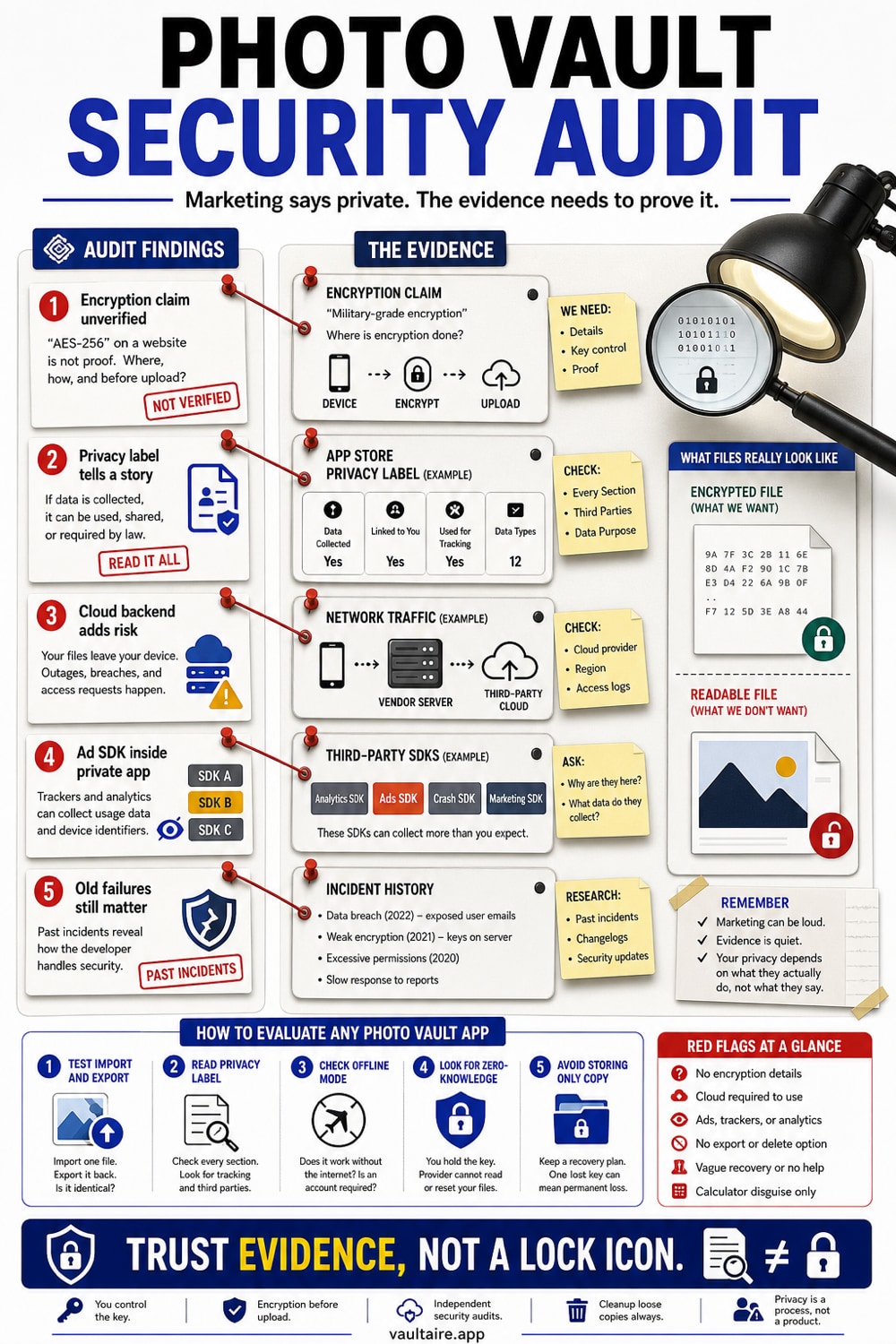
Most iOS photo vault apps protect the screen, not the files. In our June 2026 audit of 12 of the most-installed vault apps, only one named a specific encryption cipher in its App Store listing, and 7 of 12 declared that they track you. The apps worth trusting are the minority that name a real cipher, hold no key to your data, and disclose what they collect.
Photo vault apps are not uniformly safe. In our June 2026 audit of 12 of the most-installed iOS vault apps, 7 of 12 declared they track users across apps and websites, only 1 named a specific cipher in its listing, and a decade of independent research has repeatedly found apps marketing "encryption" while storing files in cleartext or behind trivial obfuscation. The safe ones name a real cipher, require no account, and hold no key to your data.
What we audited and what we did not test
We pulled the App Privacy label, the published privacy policy, and the App Store description for the top photo-vault and hide-photos apps in the US App Store in June 2026, ranked by store position and ratings volume. We classified each app by its actual security model and cross-referenced a decade of documented vault-app failures, keeping only incidents traceable to a primary or corroborated source.
Two limits matter. First, App Store privacy labels are self-reported; Apple does not audit them, so an app could declare less than it collects. Second, this is a label, policy, and architecture review plus a public-incident registry. We did not run live network capture, so we make no claim about traffic we did not personally observe. Everything here is checkable against the sources listed at the bottom of this page.
Finding 1: "Encryption" is usually a word, not a verifiable fact
The category runs on the phrase "military-grade encryption." It means nothing on its own. AES-256 is a public standard with no military grade; the phrase is marketing that survives because it sounds like a specification. What actually matters is whether an app names a cipher, a key length, and a key-derivation method you can evaluate.
Across the 12-app label audit, exactly one app named a specific cipher in its App Store description: Secret Photos KYMS, which says "AES." Every other app either said "military-grade encryption," "encrypted storage," "Zero-Knowledge architecture," or named no encryption at all. Looking deeper at eight apps' developer sites and policies, only three named a real cipher anywhere in their official materials: LockMyPix names AES-CTR, Private Photo Vault's optional cloud vault names AES-256, and Calculator# discloses AES-256 with PBKDF2 at 200,000 iterations. Those three deserve credit for showing their work.
There is a distinction most vault listings blur: hiding a photo is not encrypting it. Hiding moves a file somewhere less visible. Encrypting transforms it into ciphertext that is useless without a key. A PIN screen that gates a folder of ordinary files is a curtain, not a wall. Anyone who reaches the files underneath through a backup, a forensic tool, or an adb command walks straight in.
Finding 2: The privacy labels say more than the marketing does
Apple's App Privacy labels are the most honest page in the App Store, because lying on them is a policy violation. They are where the marketing copy and the actual data practices stop agreeing. Our June 2026 audit found that 7 of the 12 apps declare "Data Used to Track You," which is Apple's term for data shared to track you across other companies' apps and websites. Only 2 of 12 carry Apple's "Data Not Collected" label, the strongest privacy attestation in the store: Safe Lock and Secret Photo Vault Lock Photos.
The two highest-rated apps in the set, Private Photo Vault (Pic Safe) and SV Private Photo Vault PRO, are both published by Legendary Software Labs and together have roughly 1.026 million combined ratings. Both track users and, per their own labels, link your photos, videos, and device identifiers to your identity. Best Secret Folder carries the broadest "linked to you" footprint in the set: location, full contact information including name, email, and phone, and your photos, video, and audio, while running ads. A private-photo app that links your photos to your identity and tracks you across other apps is solving a different problem than the one you downloaded it for.
The remaining apps in the audit tell their own story. Private Photo Vault (Pic Safe) and SV Private Photo Vault PRO name no cipher in their listings, using only the phrase "secret value to encrypt/decrypt." Keepsafe describes its encryption as "military-grade" without naming a cipher. Privault says "encrypted storage." HiddenVault claims "Zero-Knowledge architecture" but names no algorithm. Calculator# names no cipher in its App Store listing. Best Secret Folder and Hide It Pro name nothing at all. Only KYMS names AES, and only Encamera is open source, which offers a different kind of verifiability.
Finding 3: An account and a cloud backend are a second attack surface
The local file handling can be flawless and the app can still leak, because the backend is a separate attack surface. Apps that require an account and store your files on their servers are asking you to trust a database you cannot inspect.
Keepsafe is the clearest example of this structural choice. It requires an email address before you can use it, stores content on its own servers, and an independent security analysis found that the company retains the ability to access user photos. Its privacy policy is also the only one in our set that admits some data sharing may be classified under California law as selling or sharing your personal information. That is a disclosure the others did not make, and it tells you who holds the key. When a vendor holds the encryption key, a vendor breach is your breach. The model that avoids this is zero-knowledge encryption, where the provider cannot read your data because it never holds the key.
The worked example of what goes wrong arrived in 2025. A separate app named Photo Vault, published by the developer Brain Craft, left its Firebase database with no password protection. The exposure was reported by Cybernews in 2025 and corroborated by The Dead Pixels Society. It exposed user email addresses, plaintext passwords, file and folder names, and the contents of the app's secure-notes feature, for an app with roughly 72,000 downloads. To be precise: this Brain Craft app is not the same product as Private Photo Vault or Pic Safe by Legendary Software Labs, despite the similar name. The photos themselves were not in the database, but everything needed to attack the accounts was there, including passwords stored in plaintext, which a vault app should never possess in readable form, let alone expose.
Finding 4: The ad SDK inside the "private" app
Seven of the eight privacy policies we read referenced third-party advertising. The standout is NQ Vault, also distributed as Vault-Hide, whose policy lists six advertising SDKs embedded in the app: AdMob, Facebook Audience Network, InMobi, MoPub, AppLovin, and Unity. An ad network's job is to build a profile of the user. Embedding six of them inside an app whose entire premise is privacy is the category's defining irony, and it is stated in the policy text, not our speculation.
The broader pattern from the eight-app policy review: only one of the eight, LockMyPix, positions itself as ad-free in its core model. Private Photo Vault mentions third-party cookies and advertising. Privault lists AdMob and Umeng analytics. Best Secret Folder references tailored ads, Google Analytics, and Firebase. Hide It Pro references a third-party ad SDK. The apps that keep no cloud, require no account, and name a cipher are the exception, not the default.
A decade of documented failures
None of this is new. The pattern of "encryption" that is not encryption has been documented repeatedly since 2014, by named researchers and peer-reviewed studies. What follows is the incident registry with confidence levels, because some of these are better-sourced than others.
In September 2014, forensics researcher Jonathan Zdziarski showed that Private Photo Vault, then reporting over 3 million users, applied no encryption beyond default iOS storage. Photos were recoverable in cleartext in about five minutes. This incident is verified against a primary source at zdziarski.com.
In April 2015, The Register and Slate reported that NQ Mobile Vault, which marketed "encryption" and had over 10 million downloads, applied a single-byte XOR operation to only the first 128 bytes of each file. That leaves 256 possible keys and the rest of every file in plaintext. This incident is verified.
In November 2015, IOActive researcher Michael Allen tested Private Photo Vault, an app called "My Media," and Keepsafe and broke into all three in under 30 minutes each. Methods included plaintext PINs stored in property-list files, an unauthenticated web server running on port 5555, and album passwords returned in plaintext from the server. This incident is verified.
In 2017, Zhang, Baggili, and Breitinger published a peer-reviewed study in Computers and Security (volume 70) analyzing 18 Android vault apps with roughly 220 million combined downloads. Six did not encrypt stored photos, 7 stored passwords in cleartext, and 10 exposed hidden data without root access. The research helped recover evidence in a criminal case: 66 images and 18 videos. This study is verified.
In June 2019, a researcher publishing as forensicmike1 found that Private Photo Vault had added AES encryption via RNCryptor, but the master key was stored statically in the iOS Keychain and was never rotated when the user changed their PIN. A 4-digit PIN made the key trivially brute-forceable. This incident is verified.
In 2022, Ruffin and colleagues published a peer-reviewed study at ACM WPES analyzing 20 popular Android vault apps with over 10 million downloads each. Only 5 of 20 attempted file encryption. 15 were fully retrievable with a simple adb pull, and 7 stored PINs or recovery emails in plaintext. This study is verified.
In February 2025, Kaspersky reported the SparkCat campaign: malware found in apps on both the App Store and Google Play that used on-device optical character recognition to scan users' photo libraries for cryptocurrency seed phrases and screenshots of passwords, then exfiltrated the matches. Apple and Google removed the apps. It was the first OCR-based photo stealer known to pass App Store review. This incident is verified.
Two additional incidents carry partial verification and should be read with that caveat. A 2021 analysis found a family of calculator-style vault apps on Android sharing a single hardcoded AES-CBC key across every install, meaning one known key decrypted every user's media. This is partially verified, from a single technically specific researcher. Separately, the Vault-Hide app was flagged by India's Ministry of Electronics and Information Technology in 2017 for exfiltrating phone numbers, IMEI numbers, and installed-app lists, and reportedly evaded removal by renaming itself. This is partially verified via Cybernews and CPO Magazine secondary sources.
One data point is notable for its absence: we found no CVE assigned to any consumer photo vault app. The closest formal disclosure is a 2018 advisory on an unrelated "Photo Vault" product with an unauthenticated WiFi server, rated medium severity (CVSS 4.8), with no CVE issued (seclists.org Full Disclosure, January 2018). The category is not formally tracked, which means most of these failures were caught by independent researchers outside any coordinated disclosure process.
How to actually evaluate a vault app
You do not need to reverse-engineer anything. Five questions filter most of the risk. First: does it name a cipher? "AES-256" or "AES-GCM" is a claim you can check. "Military-grade" is not. Second: does it require an account? An email and password create a credential store that can leak, as the Brain Craft Firebase incident showed. Third: if it backs up to the cloud, who holds the key? If the vendor can reset your password and recover your photos, the vendor can read your photos, and so can anyone who breaches the vendor.
Fourth: what do the App Privacy label and policy say? Open the App Privacy section. If it tracks you or links your photos to your identity, believe it. Read the policy for ad SDK disclosures. Fifth: is it auditable? "Data Not Collected," named ciphers with key-derivation details, and open-source code are all signals that an app expects to be scrutinized. Apps that cannot be checked are relying on you not checking.
Where Vaultaire fits in this picture
We built Vaultaire around the specific failure classes documented above, so it is fair to measure us against them rather than against marketing. A 5-by-5 pattern and device-wide Keychain salt feed PBKDF2-HMAC-SHA512 to derive the local vault key. That key authenticates the encrypted index and unwraps a separate random master key for AES-256-GCM file encryption. Protected pattern and recovery material remains in an encrypted Keychain database, and AES-GCM authentication gives copied storage an offline pattern-verification test.
Vaultaire requires no identity account and does not send Wraxle readable vault files or plaintext decryption keys. iCloud backup is on by default, can be turned off, and is encrypted before upload under a separate backup key. Apple can still observe account and CloudKit service metadata, and the app, iOS, Keychain, and an unlocked device remain inside the trust boundary. This is not a claim that Vaultaire is the only safe choice. It is a provider-key boundary that can be compared with the documented failures above and checked against the published security model.
Related reading:
- Are photo vault apps safe? The short version
- What AES-256 encryption actually means
- Zero-knowledge encryption, explained
- What cloud photo storage privacy policies really say
- How Vaultaire's pattern-derived vault key unlocks the master key
Sources
- Private Photo Vault: Not So Private (Zdziarski, 2014)
- NQ Mobile Vault XOR encryption analysis (The Register, 2015)
- Breaking into and Reverse Engineering iOS Photo Vaults (IOActive, Michael Allen, 2015)
- iOS Photo Vault Still Pwnable in 2019 (forensicmike1, 2019)
- Breaking into the Vault: Privacy, Security, and Forensic Analysis of Android Vault Applications (Zhang, Baggili and Breitinger, Computers and Security vol. 70, 2017)
- Casing the Vault: Security Analysis of Android Vault Applications (Ruffin et al., ACM WPES, 2022)
- SparkCat: OCR-based photo stealer found on App Store and Google Play (Kaspersky Securelist, 2025)
- iOS photo vault app exposes private user data via Firebase (Cybernews, 2025)
- Photo Vault unauthenticated WiFi server disclosure (Full Disclosure, seclists.org, 2018)
- App Privacy Details (Apple App Store policy)
Frequently Asked Questions
Are photo vault apps actually safe?
It depends entirely on the app, and most are weaker than they appear. In our June 2026 audit, 7 of 12 of the most-installed iOS vault apps declared they track you, and only 1 named a specific cipher in its listing. A decade of research has repeatedly found apps marketing "encryption" while storing files in cleartext or behind trivial obfuscation. The safe ones name a real cipher, require no account, and hold no key to your data.
Can a photo vault developer see my photos?
If the app stores your photos in its own cloud and can recover your account when you forget your password, then yes: the developer holds the encryption key and can technically access your photos, as can anyone who breaches the developer's servers. An independent analysis found this to be the case for Keepsafe. Apps that are zero-knowledge or local-only cannot see your photos because they never hold the key.
Is Private Photo Vault (Pic Safe) actually encrypted?
Private Photo Vault's optional Cloud Vault names AES-256, which is a real cipher. But the app has a documented history of weaknesses: no encryption found in 2014 (Zdziarski), broken in under 30 minutes in 2015 (IOActive), and a static, non-rotating master key found in 2019 (forensicmike1). Its current App Store privacy label also declares that it tracks you and links your photos to your identity.
Do photo vault apps really use encryption, or just a PIN?
Many use only a PIN over a hidden folder, which is not encryption. Hiding moves a file to a less visible location; the file remains readable by anyone who reaches it through a backup or forensic tool. A 2022 peer-reviewed study of 20 Android vault apps (Ruffin et al., ACM WPES) found only 5 attempted real file encryption, and 15 were fully recoverable with a simple adb pull. Real encryption transforms the file into ciphertext that requires a key.
What happens to my photos if I delete a vault app?
If the app only hid the files (no encryption), the files may remain on the device in an accessible location or in backups. If the app encrypted the files locally and you delete the app without exporting, the ciphertext may become unrecoverable because the key is gone. If the app used cloud storage, the files may persist on the vendor's servers. Check the app's export and deletion documentation before uninstalling.
Can forensic tools or police bypass a photo vault PIN?
PIN-only protection offers little resistance to forensic extraction tools. Research from 2014, 2015, 2017, and 2022 showed vault-app PINs bypassed in minutes or recovered files without any authentication at all. A 4-digit PIN found in Private Photo Vault's 2019 implementation was noted as trivially brute-forceable. Real file encryption with a strong key-derivation function raises the bar significantly; a PIN gate alone does not.
Does Keepsafe sell my data?
Keepsafe's privacy policy is the only one in our audit set that explicitly states some data sharing may be classified under California law as "selling" or "sharing" personal information. The policy also references ad partners. That is a disclosure the other apps in our set did not make. Whether that constitutes a sale depends on the legal definition applied, but the policy is the most explicit in the category on this point.
What is the difference between hiding photos and encrypting them?
Hiding moves a file somewhere less visible on the device; the underlying file is unchanged and readable by anyone with access to the storage, including backup tools or forensic software. Encrypting transforms the file into ciphertext that is unreadable without the correct key. Many vault apps only hide. A 2022 academic study (Ruffin et al.) found 15 of 20 popular Android vault apps were retrievable with a basic adb pull, with no decryption needed.
Is it safe to enable cloud backup in a photo vault app?
Only if the backup is encrypted before it leaves your device and the provider cannot decrypt it. If the vendor can recover your files when you lose your password, the backup is readable by the vendor and exposed in any server breach. The 2025 Brain Craft Firebase incident exposed emails, plaintext passwords, and folder names precisely because the cloud side had no protection. Look for zero-knowledge architecture with encryption before upload.
Which photo vault app doesn't require an account or internet access?
Several apps work fully offline with no account. In our audit, two carried Apple's "Data Not Collected" label: Safe Lock and Secret Photo Vault Lock Photos. Vaultaire requires no identity account, email address, or network connection to encrypt and store files. That removes a developer-run account credential store, the class of exposure demonstrated by the 2025 Brain Craft Firebase incident. It does not eliminate device, Keychain, CloudKit, analytics, or operating-system attack surfaces.