Did Someone Open My Hidden Album? How To Tell On iPhone
Your iPhone will not tell you who opened the Hidden album. Here is what you can actually check, what each signal proves, and how to make the question stop mattering.
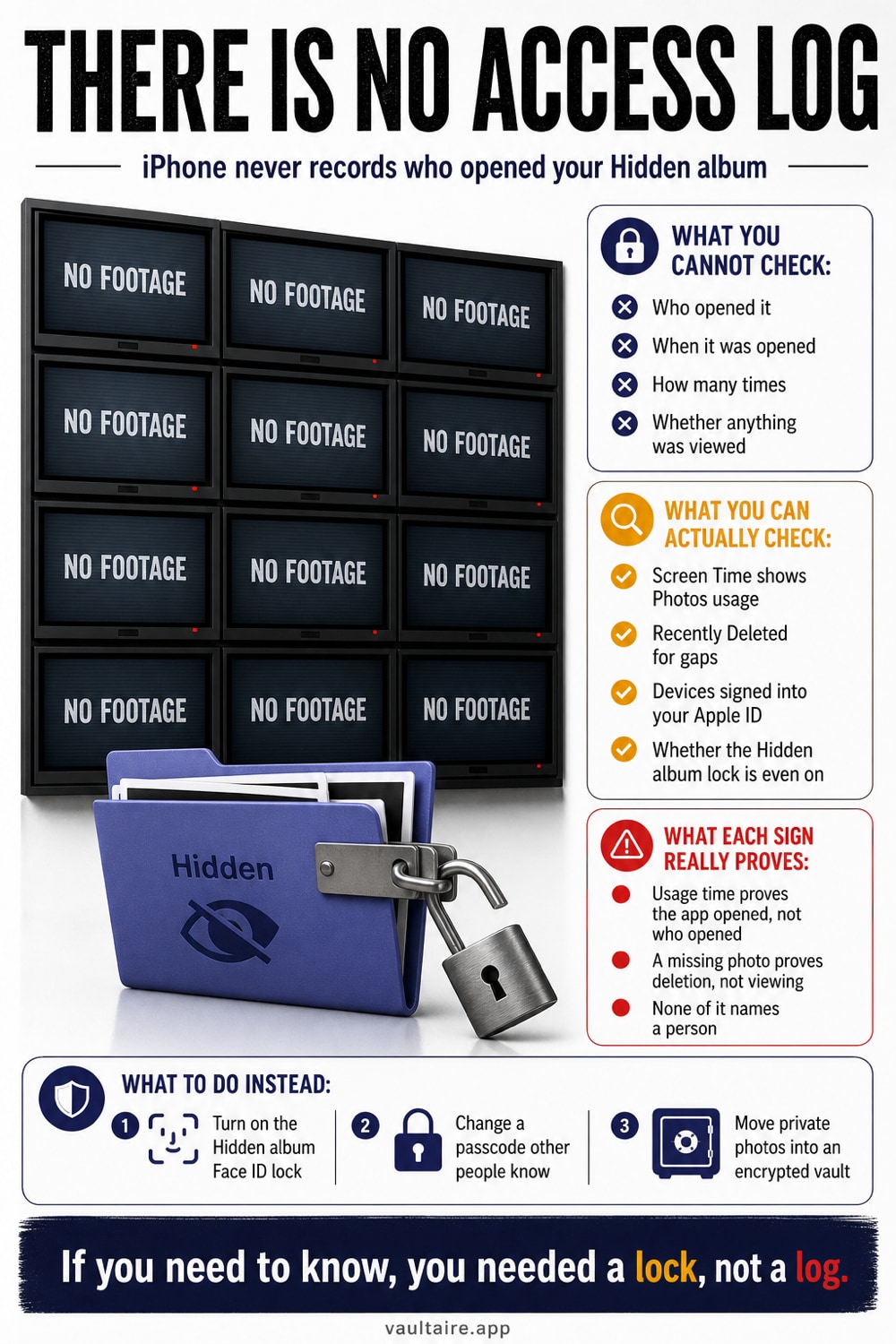
Short answer: iPhone keeps no access log for the Hidden album, so there is no built in way to see that someone opened it. The Photos app records no view history, stores no last opened timestamp, and sends no notification. What you can check is indirect evidence: Screen Time activity for the Photos app, whether the Face ID lock on Hidden is still switched on, whether any photos have moved back into your main library, and which devices are signed into your Apple Account. If the answer really matters to you, the reliable fix is a second lock that your device passcode does not open.
For a separate lock: Vaultaire
Vaultaire cannot tell you who opened Apple's Hidden album. It changes the prevention model by protecting an imported copy with AES-256-GCM under a random master key. A drawn pattern derives a separate vault key that authenticates the encrypted index and unwraps the master key, and no identity account is required. The encrypted app storage remains detectable; the encrypted CloudKit backup (on by default, can be turned off), sync and sharing, and iOS device backups are separate copy paths. Free for up to 3 vaults.
Can You Tell If Someone Opened Your Hidden Album?
Not directly, and it is better to know that up front. The Photos app keeps no view history for the Hidden album. There is no last opened timestamp, no notification, no per album audit trail, and no setting that turns one on. Anyone telling you that iOS shows who looked at your hidden photos is guessing. What you have instead is circumstantial evidence: the Screen Time record of how long the Photos app was open, the current state of the settings that guard the album, and whether any files have quietly moved between albums since you last looked.
That gap matters more than it first appears. Since iOS 16 the Hidden album is locked behind Face ID, Touch ID, or the passcode by default, but Face ID always falls back to the passcode. Anyone who knows the six digits you type in front of them every day can open the album, look at everything in it, and leave no trace at all. Detection is not really available to you here. Prevention is, and it starts with a lock that does not share a secret with your unlock screen.
How To Check Your iPhone For Signs Of Access
Start with Screen Time, which is the closest thing iOS has to an activity log. Open Settings, tap Screen Time, then tap See All App and Website Activity and switch the view to Day. Scroll to the hourly breakdown and look for Photos usage during hours when your iPhone was out of your hands. Read it carefully: Screen Time counts every second the app was open, not which album was viewed, and it credits the device rather than a person. A ten minute Photos session at midnight while you were asleep is worth investigating. A two minute session is probably a widget refresh or your own scrolling.
Then audit the settings that would have to change for someone to browse freely. In Settings, Apps, Photos, confirm that Use Face ID is still on and that Show Hidden Album is where you left it. Open Albums, scroll to Utilities, and compare the Hidden and Recently Deleted counts against what you remember. Deleted items sit in Recently Deleted for thirty days, so a photo that vanished recently is still visible there. Finally, tap your name at the top of Settings to list every device signed into your Apple Account, because iCloud Photos syncs the Hidden album to all of them.
Common Mistakes To Avoid
The first mistake is treating the Hidden album as a vault. It is an organizational shelf. The album is visible to anyone who opens Albums and scrolls to Utilities, its contents sync through iCloud Photos to every iPad and Mac signed into the same Apple Account, and switching Show Hidden Album off only removes the row from view. The files never move, never get encrypted, and never leave the same photo library. Someone with your passcode can switch that row back on in four taps and see exactly what you thought you had put away.
The second mistake is reading Screen Time as proof of anything. It reports device usage, not identity, and background activity can register as time in Photos. Treat it as a prompt to look closer, not as evidence. The third mistake is a panic delete. Photos you remove go straight to Recently Deleted, which is browsable by the same person you are worried about and holds them for thirty days. Work through the checklist calmly instead, and move the files somewhere that does not depend on anyone forgetting they exist.
What Most People Get Wrong
Hidden describes visibility, not protection. A hidden photo is still a full resolution file sitting in the ordinary photo library, readable by anything that has library access. That includes every app you granted Full Access to your photos, any backup you restore onto a new device, and any computer you have trusted with a cable. The lock on the album is a door in front of one room, not a safe around the contents. This is why the question that brought you here has no satisfying answer: the system was never built to record or restrain access in the first place.
Run a short checklist. Check Screen Time for Photos sessions you cannot account for. Confirm the Photos lock is on, remove devices you do not control from your Apple Account, and reduce unnecessary Full Access permissions. Vaultaire can move selected copies outside Photos and protect them under a random AES-256-GCM master key, with a drawn pattern separate from the iPhone passcode. Its encrypted app storage remains detectable, an examiner can still estimate how many vaults hold files, and a compromised or already-open vault remains inside the threat model.
Related reading:
- How to hide photos on iPhone
- Apps to hide pictures, ranked by what they encrypt
- Where hidden photos actually go on iPhone
- How to password protect a folder on iPhone
- Signs someone went through your phone
Sources
Frequently Asked Questions
Can someone open my Hidden album without my passcode?
Not if the lock is on. Since iOS 16 the Hidden and Recently Deleted albums require Face ID, Touch ID, or the passcode by default. The catch is that Face ID always falls back to the passcode, so anyone who knows yours can open the album. If Use Face ID has been switched off in Settings, Apps, Photos, the album opens with no authentication at all.
Does iPhone keep a log of who opened the Hidden album?
No. The Photos app stores no view history, no last opened timestamp, and no per album access record, and it sends no notification when the album is opened. Screen Time is the nearest substitute, and it only shows how long the Photos app was in use, not which album someone looked at.
How can I tell if someone tried to unlock my iPhone?
iOS does not show a list of failed attempts, but repeated wrong passcodes trigger a lockout delay and then an iPhone Unavailable screen. Seeing that message, or an unexpected passcode prompt when Face ID normally works, is the strongest signal you get. Stolen Device Protection also adds a security delay for sensitive changes when your iPhone is away from familiar locations.
Is a photo vault app safer than the Hidden album?
Yes, when it encrypts the files rather than simply hiding them. The Hidden album leaves ordinary library files in place, so your device passcode is the only thing between a curious person and your photos. Vaultaire encrypts every file with AES 256 behind its own lock and works with no account and no cloud requirement, which means the device passcode alone does not open it.