How to Reset a Photo Vault Password (App by App)
Forgot your photo vault password? Whether a reset exists depends on the app, and the answer is fixed before you ever lose the password.
How to reset a photo vault password
There are only two answers, and which one you get was decided by the app, not by you.
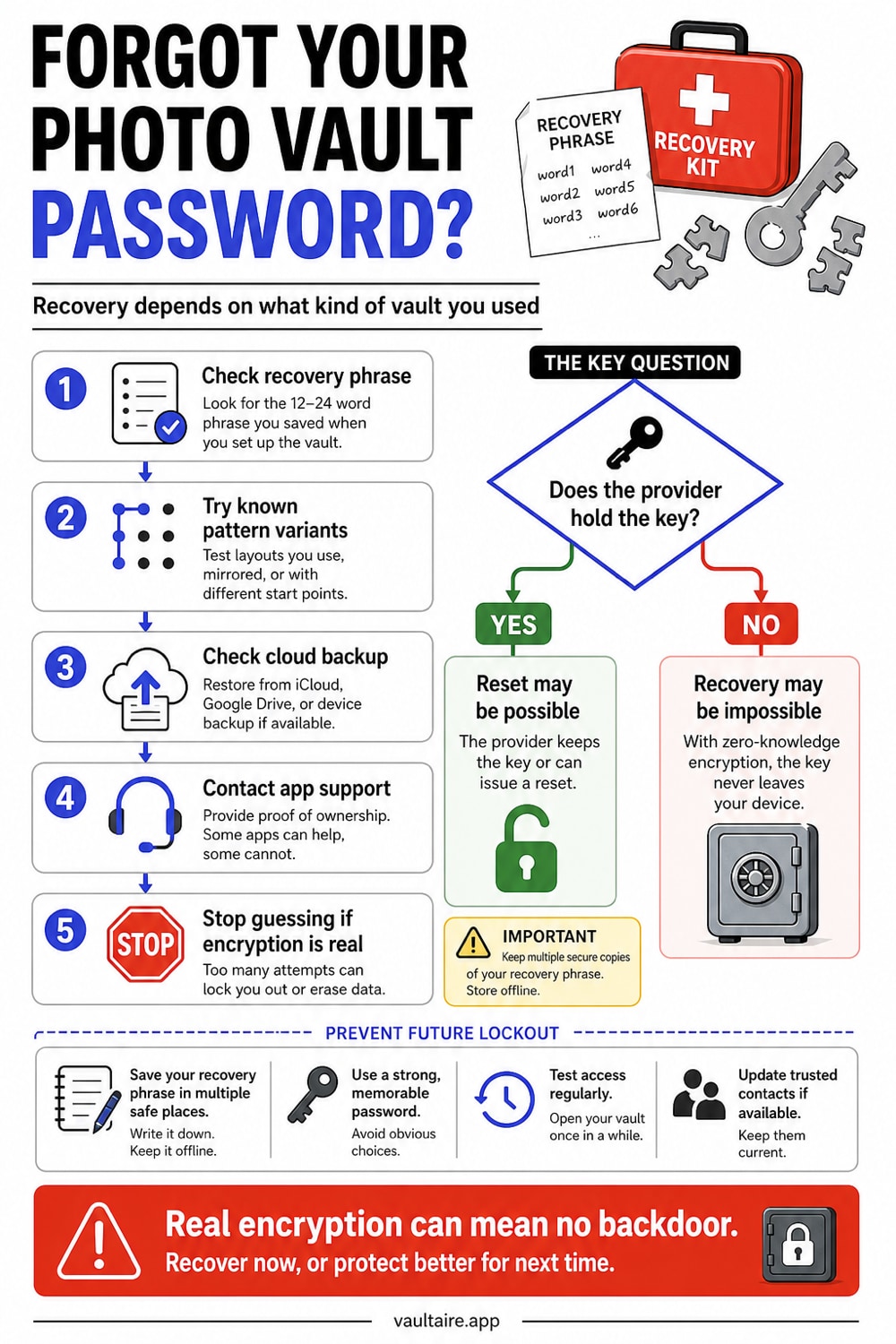
- If the app is a PIN gate, a reset usually exists. Look for a forgot-PIN link on the lock screen, an email reset in the account settings, or a support request. Keepsafe's free tier, Hide It Pro and most calculator vaults work this way. Deleting and reinstalling sometimes clears the PIN, and sometimes deletes the photos with it, so try the reset link before the reinstall.
- If the app really encrypts files, there is no reset. The password is the key. No support team, no email link and no master key can produce your photos, because the capability to decrypt without your password was never built. Your only paths are a recovery phrase you saved earlier or a backup made while the vault was unlocked.
Work out which one you have before spending time on the wrong path: check the table below, or check whether the app ever offered you a recovery phrase. An app that resets your password from an email link, with your photos intact afterwards, was holding the key the whole time.
Resetting a photo vault password is a different question from changing the passcode on the iPhone Hidden Album, which is your device passcode and resets with Apple ID.
Why some vault passwords cannot be reset
You forgot your photo vault password. Your private photos are locked behind it, and you need them back. Whether recovery is possible depends entirely on how the app stores your data. Apps that use real encryption (AES-256) cannot be bypassed -- the password is the key. Apps that merely gate access behind a PIN often have recovery paths through email resets, iCloud Keychain, or reinstallation.
This guide covers recovery options for the most popular vault apps, explains why some passwords are unrecoverable by design, and walks through what to do next.
Access control against encryption
The answer comes down to one distinction: access control vs. encryption.
Access control apps put a PIN screen in front of your photos. The photos themselves sit on your device in a readable format, tucked into a renamed folder. If you forget the PIN, the app (or its support team) can often reset it because the data behind the PIN was never scrambled. Connect the phone to a computer, and the photos may be sitting right there in the file system.
Encryption apps mathematically transform your photos using your password as the key. Without the correct password, the encrypted files are indistinguishable from random noise. There is no backdoor, no master key, and no support team that can help -- because the capability to decrypt without the password does not exist. This is not a policy choice. It is a mathematical constraint.
| Type | How Data Is Stored | Password Recovery Possible? | Example Apps |
|---|---|---|---|
| Access control (PIN gate) | Unencrypted in hidden folder | Usually yes (email reset, reinstall, support) | Keepsafe (free tier), Hide It Pro, most calculator vaults |
| Encryption (real) | AES-256 or similar cipher | Only with recovery phrase or backup | Vaultaire, 1Password, Cryptomator |
| Hybrid (partial encryption) | Some files encrypted, metadata not | Varies by app | Keepsafe Premium, Private Photo Vault |
Recovery Options by App
Keepsafe
Keepsafe offers an email-based password reset for free accounts. Open the app, tap "Forgot PIN," and check your email for a reset link. Premium Keepsafe users with the "safe send" feature enabled may have additional recovery through Keepsafe's support team. Keepsafe's free tier does not use end-to-end encryption, so the reset works because the company can verify your identity without needing to decrypt your files.
Private Photo Vault
Private Photo Vault stores a recovery email during setup. If you forgot your password, tap the lock screen, select "Forgot Password," and follow the email verification. If you skipped the email setup, contact their support team with your Apple ID receipt as proof of purchase. Recovery rates vary.
Calculator Vault Apps (Calculator#, Secret Calculator, etc.)
Most calculator-disguise vault apps use a simple PIN with no encryption behind it. Uninstalling and reinstalling the app sometimes resets the PIN but may also delete stored photos. Check the app's specific documentation before reinstalling. Some calculator vaults sync to a cloud account that preserves photos across resets.
Vaultaire
Vaultaire feeds your drawn pattern and a device-wide Keychain salt into PBKDF2-HMAC-SHA512 to derive a local vault key. That key authenticates the encrypted index and unwraps a separate random master key used for AES-256-GCM file encryption. The encrypted recovery database in Keychain contains protected pattern and recovery material, so the pattern is not accurately described as “stored nowhere.” Vaultaire does not operate an account reset service or hold a provider recovery key.
However, Vaultaire gives each vault a recovery phrase: a generated nine-word phrase or a custom one of at least six words. It is not BIP-39 and does not encode the vault key. PBKDF2 derives a recovery key from the normalized phrase, and that key opens an AES-GCM encrypted envelope containing the existing vault key. If you retained the phrase, enter it in the app to regain access or restore an available encrypted iCloud backup.
If neither credential is available, recovery depends on what protected Keychain data, unlocked devices, exports, or other key-bearing copies still survive. Wraxle has no account-reset key that can bypass those paths. Losing every usable decryption and recovery path makes the encrypted data unrecoverable.
1Password / Cryptomator / Other True Encryption Apps
The same audit applies to other encrypted apps. Check for a recovery key, trusted device, master-password backup, emergency kit, or encrypted key envelope. A provider-blind design can offer recovery without holding the plaintext file key, but the recovery credential and stored envelope become part of the threat model.
Step-by-Step: What to Do Right Now
Step 1: Check for a Recovery Phrase or Backup Key
Before trying anything else, look for the recovery mechanism. Most encryption apps generate a recovery phrase, emergency kit, or backup key during initial setup. Check your email for setup confirmation messages, your notes app, your password manager, or any physical paper where you might have written it.
Step 2: Try Pattern and Password Variations
If you set a drawn pattern (Vaultaire) or a password, try the variations you commonly use. Muscle memory is often more reliable than conscious recall for patterns -- try drawing on the grid without overthinking. For text passwords, try your common passwords with typical capitalization and number substitutions.
Step 3: Check for Cloud Backups
If the app offered cloud backup (iCloud, Google Drive, Dropbox), your encrypted vault may have a backup copy. Restoring from backup does not bypass encryption, but it ensures the data is preserved while you work on remembering the password. In Vaultaire, encrypted iCloud backups can be restored on a new device -- you still need the pattern or recovery phrase to decrypt.
Step 4: Contact App Support (Access-Control Apps Only)
For apps that use PIN-based access control without encryption, the support team may be able to help. Provide proof of purchase and any identity verification they request. For encryption apps, support cannot help by design.
Step 5: Accept the Outcome
If the app uses real encryption and you have lost both your password and recovery phrase, the data is gone. No amount of hacking, brute-forcing, or support escalation changes this. This is the price of genuine security. The same mechanism that protects your photos from attackers also protects them from you if you lose the key.
How to Prevent This in the Future
- Save the recovery phrase. Write it on paper and store it somewhere physically secure. Do not store it in a screenshot on the same device the vault is on.
- Use a password manager. Store your vault password or recovery phrase in 1Password, Bitwarden, or Apple's built-in Passwords app.
- Keep cloud backup on. Encrypted cloud backups (like Vaultaire's iCloud backup, which is on by default) protect against device loss. They do not help with a forgotten password, but they prevent data loss from device failure.
- Choose memorable credentials. Vaultaire uses drawn patterns instead of text passwords because muscle memory is more persistent than declarative memory. You remember how to ride a bike decades later. Pattern-based keys leverage the same cognitive mechanism.
- Test your recovery phrase. After creating a vault, close the app and reopen it using only the recovery phrase. Verify it works before you need it.
Frequently Asked Questions
How do I reset my photo vault password?
Through the app, if the app is a PIN gate: a forgot-PIN link on the lock screen, an email reset in account settings, or a support request. If the app encrypts files under your password, there is no reset at all. The password is the decryption key, so no reset path can exist without the company holding a copy of that key. A reset that returns your photos intact is proof the files were not encrypted under your password alone.
Can I hire someone to crack my vault password?
If the app uses authenticated encryption with a properly configured password-based key derivation function, recovery depends on the credential's strength and the measured cost of each guess. At exactly one millisecond per candidate, one billion guesses take about 11.6 days on one worker, not years. A higher work factor can make each candidate slower, while parallel hardware can test more candidates at once. Password recovery services that promise a universal shortcut are either targeting a weak implementation or making a claim they cannot support.
Does factory resetting my phone help?
No. A factory reset deletes everything, including the encrypted vault data. It does not reveal the password or decrypt anything. If you have a cloud backup, the backup survives a factory reset, but you still need the password to decrypt it.
Will Apple or Google help me recover my vault app data?
Apple or Google may hold an operating-system backup, cloud record, account metadata, or other copy associated with a third-party app. Whether they can read file contents depends on the app's client-side encryption and key path. Platform-account recovery does not by itself recreate a missing vault credential or plaintext content key.
Is there a difference between forgetting a vault PIN and a vault password?
Functionally, yes. A four-digit PIN has 10,000 combinations. A 5x5 pattern space can be much larger, but a human choice may occupy only a predictable fraction of it. A text password varies by length and selection method. Both access-gate credentials and cryptographic key inputs can be guessed; authenticated ciphertext provides an offline verifier, while a KDF raises the measured cost of each cryptographic guess.
Why do encryption apps not offer password recovery?
Encrypted apps can offer recovery without giving the provider a plaintext file key. Common designs encrypt a content or unlock key under a recovery key derived from a phrase, or authorize another trusted device. The security question is who can open that envelope, what metadata the provider retains, and whether any account-reset path can substitute for the recovery credential. Our zero-knowledge encryption guide explains that provider boundary.
Bottom Line
Whether you can recover photos depends on the app's access, encryption, key-wrapping, and recovery design. Vaultaire normally unlocks with the pattern and offers a custom phrase that opens an encrypted recovery envelope; Cloud restoration also needs the matching encrypted backup records. Wraxle cannot replace either credential with an account reset. Check every surviving device and documented recovery path before treating encrypted data as lost.
Save your recovery phrase. Test it once. Store it somewhere safe. Your future self will thank you.