Private Photo Vault Password and Photo Recovery
Private Photo Vault is one of the oldest photo hiding apps on the App Store, and most people search for it after they are locked out. Here is what its developer can and cannot restore, and the order to try things in so you do not lose more.
Short answer
Private Photo Vault is a free photo hiding app from Legendary Software Labs. You can recover its app or album password only if you set a recovery email when you first used it, and its separate Cloud Vault password cannot be recovered at all.
What Can Be Recovered
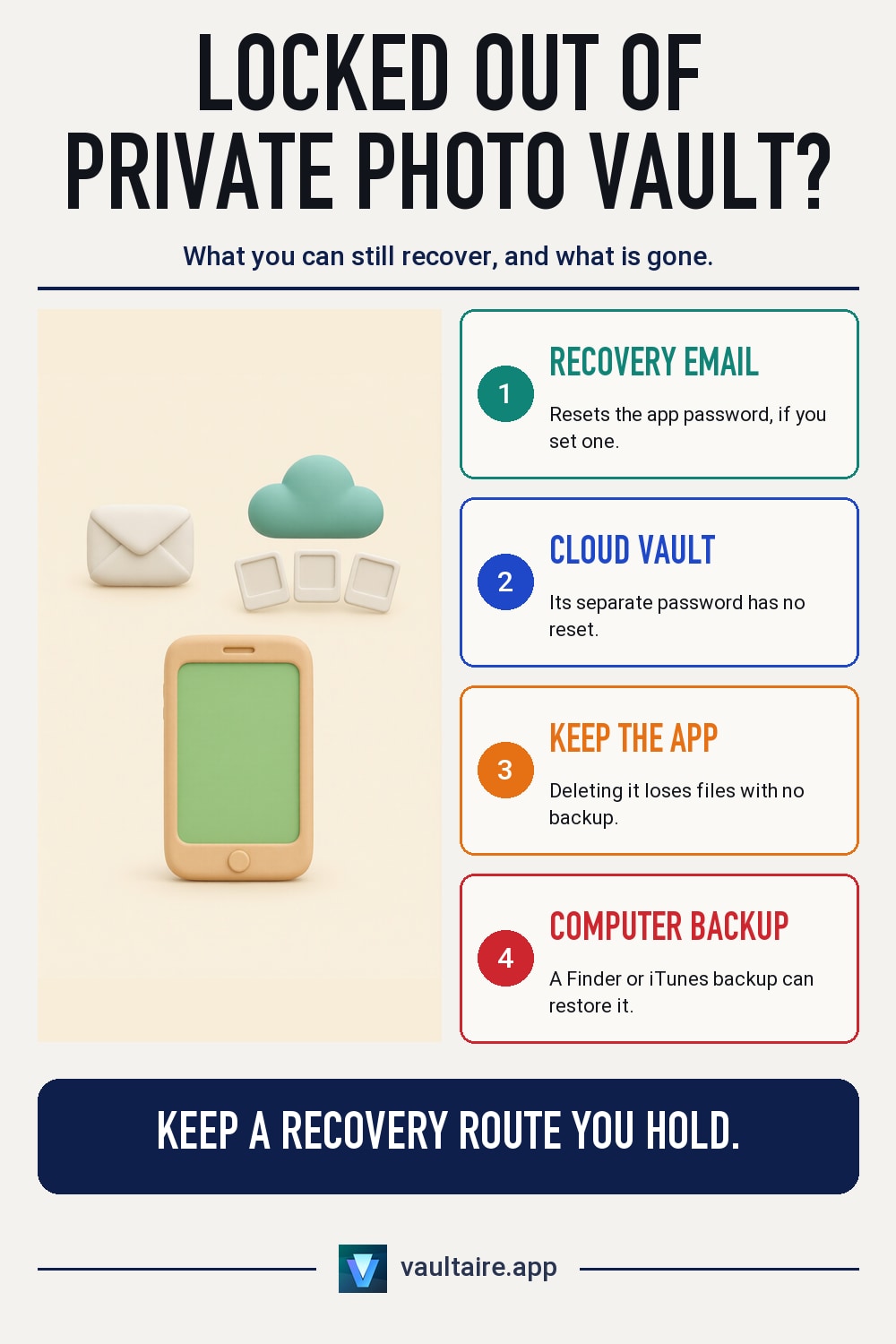
Your app password and your album passwords can come back, but only through the recovery email you entered the first time you opened Private Photo Vault. The developer's FAQ describes the route: enter the app password wrong eight times in a row, or an album password wrong five times, and choose Yes when the recovery prompt appears. The steps then go to that email address. The app has been on the App Store since 2011, so the address you typed may be old. Check every inbox you have used, including school and work accounts and their spam folders, before you decide you never set one.
Your photos and videos can also come back, as long as a copy exists outside the app. If you paid for Premium and turned on Cloud Vault, sign in to Cloud Vault from the app on the same or a new phone, with your Cloud Vault password, and download the files that finished uploading. Files that were still waiting to upload are not in the cloud copy. If you backed up the iPhone to a Mac or PC with Finder, Apple Devices or iTunes, restoring that backup brings back the vault as it was on the day of the backup, together with the rest of the phone.
What Cannot Be Recovered
Without a recovery email, the app and album passwords cannot be recovered through the developer's process, and support cannot read your photos to send them to you. The Cloud Vault password is stricter still. Private Photo Vault says it is never uploaded to its servers and that its team cannot recover it, because it is the secret that encrypts your cloud copies. That is good privacy design, and it also means a forgotten Cloud Vault password locks the cloud backup for good. No support ticket changes that.
Files that lived only inside the app are gone once the app is deleted. The developer says it cannot restore deleted files without a usable backup, and that some customers had problems restoring vault data from iCloud device backups, so do not count on an iCloud device backup alone. A lapsed subscription has a cost too: switching from Premium to the free Basic plan keeps the photos on your phone but deletes your Cloud Backup. If you plan to let Premium expire, download everything to the phone first and check that it opens.
The Safe Next Step
Start with the least risky move. Leave the app installed, do not reset the phone, and do not restore an old backup yet, since a device restore replaces everything on the phone with the older copy. Try the recovery prompt first. If no email arrives, search your mail for messages from Private Photo Vault, because the address you used may not be the one you use now. Then write to support through the form on privatephotovault.com or at support@privatephotovault.com, with your phone model, app version and a short account of what happened. Never send a password, a PIN or a photo.
Once you are back in, make the next lockout harmless. Keep a second copy of your most important photos in a computer backup, make sure the recovery email points to an inbox you still use, and write your Cloud Vault password somewhere safe and offline. A vault you cannot reopen protects your photos from everyone, including you. If that risk worries you, keep a second copy in an encrypted vault whose recovery route you hold yourself, so that one forgotten password never costs you every copy at once.
If That Does Not Work
If support cannot help and you have no backup, be careful with what comes next. Search results offer paid tools and services that promise to pull a vault passcode out of an iPhone backup. Most cannot show you a result before you pay, and none of them can reach a Cloud Vault password that never left your phone. Never hand your Apple ID, your passcode or your phone to a recovery service you cannot verify. A service that promises a sure result for any vault app is one to avoid.
If you choose a different app for the future, compare how each one lets you back in. Vaultaire has no account or email. Each vault opens with a pattern you draw on a 5x5 grid, and a nine-word recovery phrase can restore it from the encrypted iCloud backup, which is on by default in the free tier as well as Pro. Files are encrypted with AES-256-GCM, and Apple stores the ciphertext without the keys. A pattern is easier to guess than a long password, and anyone with a copy of the backup data can test pattern guesses offline, so draw a long pattern with several turns. Keep the phrase written down and the same rule applies as with any vault: lose both the pattern and the phrase, and nobody can open it for you.
Private Photo Vault and Vaultaire: how each one lets you back in
| Feature | Private Photo Vault | Vaultaire |
|---|---|---|
| How it unlocks | PIN, pattern or password | A pattern on a 5x5 grid; no Face ID or passcode |
| Forgotten app password | Recovery email, if set at first use | Nine-word recovery phrase; no account or email |
| Cloud backup | Cloud Vault, a Premium feature, with its own password that cannot be recovered | Encrypted iCloud backup, on by default in free and Pro |
| After the app is deleted | Files come back only from Cloud Vault or a computer backup | Files come back from the encrypted iCloud backup with the pattern or recovery phrase |
| US price | Free download; in-app purchases from $6.99 to $39.99 | Free tier; Pro $19.99 per year or $39.99 lifetime |
Related reading:
- How to reset a photo vault password, app by app
- Where hidden photos go on iPhone
- The best photo vault apps for iPhone
- How to make a secret folder on iPhone
Sources
Frequently Asked Questions
Is the Private Photo Vault app safe?
Private Photo Vault comes from Legendary Software Labs, has been on the App Store since 2011 and holds a 4.8 rating from more than a million ratings. Its developer says its team cannot view your photos and that Cloud Vault encrypts files on your device before upload. The bigger risk for most people is losing access, since password recovery depends on an email you may not have set and the Cloud Vault password has no reset.
Can you recover photos from a Private Photo Vault?
Yes, but only from a backup. If Cloud Vault finished uploading your files, sign in to it from the app, and if a Mac or PC backup holds the vault, restore it with Finder, Apple Devices or iTunes. Without either, the developer says deleted files cannot be restored.
What is the best safe vault for private photos?
Pick a vault that encrypts the files themselves and gives you a way back in that does not depend on an email inbox. Vaultaire encrypts files with AES-256-GCM, opens with a pattern, and restores from an encrypted iCloud backup with a nine-word recovery phrase. Our roundup of photo vault apps for iPhone compares the other options.
How much does a Private Photo Vault cost?
Private Photo Vault is free to download. In November 2026 the US App Store listed a 3-day free trial and then $6.99 per month, with in-app purchases from $6.99 to $39.99. Vaultaire has a free tier, and Pro costs $19.99 per year with a 7-day free trial for new subscribers, or $39.99 once for lifetime access.