Secret Photo Vault: Getting Your Photos Back
Dozens of iPhone apps call themselves a secret photo vault, and they store your photos in very different ways. When you lose the code, delete the app or switch phones, the kind of vault you picked decides whether your photos come back. Here is how to tell which kind you have and what to do next.
Short answer
A secret photo vault returns your photos only from a copy that still exists: the files inside the installed app, the developer's cloud account, or an encrypted backup in your iCloud. If the app is deleted and it never made a backup, no download, APK or recovery tool can bring those photos back.
What Can Be Recovered
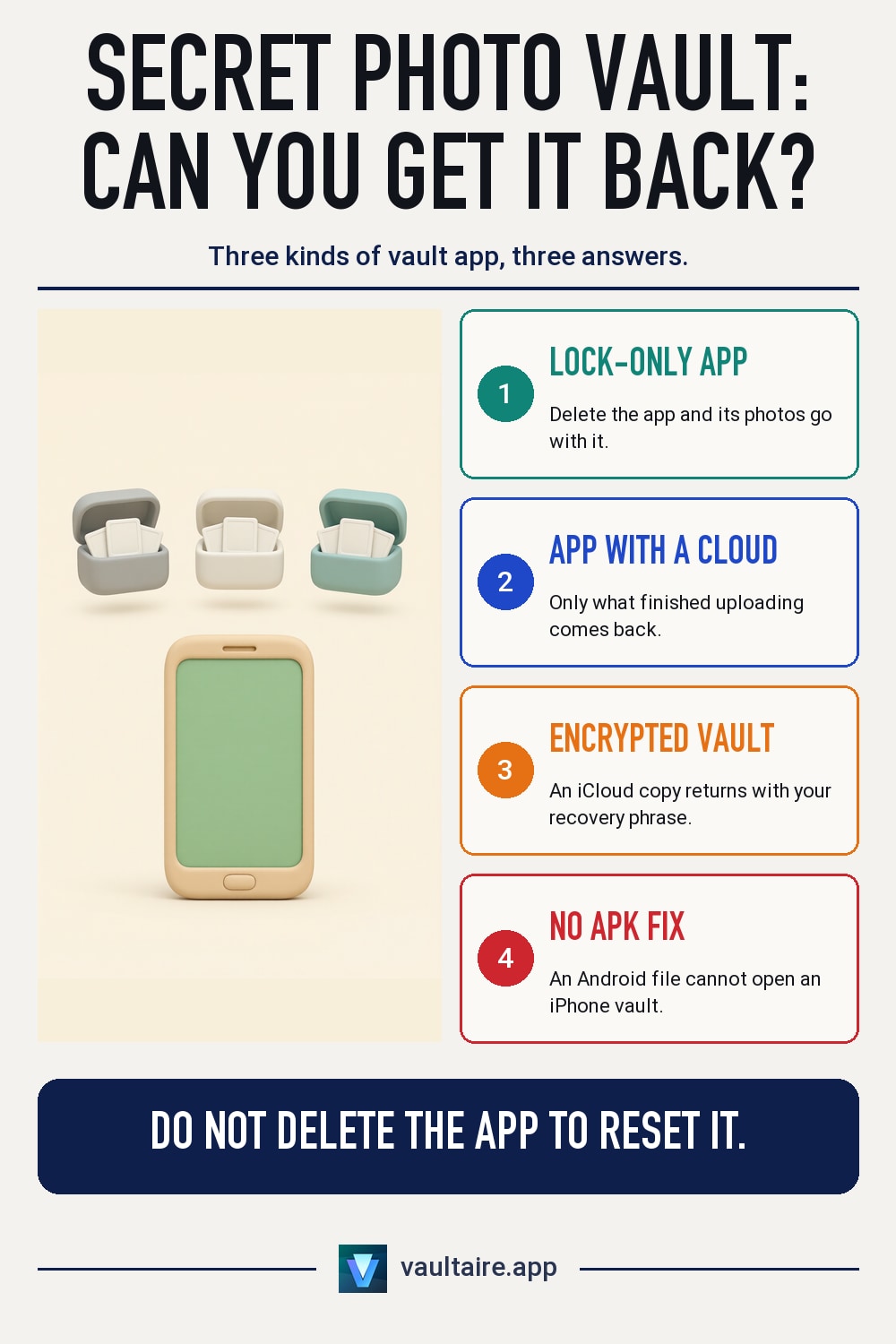
Most secret photo vault apps fall into three groups, and each one keeps a different copy. A lock-only app puts a PIN screen in front of photos stored inside the app on your iPhone. An app with its own cloud uploads copies to the developer's servers under an account you sign in to with an email. An encrypted vault scrambles every file on the phone and can keep an encrypted copy in your own iCloud.
What comes back depends on which copy survived. While the app is still installed, the files inside it are on the phone, and a reset of the code through a recovery email or phrase opens them again. A cloud account returns whatever finished uploading before the trouble started. An encrypted iCloud backup returns the vault on a new or reset phone, as long as you still have its recovery phrase. Vaultaire keeps that copy on by default in the free tier.
What Cannot Be Recovered
A lock-only app that you deleted takes its photos with it. iOS removes an app's files when you delete the app, and offloading keeps documents only for apps that store them that way. An iCloud or computer backup of the whole iPhone may hold the app's data, but only if the backup ran before the deletion and the app did not exclude its files. Restoring it means erasing the phone back to that date.
An encrypted vault without its code is a different kind of loss. If you have neither the code nor the recovery phrase, the files stay encrypted, and no support team can open them, because the developer never held the key. Sites that promise to unlock a secret photo vault with an APK, a desktop tool or a paid service cannot break that encryption. At best they find thumbnails or files the app never encrypted.
The Safe Next Step
Stop and keep what you have. Do not delete and reinstall the vault app to clear a forgotten code, and do not erase the phone, because both remove the only local copy. Find the app by name and developer in the App Store under Purchased, then read its settings for a backup or account section. Write down the account email and the date of the last backup before you change anything.
Then use the route the app itself provides: a recovery email, a recovery phrase, or a restore from its cloud or your iCloud. Download apps only from the App Store page of the developer you already use. An APK is an Android install file and does not run on an iPhone, and a cloned vault app from an unknown site asks for access to your whole photo library.
If That Does Not Work
If the app offers no recovery, write to its developer with the account email and the date you last opened the vault. A developer that runs its own cloud can sometimes restore an account, and one that never held your files will say so. Then check whether an older iCloud or Finder backup of the iPhone predates the loss, and weigh that against everything newer on the phone.
Whatever you get back, do not leave it in a vault you cannot recover a second time. Vaultaire has no account to reset: each vault opens with a pattern drawn on a 5x5 grid, and each vault has a recovery phrase you keep. Files are encrypted with AES-256-GCM, and the encrypted iCloud backup runs every 24 hours and restores on a new iPhone with the recovery phrase. The free tier holds 100 photos and 10 videos.
Three kinds of secret photo vault compared
| Question | Lock-only hiding app | App with its own cloud account | Vaultaire |
|---|---|---|---|
| Where your photos sit | Inside the app on this iPhone | On the iPhone and the developer's servers | Encrypted on the iPhone, with an encrypted copy in your iCloud |
| Account | Usually none | Email sign-up with the developer | No Vaultaire account; iCloud uses your Apple ID |
| Backup | None unless the app adds one | Uploads tied to the app account | iCloud backup on by default, every 24 hours, Wi-Fi only by default |
| If you forget the code | A recovery email, if you set one | Account reset by email | Recovery phrase; no reset exists |
| If you delete the app | The photos inside it are gone | The cloud copy stays with the account | Restore from the iCloud backup with your recovery phrase |
Related reading:
- Forgot your photo vault password
- Hidden photos on iPhone
- Best photo vault apps for iPhone
- Make a secret folder on iPhone
Sources
Frequently Asked Questions
Is Private Photo Vault actually private?
Private Photo Vault is private from someone who picks up your unlocked phone, because it hides photos behind its own code. Whether it is private from anyone else depends on where its copies go and who holds the key, so read the developer's privacy policy and the App Privacy section of its App Store page. An app that resets your code by email holds a way into your vault.
Where can I secretly hide photos?
On an iPhone you can use the Hidden album in Photos, which Face ID or your passcode locks, or a vault app that keeps photos out of your library. The Hidden album is free and built in but sits inside Photos and iCloud Photos. A vault app keeps the photos in its own storage, and an encrypted one adds a separate code that your phone passcode does not open.
What is the best vault to hide photos?
The best vault is one whose recovery you understand before you need it. Look for real encryption, a backup you control, and a recovery phrase or another route that does not depend on the developer holding your key. Vaultaire encrypts files with AES-256-GCM, keeps an encrypted backup in your own iCloud, and gives each vault a recovery phrase.
Is Secret Photo Vault free?
Several apps use the name Secret Photo Vault, and most are free to download with a paid plan for more space or features. Check the App Store listing of the exact app, because the free limits differ. Vaultaire is free for 3 vaults, 100 photos and 10 videos, and Pro costs $19.99 a year with a 7-day free trial or $39.99 once.