Signs Someone Went Through Your iPhone Photos (2026)
If you handed your phone to someone, or left it unlocked and now have a bad feeling, here is how to check whether your iPhone photos were opened, what the real warning signs are, and how to make sure it cannot happen again.
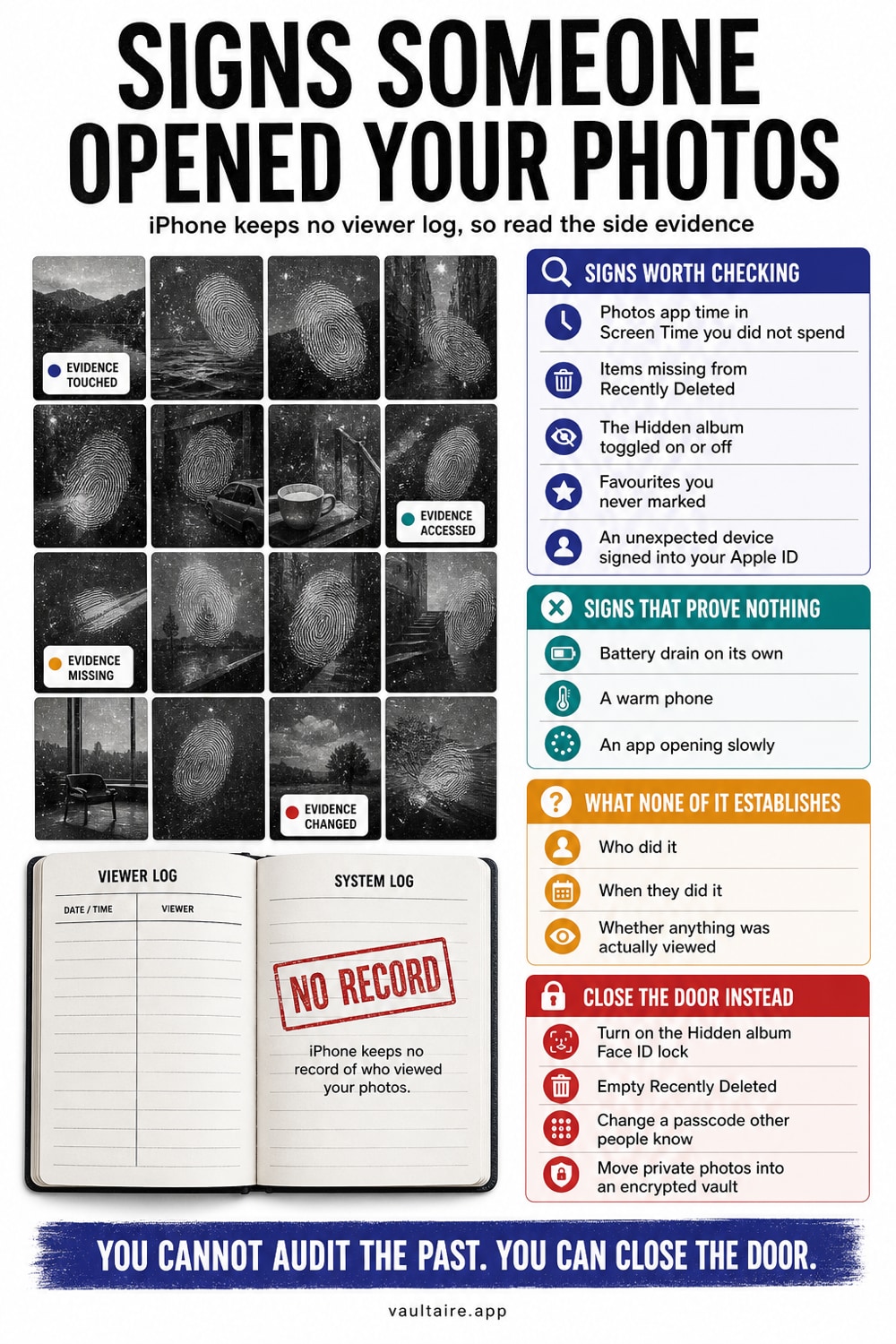
You usually cannot pull up a definitive log of who opened your Photos app, because iOS does not record per photo access. What you can do is look for indirect signs: photos moved into or out of the Hidden album, images sitting in Recently Deleted that you did not remove, unexplained Photos usage in Screen Time, and AirDrop or shared album activity you did not start. If you find any of these, change your passcode, empty Recently Deleted, and move your private photos into an encrypted vault so the next person who picks up your phone cannot open them.
How to tell if someone went through your iPhone photos
The clearest signals are small changes inside the Photos app itself. Check the Recently Deleted album for pictures you did not remove, and notice where the camera roll is scrolled to when you open it. Because iOS does not log who opened Photos, you are looking for indirect evidence: a photo moved out of or into the Hidden album, an image marked as a favorite that you never starred, or a picture that reappeared after you thought you deleted it.
Timestamps help too. Open a photo, swipe up to see its details, and check the date against your own memory of when you took it. If someone browsed your library while you were away, the Photos app may also show recent usage in Screen Time. None of these clues prove anything on their own, but together they build a reliable picture of whether your camera roll was opened without you.
Signs in Screen Time, notifications, and battery
Screen Time keeps a running tally of how long each app was used and when. Go to Settings, Screen Time, See All App and Website Activity, and look at the Photos entry for the day in question. Usage you cannot account for, especially during a window when your phone was out of your hands, is one of the stronger signals that someone opened your photos.
Watch for secondary clues as well. A phone that was unlocked and used often feels warmer or shows a sudden drop in charge. Notifications may be swiped away or already marked as read. If AirDrop was used to copy photos off the device, you might spot an unfamiliar device name in the AirDrop sheet or a share you do not recognize in a recent thread.
Why the Hidden album is not enough
Many people move sensitive photos into the built in Hidden album and assume they are safe. By default that album is only one tap away in the Photos app, and even with Face ID protection turned on, anyone who knows your passcode can still open it. The photos also stay on the device unencrypted, so they are readable by anyone who can unlock the phone.
Recently Deleted has the same weakness. Photos you delete linger there for up to 40 days and stay visible to anyone who can unlock your phone. If you share an Apple ID, or your passcode is known to a partner, family member, or roommate, then neither the Hidden album nor Recently Deleted keeps your photos truly private.
Lock down your photos so no one can snoop again
Start by turning on Face ID for the Hidden and Recently Deleted albums, then empty Recently Deleted so old images are gone for good. Change your passcode if anyone else knows it, and open Settings, Screen Time to confirm that content and privacy restrictions are set the way you want. These steps raise the bar for a casual snoop who has a moment alone with your phone.
For photos you truly want to keep private, move them out of the system Photos library into an encrypted vault app that locks separately from your phone. A vault that stores images with on device encryption means even someone holding your unlocked phone cannot open them without the vault's own separate code. That separation is what stops the next person who picks up your phone from ever seeing them.
Related reading:
- Signs someone went through your iPhone
- How the iPhone Hidden album really works
- Best vault app for iPhone: 7 tested
- Password protect a folder on iPhone
- Did Someone Open My Hidden Album? How To Tell On iPhone
Sources
Frequently asked questions
Can I see exactly who opened my photos?
No. iOS does not keep a per photo access log, so there is no screen that names who opened your camera roll. You can only read indirect signs like Screen Time usage, changes in the Hidden or Recently Deleted albums, and AirDrop history.
Does the Hidden album keep my photos private?
Not really. The Hidden album is one tap away in Photos, and even with Face ID turned on, anyone who knows your passcode can open it. The photos also stay on the device unencrypted. For real privacy, use an encrypted vault app that locks on its own.
How long do deleted photos stay on my iPhone?
Deleted photos sit in the Recently Deleted album for up to 40 days before iOS erases them. During that time, anyone who can unlock your phone can see and even restore them, so empty the album if you want them gone for good.
What is the safest way to store private photos?
Move them out of the system Photos library into an app that encrypts images on the device and locks with its own separate code. That way, even someone holding your unlocked phone cannot open them without the vault's separate lock.