Gallery Safe App Alternative for iPhone
On your Android phone, private photos lived in a gallery safe app like Gallery Vault, Safe Gallery or Hide It Pro. Now you have an iPhone and want a replacement that works the same way. This guide shows why the hidden photos do not come along on their own, how to move them safely, and which alternative on iPhone suits you.
Quick answer
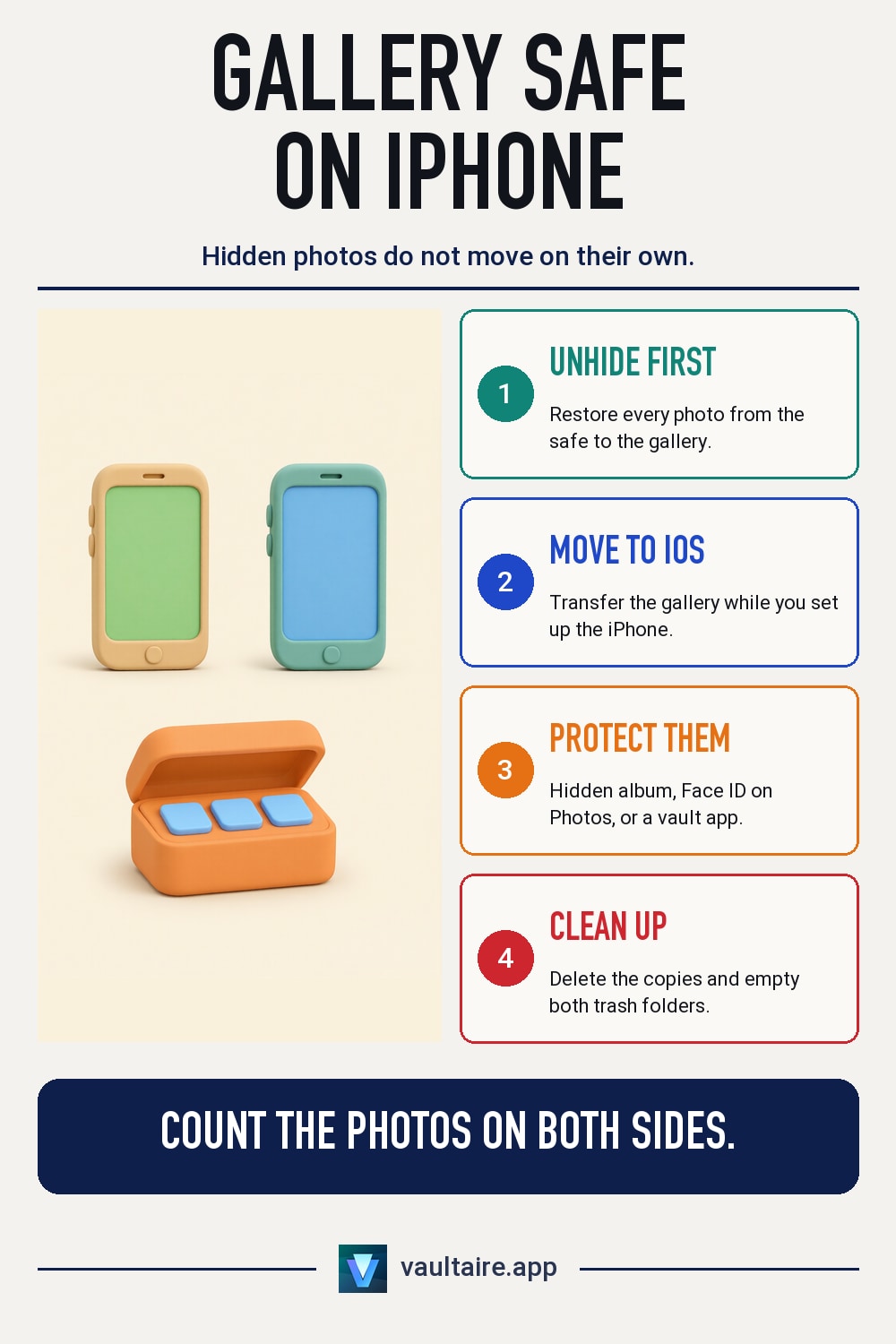
The iPhone does not take over the contents of an Android gallery safe app, so first restore the photos to the gallery in the app and transfer them with Move to iOS. On the iPhone, protect them in the Hidden album with Face ID, with a locked Photos app, or in a vault app like Vaultaire.
Why your gallery safe app does not come over to iPhone
A gallery safe app does not keep your photos in the gallery. It keeps them in its own storage, behind a PIN or pattern. Some apps encrypt the files there, many only hide them. Either way, only that app can get to the files.
According to Apple, the Move to iOS app brings camera photos, photo albums, files and folders, contacts, messages and other data to the iPhone. What the safe app hides is not part of the gallery. So even if the same app exists for iOS, the hidden photos do not come along on their own. You have to take them out on the Android phone first.
Step 1: Take the photos out of the safe on your Android phone
Open the safe app and unlock it. Select all albums or all files and look for the feature that puts them back in the gallery. Depending on the app, it is called Restore, Export, Unhide or Move. Then count: if the safe held 340 photos, there should be 340 new photos in the gallery.
Then transfer the gallery with Move to iOS. This only works while setting up the iPhone: on the Apps & Data screen, choose From Android, the iPhone shows a code, and you enter it in the app on the Android phone. If your iPhone is already set up, copy the photos to a computer with a USB cable and from there to the iPhone.
Step 2: Choose the right alternative on iPhone
Without an extra app you have two options. Photos go into the Hidden album when you open them, tap the three dots and choose Hide. From iOS 16, the album requires Face ID, Touch ID or your passcode. From iOS 18 you can also lock the whole Photos app: touch and hold the app icon and tap Require Face ID. In both cases the photos stay in your library and sync with iCloud Photos if you use it.
If you want a separate, encrypted space like the Android safe app, use a vault app. Vaultaire encrypts each file with AES-256-GCM, a strong standard method. The files are encrypted with a random key, and your pattern unlocks that key. You draw the pattern on a 5x5 grid, with at least 6 points and one change of direction. Vaultaire has no Face ID or passcode unlock. Each pattern opens its own vault, and the app never shows a list of your vaults.
Step 3: Clean up on both devices
If you import the photos into Vaultaire, the app offers to delete the originals after the import. They then go to the Recently Deleted album in the Photos app and stay there for 30 days. Empty that album once you are sure everything has arrived in the vault. Vaultaire also creates an encrypted backup in iCloud by default.
On the Android phone, the photos sit unprotected in the gallery after step 1. Delete them there, empty the gallery app's trash, and check whether Google Photos backed up a copy. Uninstall the safe app last, once you have found every album again on the iPhone. If you want to sell the old phone, reset it to factory settings afterward.
Hidden album, locked Photos app and Vaultaire compared
| Question | Hidden album | Photos app locked with Face ID | Vaultaire |
|---|---|---|---|
| Protection when opening | Face ID, Touch ID or passcode from iOS 16 | Face ID, Touch ID or passcode from iOS 18 | Pattern on a 5x5 grid |
| What is protected | Only the hidden photos | The whole Photos app | Only the imported files |
| Own encryption of the photos | No, the photos stay in the library | No, the photos stay in the library | Yes, AES-256-GCM with its own key |
| Multiple separate spaces | No, one album | No | Yes, each pattern opens its own vault |
| Cost | Free, included in iOS | Free, included in iOS | Free up to 100 photos and 10 videos, Pro for more |
Related guides
- The best photo vault apps for iPhone
- Hidden album or photo vault on iPhone
- Gallery lock or photo locker
- Move photos to a vault app on iPhone
Sources
Frequently asked questions
Can I keep using my Android gallery safe app on iPhone?
Whether the same app exists for iOS depends on the developer. But the hidden photos do not come along on their own. Restore them to the gallery on the Android phone and then transfer them to the iPhone.
Does Move to iOS transfer hidden photos from a safe app?
No. The app transfers camera photos, photo albums, files and folders and other data. What a safe app hides in its own storage is not included.
Does the iPhone have a built-in photo safe?
The Hidden album comes closest. From iOS 16 it requires Face ID, Touch ID or your passcode. But the photos remain part of your library and are not encrypted by a separate app.
Can I open Vaultaire with Face ID?
No. Vaultaire unlocks only with a pattern on a 5x5 grid with at least 6 points. Longer patterns with several changes of direction are harder to guess.