Does Lockdown Mode Protect Your Photos on iPhone?
Apple describes Lockdown Mode as extreme protection, built for people who might be targeted by mercenary spyware. That framing makes it sound like the strongest privacy switch on the iPhone, so a reasonable question follows: if I turn it on, are my photos finally safe? The honest answer has two halves. Lockdown Mode does change real things about Photos, and both of them are worth having. It also leaves the most common way private pictures actually get seen completely untouched, and knowing which half is which stops you trusting the wrong lock.
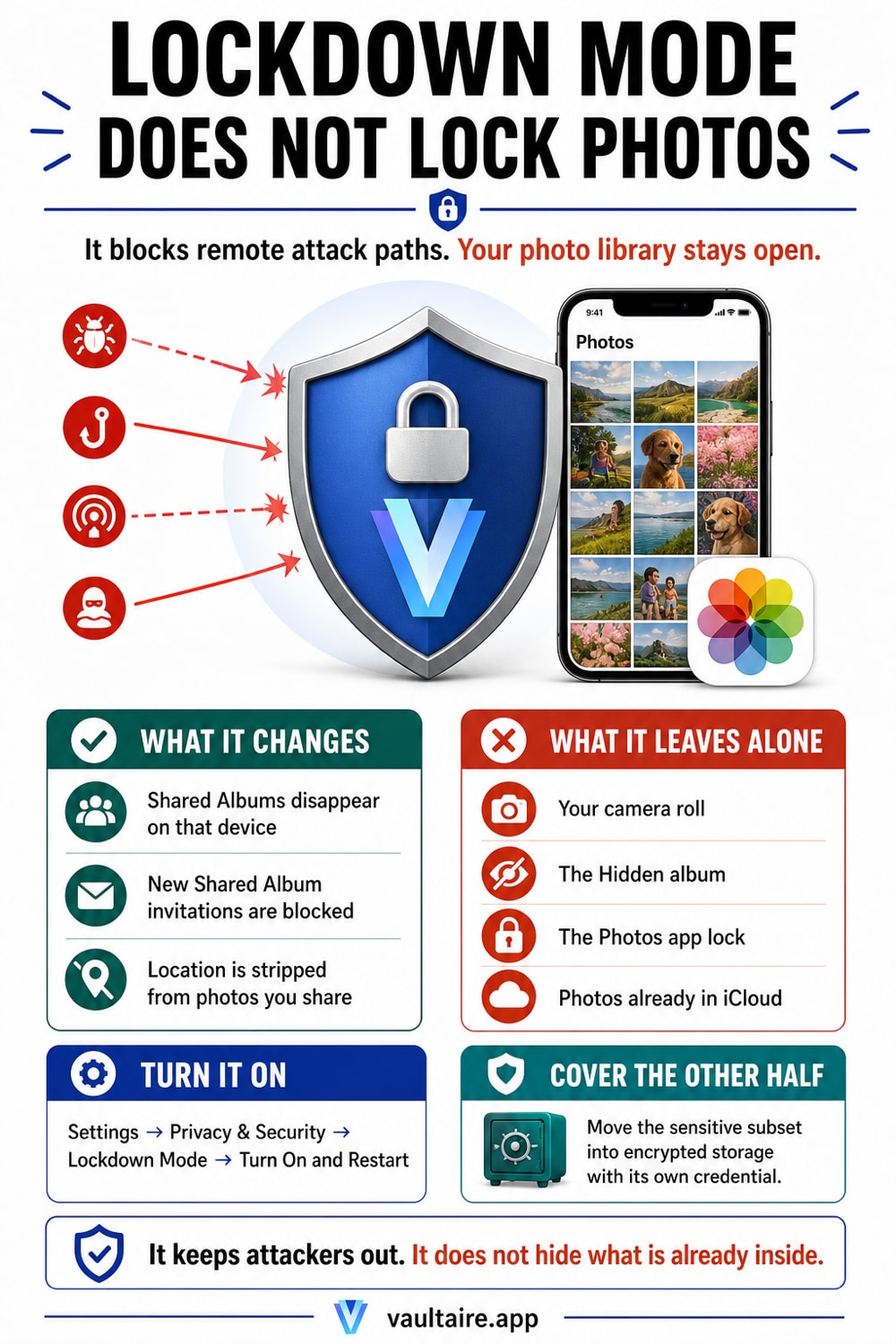
Partly, and probably not in the way you are hoping. Lockdown Mode is an anti spyware measure. It shrinks the attack surface a remote attacker can reach by shutting off the features that get exploited, and Apple is explicit that the tradeoff is a phone that no longer works normally. Two of those restrictions touch Photos directly. Shared Albums are removed from the Photos app while the mode is on and new Shared Album invitations are blocked, so an invite from a stranger cannot land in your library at all. And location information is excluded from photos you share, which turns the share sheet toggle you keep forgetting into an enforced default. Both are real gains. Neither of them hides, locks or encrypts a single picture. Your camera roll opens exactly as before. The Hidden album is still one tap and one Face ID prompt away. iCloud Photos keeps syncing to every device on your account, and any app you granted photo access to still has it. Lockdown Mode also does nothing at all about the ordinary case, which is a person holding your unlocked phone: a friend scrolling past the picture you meant to show, a partner going through the camera roll, a technician at a repair counter. That threat needs a separate lock. Turn Lockdown Mode on if you have reason to think you are targeted, and understand it as a network and messaging shield rather than a photo lock. For the pictures themselves, the answer is a vault: a separate encrypted app with its own lock, holding nothing the Photos library can hand to anybody.
Where the switch is and what turning it on costs
Open Settings, tap Privacy and Security, scroll all the way down and tap Lockdown Mode. Apple puts a summary of the restrictions in front of you before anything happens. Tap Turn On Lockdown Mode, tap it again, then tap Turn On and Restart and enter your passcode. The iPhone reboots into the mode. It applies to that device only, so an iPad and a Mac on the same Apple Account carry on as normal until you repeat the steps on each of them. Turning it off is the same path in reverse, plus another restart.
The cost is not subtle. Most message attachment types are blocked apart from certain images, video and audio, and links and link previews stop working. Incoming FaceTime calls are refused unless you called that person in the past 30 days. Safari turns off just in time JavaScript and some web fonts, so sites break. The iPhone will not auto join a Wi-Fi network that is not secure, and 2G and 3G support is switched off. Wired accessories need the iPhone unlocked before they connect. Configuration profiles cannot be installed and the device cannot enroll in mobile device management. This is a deliberate trade of convenience for a smaller attack surface, and it only pays off if the attack you fear is a remote one.
The two things it actually changes in Photos
The first is Shared Albums. While Lockdown Mode is on they are removed from the Photos app and new Shared Album invitations are blocked. That closes a genuine hole, because a Shared Album invitation is an unsolicited object arriving from someone you may not know, and the album view itself is a surface an attacker would rather you kept open. Nothing is deleted by this. The albums stay on your account, they stay visible on devices that are not in Lockdown Mode, and they come back when you switch the mode off. If you want the same albums locked down permanently rather than while a mode is running, that is a sharing settings job instead, covered in how private iCloud Shared Albums really are.
The second is location. Lockdown Mode excludes location information from the photos you share, so the coordinates baked into the file when you took the shot do not travel with it. Normally that is a manual step: tap the share button, tap Options, turn Location off, remember to do it again next time. Lockdown Mode makes it the default and removes the chance to forget. What it does not do is clean the originals. The location is still recorded in each photo sitting in your library, which matters the moment a file leaves by a route other than the share sheet, and stripping it for good is a separate job set out in removing location metadata from iPhone photos. The same gap catches people out with the extra seconds a Live Photo carries, where the risk is in the file rather than in the sharing screen.
What it leaves exactly as it was
Everything else. Open Photos in Lockdown Mode and your entire camera roll is there, in the same order, with no extra prompt. The Hidden album is still in Utilities at the bottom of the Albums tab, still behind a single Face ID check that anybody watching you unlock the phone can defeat, and Lockdown Mode adds nothing to it. iCloud Photos keeps syncing every picture to every device signed in to your account. Apps you previously granted full photo access keep that access. Recently Deleted still holds 30 days of pictures you thought were gone. None of that is a flaw in Lockdown Mode, because none of it was ever what Lockdown Mode was built to stop.
It is also not the same feature as the two people usually confuse it with. Advanced Data Protection is the setting that end to end encrypts your iCloud Photos so Apple itself cannot read them, and it lives at Settings, your name, iCloud, Advanced Data Protection. Stolen Device Protection adds a biometric requirement and a security delay when the iPhone is somewhere unfamiliar, which is the thief scenario rather than the spyware one, and is worked through in what Stolen Device Protection does for your photos. All three can be on at once. None of them stops the person you handed the phone to from swiping one picture too far, which is the failure mode behind almost every story about private photos being seen.
Cover the half Lockdown Mode was never aiming at
Run the short version as a checklist. Turn Lockdown Mode on if you have a real reason to think you are targeted, and accept the broken links and blocked calls that come with it. Turn on Advanced Data Protection so iCloud Photos is end to end encrypted, which is explained in how iCloud photo encryption works. Turn on Stolen Device Protection for the phone snatched in a bar. Then look at the one thing none of the three touch, which is your unlocked phone in somebody else's hands, and stop relying on the Hidden album for it, because the Hidden album was designed to reduce clutter rather than to keep secrets.
That last gap needs a different storage boundary. Vaultaire encrypts imported copies under a random master key and uses a drawn pattern separate from the phone passcode. After you remove the Photos originals, widgets, Memories, and apps with Photos access no longer enumerate the vault copies. A locked vault does not guarantee protection on a compromised or already-unlocked device, so Lockdown Mode, device hygiene, and authenticated file encryption address different parts of the threat model.
Related guides
- The iPhone privacy settings worth changing
- What Stolen Device Protection does for your photos
- How private iCloud Shared Albums really are
- The privacy cost of iPhone Live Photos
Sources
Frequently Asked Questions
Does Lockdown Mode hide my photos?
No. Lockdown Mode does not hide, lock, move or encrypt anything in your photo library. Open Photos with the mode running and the camera roll looks identical, with no additional passcode and no additional prompt. The Hidden album stays exactly where it was, behind the same single Face ID check. Lockdown Mode is aimed at remote attacks arriving through messages, web pages, wireless connections and accessories, so it removes the paths an attacker uses to get in. It says nothing about what somebody sees once they are already holding your unlocked iPhone.
Will Lockdown Mode delete my Shared Albums?
No. They are removed from the Photos app while the mode is on, and new Shared Album invitations are blocked, but nothing is deleted. The albums stay on your account, other people in them keep their access, and the albums remain visible on any device that is not in Lockdown Mode. Turn Lockdown Mode off and restart, and they reappear in Photos as before. If a family album vanished right after you enabled the mode, this is why, and no photos were lost.
Does Lockdown Mode stop iCloud Photos from syncing?
No. iCloud Photos keeps working normally and keeps pushing every picture to every device signed in to your Apple Account. If you want the sync itself limited, that is a Photos setting rather than a Lockdown Mode one. If you want Apple to be unable to read the pictures it is storing, the feature you want is Advanced Data Protection, at Settings, your name, iCloud, Advanced Data Protection, which switches iCloud Photos to end to end encryption. The two features solve different problems and are designed to run at the same time.
Should I turn it on if I am not a journalist or an activist?
You can, and Apple lets anybody enable it, but be clear about what you are buying. Most people are not targeted by mercenary spyware, and the price is a phone with broken links, blocked FaceTime calls from new contacts, missing message attachments and websites that fail to render. If your actual worry is somebody picking up your phone and scrolling, Lockdown Mode does not help with that at all and a vault app does. Turn it on for a threat that is remote and sophisticated. Use a separate lock for the threat that is standing next to you.