Can Hackers Get Into Your Cloud Photo Storage?
The question usually arrives after a headline: a leak, a celebrity, a folder of private photos somewhere it should not be. The instinct is to picture encryption being broken. That is almost never what happened. Cloud photo storage gets opened the same handful of ways every time, and all of them go through the account rather than the cryptography. That is worth knowing, because it changes what protects you. Nothing you can do makes AES weaker or stronger, but everything about how your account is reached is in your hands.
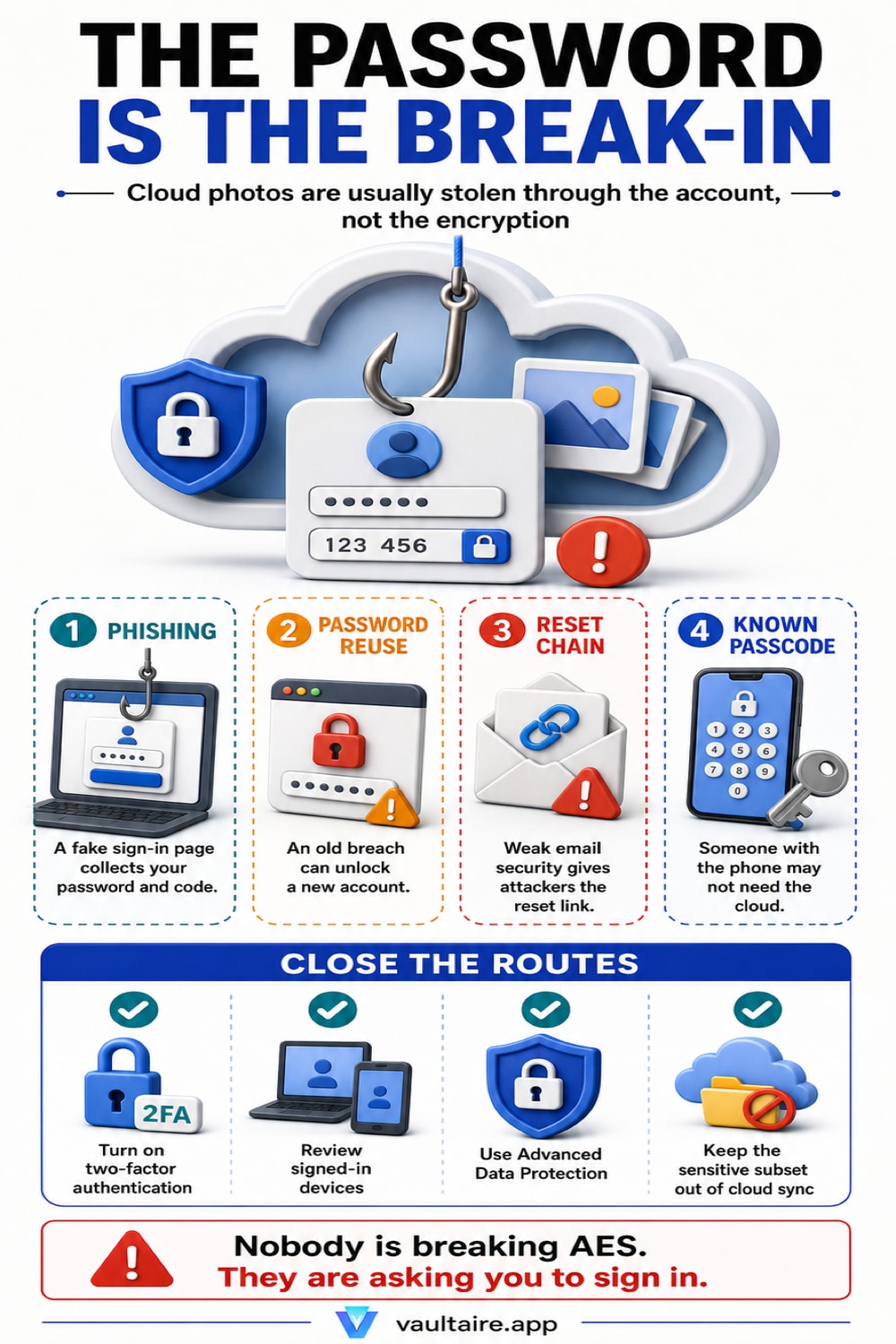
Yes, but not by breaking the encryption. In practice, cloud photo accounts are opened with credentials: a phishing page that looks like a sign-in screen, a password reused from a site that was breached years ago, a support impersonation call, or a person who already knows your device passcode. Two-factor authentication closes most of the remote routes, because a password on its own stops being enough. Advanced Data Protection closes the server side, moving iCloud Photos to end-to-end encryption so the keys sit on your devices and Apple holds no photo keys it could hand over or lose. Neither one helps against someone who unlocks your phone in front of you, and neither applies to a service that keeps the keys itself, which is the default for Google Photos and most other providers. The photos that would genuinely hurt to lose belong in an encrypted vault on the device, where no vault account exists to break into and any cloud backup holds only encrypted data.
What getting hacked actually means here
Two very different events get the same word. One is a provider breach, where an attacker reaches the servers and takes data belonging to many people at once. The other is an account takeover, where somebody signs in as you, from an ordinary sign-in screen, using credentials they obtained. Almost every case of private photos surfacing from cloud storage is the second kind. The large celebrity photo leak that people still remember was not a break-in at Apple: the accounts were reached with phished passwords and guessed security answers, one at a time. The prosecutions that followed described the same pattern, someone posing as customer support and simply asking for the password.
The distinction matters because the two have opposite defences. A provider breach is answered by encryption design, meaning whether the company holds keys that could be taken along with the files. An account takeover is answered by authentication, meaning whether a password alone gets anyone in. Most people worry about the first and are exposed by the second. Our audit of what cloud photo storage privacy policies actually say covers the key-holding question provider by provider. This guide covers the other half, the part where a person on the far end of a link is trying to become you.
The four routes that actually work
Phishing is first and by a distance. A message arrives about suspicious activity or a locked account, the link opens something that looks exactly like a sign-in page, and the password is typed into it. The modern version relays the two-factor code in real time, so a page that asks for the six digits right after the password is not proof that the site is genuine. Second is password reuse. A password you set on a forum in 2015 that was later breached is now in a list, and the list gets tried against every major service automatically. Nothing about that attack requires anyone to know or care who you are.
Third is the reset chain. Access to the email address on the account is often enough to move the password, so an email account with a weak password quietly becomes the key to everything attached to it. Fourth, and the most common of all in real life, is proximity. Someone who knows your device passcode can unlock the phone, and on iOS that passcode can also be used to change the account password, which is exactly why Stolen Device Protection exists and is worth switching on. The same category includes monitoring apps installed on an unlocked phone. None of the four involves attacking encryption, and no amount of encryption strength addresses any of them.
What two factor and end to end encryption each cover
Two-factor authentication answers routes one and two well. A stolen or guessed password stops being sufficient, since signing in also needs a code delivered to a device already inside your circle. It does not answer a live relay page that collects the code seconds after you read it, and it does nothing about a person holding your unlocked phone. Advanced Data Protection answers a different question entirely. Switched on, iCloud Photos and iCloud Backup become end-to-end encrypted, the keys stay on your devices, and Apple holds nothing that could be produced under a legal request or taken in a server breach. That is a real change in exposure, and it is the reason the recovery contact setup is mandatory: with the keys gone from Apple, a forgotten password is genuinely unrecoverable. Apple no longer offers it to new users in the United Kingdom.
By default, without that setting, iCloud Photos is encrypted in transit and on Apple servers with keys Apple also holds. Google Photos works the same way and has no end-to-end option for the main library at all. Neither arrangement is careless, and both are perfectly reasonable for the overwhelming majority of a camera roll, but the honest description is that the provider can read the files and you are trusting them not to. Our explainer on end-to-end encrypted iCloud photo storage walks through what the setting changes, and how iPhone photo backups are encrypted covers the backup side, which is where copies of hidden photos often live.
The photos that should never be in the account at all
Every defence above is probabilistic. Two-factor makes a takeover much harder rather than impossible, end-to-end encryption removes the server as a target but keeps the device as one, and both rest on an account that a determined attacker, or a person who already lives with you, can eventually reach. Sorting by consequence is more useful than sorting by likelihood. Most of a camera roll is fine in the cloud, and the convenience is real. A small subset is not: documents with identifying numbers, intimate photos, anything that would be leverage. For those, the goal is not a stronger lock on the account but no account in the equation.
A local encrypted vault reduces cloud exposure by default. Vaultaire protects file contents with AES-256-GCM, needs no identity account, and uploads only encrypted data: its iCloud backup is on by default and can be turned off, and sync and sharing run only when you set them up. These use client-side encrypted CloudKit records but still expose service metadata and depend on recovery credentials, the client, iOS, and device security. It is free for up to 3 vaults. Our audit of whether photo vault apps are safe explains which claims survive inspection.
Related guides
- What cloud photo storage privacy policies say
- How iCloud photo encryption works
- Can anyone see your hidden photos on iCloud
- Are photo vault apps safe
Sources
Frequently Asked Questions
Has iCloud itself ever been hacked?
Apple's servers have not been publicly breached in the way people usually mean. The incidents that produced leaked photos were account takeovers: passwords obtained through phishing, guessed security questions, or reuse from other breached sites. That is a meaningful distinction, because it means the fix is on your side of the sign-in screen rather than Apple's.
Does two-factor authentication make my photos safe?
It closes the most common remote routes, which is a large improvement, but it is not absolute. A convincing phishing page can relay your code in real time, and two-factor does nothing against someone who unlocks your phone or knows your device passcode. Treat it as the baseline that stops opportunistic attacks, not as a guarantee.
Is Google Photos less secure than iCloud?
For the main library, Google holds the keys and offers no end-to-end encrypted option, while iCloud can be switched to end-to-end encryption with Advanced Data Protection. Left at its defaults iCloud holds keys too, so the difference is the ceiling rather than the starting point. Both encrypt data in transit and at rest against outside attackers.
What should I do first if I think my account was opened?
Change the password from a device you trust, then review the device list under your name in Settings and remove anything unfamiliar, which ends those sessions. Check that the account email and phone number are still yours, since attackers change them to keep access. Then check your email account itself, because it is usually the route back in.