Do Photo Vault Apps Block Screenshots? What iPhone Allows
Many photo vault apps on the App Store promise screenshot protection, and the phrase covers very different things. Some apps only notice that a screenshot was taken. Some blur the screen while a recording runs. A few keep their content out of the captured image altogether. iOS sets the limits for all of them: Apple gives apps a notice after a screenshot, and a signal while the screen is being recorded or mirrored, but no switch that stops a capture. This guide explains what each kind of protection does, what none of them can stop, and how to test the app you use in about five minutes.
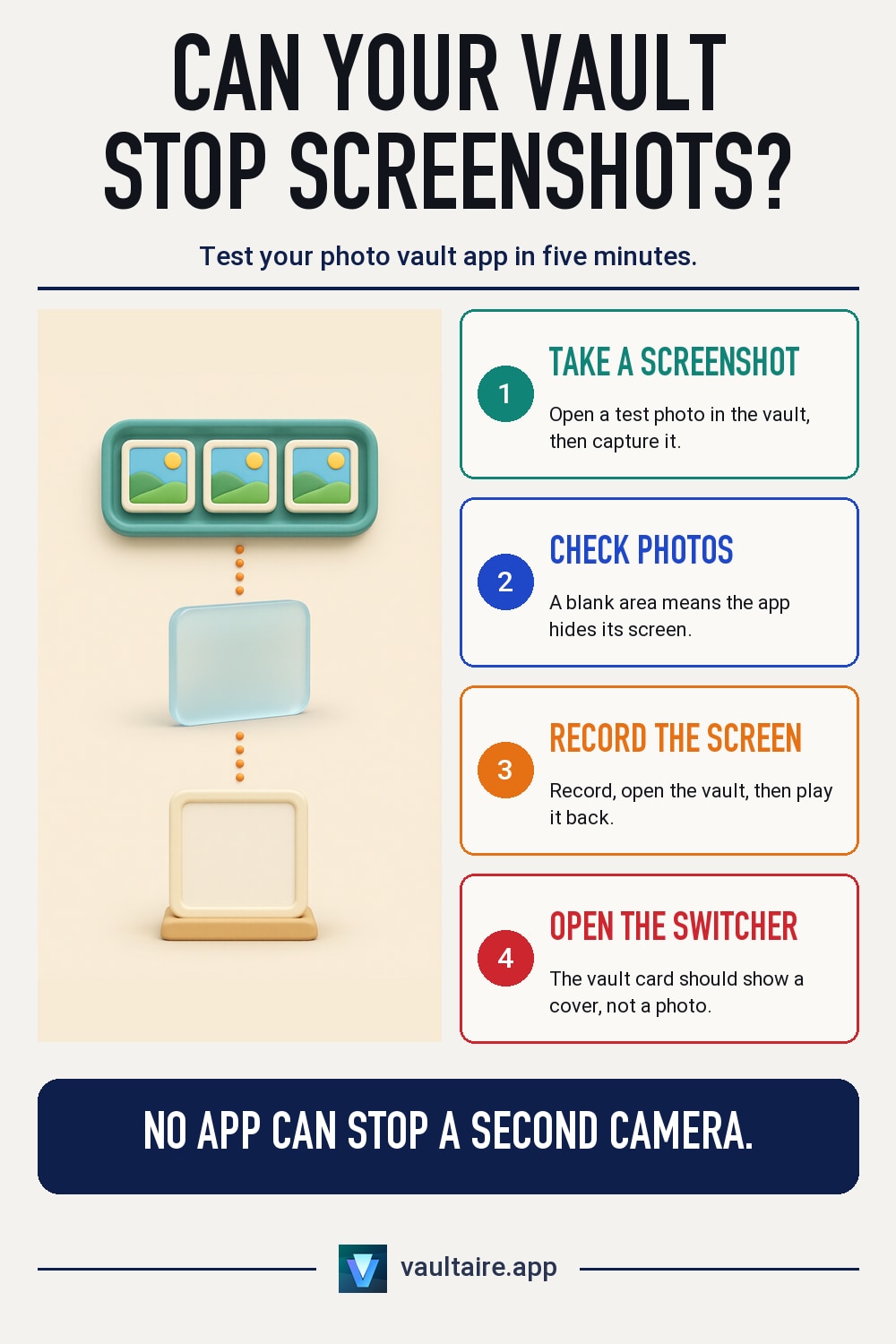
No iPhone app can stop you or anyone holding your unlocked phone from pressing the screenshot buttons. iOS tells the app in front that a screenshot was taken only after the image is saved, and it reports when the screen is being recorded, mirrored or streamed with AirPlay. A vault app can still make a capture useless by drawing its screen inside a secure layer that iOS leaves out of screenshots and recordings. Vaultaire does this: screenshots and screen recordings of the phone's screen come out blank while a vault is open, and taking one locks the vault. No app can stop a second camera from photographing the screen.
What screenshot detection means on iPhone
When a vault app lists screenshot detection, it almost always means one thing: the app listens for the notice iOS sends when a screenshot is taken. Apple documents this as a notification that posts when a person takes a screenshot on the device. It arrives after the image is already in the Photos app, and only the app on screen at that moment gets it. The app cannot cancel the screenshot, cannot read the image, and learns nothing about screenshots taken while it is closed or in the background.
Recording is different. Apple gives apps a separate signal, isCaptured, that reports whether the screen is being recorded, mirrored or streamed with AirPlay, and apps can check it while the capture runs. Apple's own suggestion for that signal is to pause or hide sensitive content until the capture stops. So an app that reacts to recording can blank its screen during it. An app that reacts only to the screenshot notice can show a warning or log the event, but the picture has already been taken.
The three kinds of protection vault apps offer
Vault apps that mention screenshots fall into three rough groups. The first only detects: it shows a message, records the event, or locks itself after the screenshot is saved. The photo you were looking at is still in your camera roll and in iCloud Photos if that is on. The second reacts to recording: it covers or blurs the screen while isCaptured is on, which helps against a screen recording or a mirrored display but does nothing for a single screenshot.
The third keeps the content out of the capture itself. iOS leaves some screen content out of screenshots and recordings, the way it hides the text of a password field. An app can draw its whole window inside that kind of secure layer, so a capture shows a blank area where the photos were. Vaultaire works this way in its App Store builds: screenshots and screen recordings of the phone's screen come out blank while a vault is open, and taking one locks the vault. The app switcher shows an opaque cover, so the last photo you viewed does not appear there either.
What no app can stop
A capture blocker works only on the phone's own screenshot and recording tools. It cannot stop someone from photographing the screen with a second phone or camera, and no vault app can. It also cannot help once a photo leaves the vault: a picture you export, share to another app, or send in a message is protected only by whatever that app does. Before you rely on any protection, think about the person you worry about. If they could hold your unlocked phone, the vault's own lock matters more than its screenshot setting.
Shared vaults carry their own limit. When you share a vault in Vaultaire with Prevent screenshots turned on, the recipient's copy of the app enforces that setting and any export limit, not the encryption. A person who gets the photos on screen can still point another camera at them. A connected display is a different path too, because the device receiving it can record what it shows. Vaultaire keeps a connected display on a neutral locked screen until you choose to show the vault there, and it does not show shared vaults on it.
How to test the vault app you use
App Store text is not proof, so test it. Open the vault, open a photo you do not mind using, and take a screenshot. Then open the Photos app and look at it. If you see your photo, the app does not keep its screen out of captures, whatever the listing says. Next, start a screen recording from Control Center, open the vault, stop the recording, and play it back. Finally, open the app switcher while a photo is on screen and check the vault's card.
Delete every test screenshot and recording when you finish, then empty Recently Deleted, or your test leaves exactly the copy you wanted to avoid. If the app fails the test, keep using it only for photos you would not mind appearing in a screenshot, and look for an app that keeps captures blank. To compare vault apps on encryption, lock and backup as well, read the guide to the most private photo app for iPhone in the related guides below.
Related guides
- Private Photo App for iPhone: The Most Private Pick
- How to Keep Screenshots Private on iPhone
- Are Photo Vault Apps Safe? What to Check First
- Are Photo Vault Apps Safe? A 2026 Security Audit
Sources
Frequently asked questions
Can an iPhone app detect a screenshot?
Yes, but only after it is taken. iOS tells the app on screen that a screenshot was saved. The app cannot stop it, cannot see the image, and is not told about screenshots taken while it is closed.
Can a photo vault app block screen recording?
It can keep its content out of the recording. iOS reports when the screen is recorded or mirrored, and an app can hide its screen then or draw it in a secure layer that recordings leave blank.
What happens if I take a screenshot in Vaultaire?
The screenshot comes out blank where the vault was, and the vault locks. Screen recordings of the phone's screen are blank too while a vault is open.
Can someone still photograph my vault with another phone?
Yes. No app can stop a second camera from photographing the screen. Screenshot protection covers only the phone's own screenshot and recording tools.