How to Spot a Fake Calculator App on an iPhone
A calculator is the one app nobody inspects. That is the entire reason a category of photo vaults ships with a working keypad on the front: the icon reads as furniture, and typing a passcode into it looks like typing a sum. Identifying one takes about five minutes and needs no software, no account and no access to the vault itself. What those five minutes cannot do is open it, and that limit matters more than any of the checks.
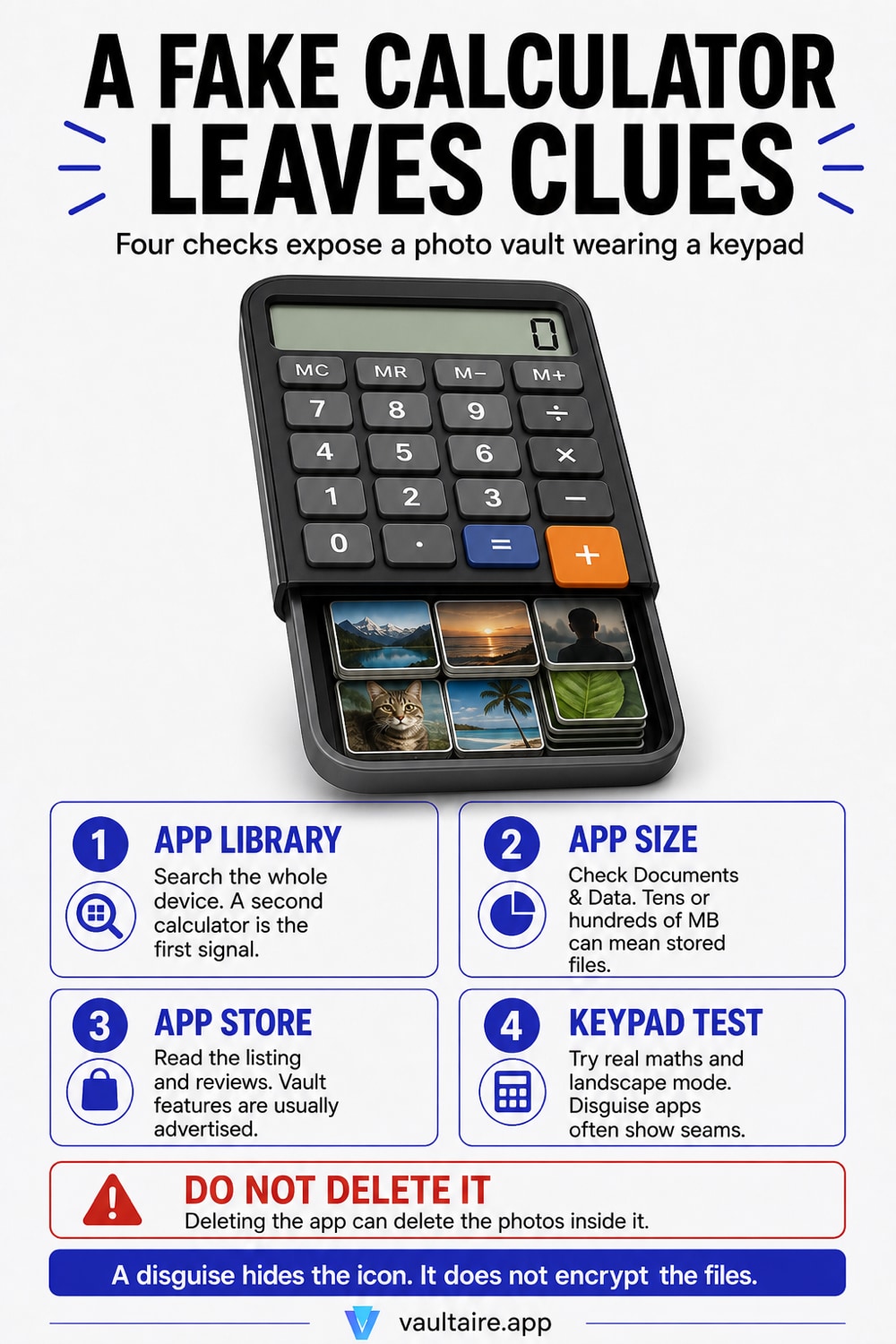
Swipe left to App Library, search for calculator, and see how many results come back. The iPhone ships with one, so a second one is the first signal. Then open Settings, General, iPhone Storage and read the size: a real calculator is a few megabytes, while one storing photos and videos runs to tens or hundreds. Open its App Store listing and read the description and reviews, because disguise apps advertise the vault in their own copy. Finally, use it as a calculator and see whether it behaves like Apple's, including in landscape. Any two of those four together make it a vault. None of them opens it: the contents sit behind a passcode only the person who set it knows, and some of these apps accept a second passcode that opens a decoy of harmless pictures instead.
Start in App Library, not on the Home Screen
The Home Screen is not an inventory. An app can sit inside a folder, on a page that has been switched off in Edit Pages, or nowhere at all, because iOS lets new downloads go straight to App Library and never appear on a page. App Library is the complete list. Swipe left past every page to reach it, tap the search field at the top, and type calculator. Everything installed on the device answers that search, whatever has been done to keep it out of view. On a phone managed with Screen Time, Settings, Screen Time, See All App and Website Activity gives the same inventory with usage time next to each app, which turns a quiet installation into a visible habit.
What you are looking for is a duplicate. Apple ships one Calculator, and deleting it does not leave a second one behind, so two entries in that search means one of them came from the App Store. The name is usually a small variation, Calculator Pro, Calc, Calculator Plus, and the icon a close copy of Apple's in a slightly different orange or grey. A duplicate is not proof on its own, since people do install scientific calculators on purpose, but it tells you which app to run the next three checks against.
The size, the listing and the keypad
Storage is the check that is hardest to dress up. Open Settings, tap General, then iPhone Storage, and find the app in the list. Apple's Calculator is a system app doing arithmetic, and any honest third party calculator sits in the same range, a handful of megabytes. A calculator carrying tens or hundreds of megabytes is carrying files, and tapping its row splits the number into the app itself and Documents and Data, which is where imported photos and videos land. That second number growing week to week is the vault being used rather than merely installed.
The App Store listing is the check people skip, and it is usually decisive. Touch and hold the icon, open its store page, and read the description the developer wrote. These apps are not secretive about what they are, because hiding photos is the feature they are selling: the copy says private photo vault, secret album, hide pictures behind a calculator. The reviews say the same thing in plainer words, arguing about the passcode, about photos lost after an update, about whether a second code works. Then run the app as a calculator. Turn it landscape, where Apple's own app switches to a scientific layout, try a percentage and a decimal, and watch for the seams. The keypad exists to receive a passcode, so the maths behind it is often an afterthought.
What finding it does not get you
Identification and access are different problems, and the second has no solution from the outside. The passcode is set locally, most of these apps encrypt what they hold, and there is no recovery route a bystander can take. Several go further and accept more than one code: one opens the real album, another opens a decoy stocked with ordinary pictures, so a phone handed over on request can look entirely innocent. That behaviour is deliberate and it is advertised as a feature. Our guide on plausible deniability apps covers how the decoy pattern works.
Deleting the app is worse than useless. On iOS, removing an app removes its sandboxed container, so the photos inside a vault go with it, permanently, and nothing lands in Recently Deleted because those files were never in the Photos library while they sat in the vault. Many of these apps also offer their own cloud backup, which means copies can exist on a server tied to an account rather than to the phone in your hand. If the question behind all of this is a person rather than a device, the honest answer is that the phone will not tell you what is in the vault. A conversation is the only method with a real success rate, which is an unsatisfying finding and still the correct one.
A disguise is the weakest part of the design
Everything above is a five minute check that anyone can run after reading one article, which is the structural problem with a disguised vault. The disguise is doing the security work, and a disguise fails the moment somebody looks twice at the icon, at the storage list, at the store page. Often the disguise is all there is: plenty of calculator vaults hold their files with weak or unstated encryption and back them up to servers you cannot inspect, so an app that has been spotted is also an app that can be read. Our comparison of calculator vault apps goes through what that category actually protects, and our audit of whether photo vault apps are safe covers the encryption claims behind them.
The alternative is to stop hiding the app and start protecting stored content. Vaultaire encrypts files with AES-256-GCM under a random master key, needs no identity account, and uploads only client-side encrypted data: its iCloud backup, on by default and switchable off in Settings, plus any sync or share you set up. Separate system backups and metadata still matter, but the content claim does not depend on disguising the app. Free for up to 3 vaults.
Related guides
- What calculator vault apps actually protect
- How plausible deniability apps work
- How photo vault apps work
- Signs someone went through your phone
Sources
Frequently Asked Questions
Does a fake calculator app still work as a real calculator?
Yes, usually well enough to pass a glance, which is the point. The seams show under pressure: no scientific layout when you turn the phone landscape, missing operators, odd handling of decimals and percentages, or a display that truncates long results. Compare it side by side with Apple's Calculator and the differences appear within a minute.
Can I see what is inside a calculator vault without the passcode?
No. The contents sit in the app's own sandboxed storage, usually encrypted, and the passcode is set on the device with no reset path for anyone but the person who chose it. Some of these apps also accept a second passcode that opens a decoy album of harmless pictures, so even an unlocked screen is not evidence of what else is stored.
If I delete the app, what happens to the photos inside it?
They go with it, and they are not recoverable from the phone. iOS removes an app's container when the app is deleted, and vault contents live in that container rather than in the Photos library, so they never appear in Recently Deleted. The exception is a vault that was backed up to the developer's own cloud service, where a copy survives outside the device.
Is a large calculator app always a photo vault?
No, and size alone should not decide it. Graphing and engineering calculators ship real computation engines and can legitimately run to tens of megabytes. What separates them is where the weight sits: read the Documents and Data figure in iPhone Storage rather than the app size, then confirm against the store listing and the keypad before concluding anything.