Where is Utilities in the iPhone Photos app? Location and contents
Scroll down in the Photos app and you will come across a heading called Utilities. The name alone does not say much about what is inside, and some people never find it on their own iPhone at all. This is not a new feature. It is a spot where the Photos app gathered management albums it already had. Here is where to find it, what is inside, and what to check if it does not show up.
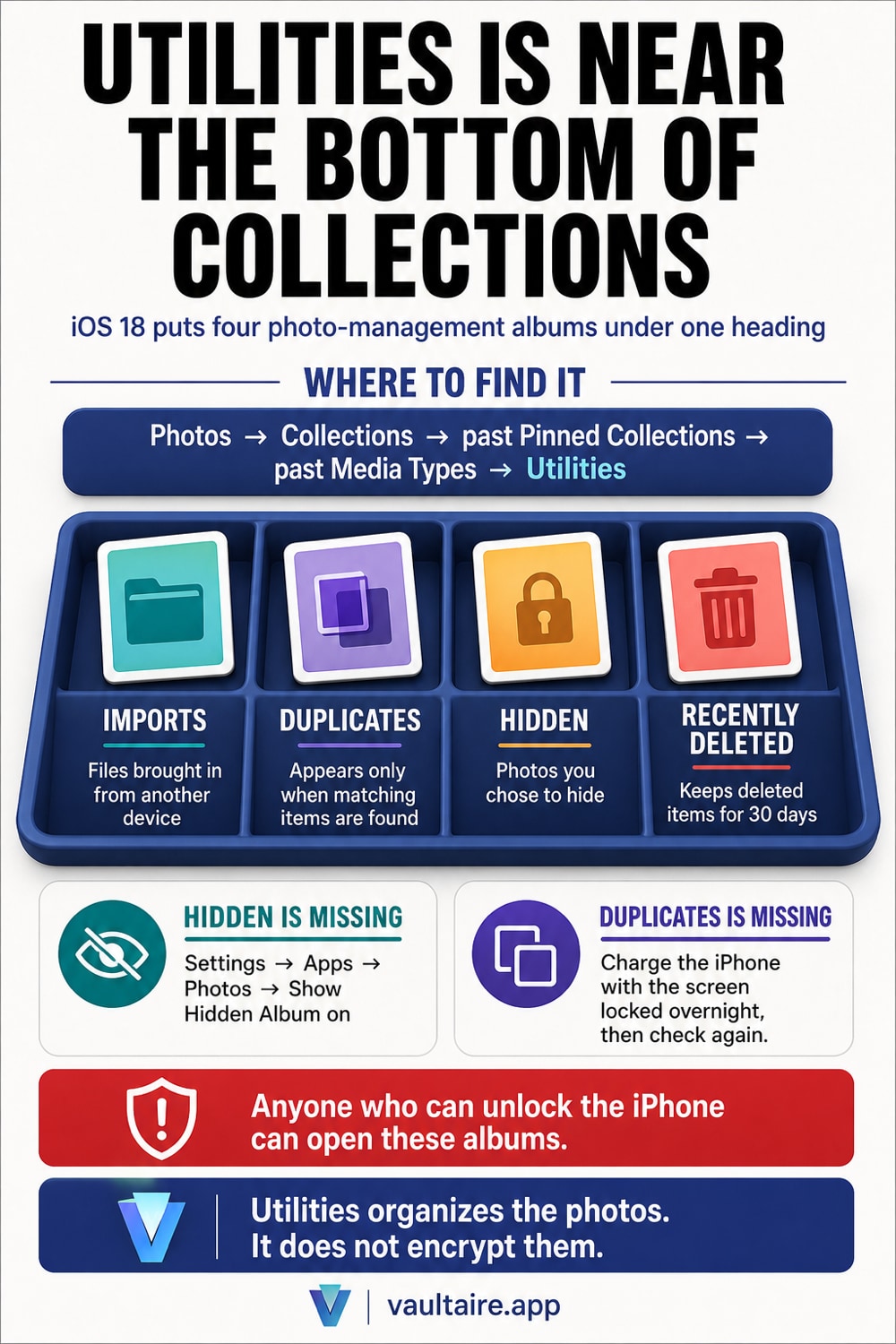
Utilities sits near the bottom of the Collections screen in the Photos app. Open the Photos app, tap Collections, then scroll down past Pinned Collections and Media Types until the heading appears. Inside are four albums: Imports, which holds photos brought in from another camera or computer; Duplicates, which shows up only when the same photo exists more than once; Hidden, which holds photos you hid yourself; and Recently Deleted, which keeps photos for 30 days after you delete them. When iOS 18 reworked the Photos app layout, these albums moved under one heading called Utilities. If you go looking for the old Albums tab, you will not find it, because that tab is gone. If Utilities itself is missing, or only the Hidden row is missing, open Settings, then Apps, then Photos, and check whether Show Hidden Album is turned off. Read how the Hidden album works first, and this screen will make more sense.
Utilities sits near the bottom of Collections
Open the Photos app and tap Collections at the bottom of the screen. From top to bottom you see Pinned Collections, the albums you chose yourself, then Media Types, split by video and screenshot, and after that the Utilities heading. Tap it to open a list of the albums inside. The location stays the same no matter how many photos are on your iPhone. Just scroll down past the rows above it.
When iOS 18 reworked the Photos app layout, the management albums that used to sit scattered under the old Albums tab moved into this one Utilities heading. If you search for the Albums tab from memory, you will not find it, because that tab no longer exists. You can change the order. Scroll to the bottom of the Collections screen, tap Reorder, and move Utilities higher up so you do not have to scroll for it next time.
There are only four albums inside
Imports holds photos and videos brought in from another camera, an SD card, or another device, sorted by the date you imported them. Photos you took on this iPhone do not appear here. Duplicates shows up only when the Photos app finds a matching pair of photos or videos. Open it and choose Merge, and only the highest quality copy stays, while the rest move to Recently Deleted. On a device with no duplicates, this row does not appear at all.
Hidden holds photos you hid by pressing and holding a photo, then choosing Hide. Those photos drop out of the date ordered library view, but they are not deleted. Recently Deleted keeps photos and videos for 30 days after you delete them, then clears them automatically. These two albums are also the first place someone looks if they hand over a device without knowing where deleted photos still sit.
Hidden is not encrypted. Anyone who knows your passcode can open the Hidden album, and it syncs with iCloud Photos when that is on. Vaultaire keeps imported copies in an encrypted vault with its own pattern lock, outside Photos and iCloud Photos. Free for up to 3 vaults.
When Utilities or Hidden does not show up
If the Hidden row is missing from Utilities, check Settings first. Open the Settings app, then Apps, then Photos, and look at the Show Hidden Album switch. When it is off, the Hidden album drops out of the list. Nothing was deleted, the entry point is just hidden. Turn the switch back on and it reappears in the same place. This setting lives on each iPhone separately and does not carry over to other devices through iCloud.
Duplicates missing is usually not a fault. The Photos app matches duplicates while your device is charging with the screen locked, so right after you set up a new iPhone or import a large library, results can take overnight to appear. If something still seems off after that, the checklist for missing hidden photos helps you work out whether the cause is sync or the album itself.
Utilities organizes your photos. It does not lock them
This needs to be said plainly: neither the Hidden album nor Recently Deleted encrypts your photos. They only move where the photos sit. Turning on Use Face ID adds a face or passcode prompt before either one opens, but that only confirms you are the owner of this device. Anyone who can unlock the iPhone can open Utilities and see everything inside. With iCloud Photos on, the contents of Hidden also reach any iPad or Mac signed into the same Apple Account.
If you have photos you genuinely do not want anyone else to see, you need to change where they are stored, not just where they are hidden. Vaultaire encrypts photos on your iPhone with AES-256 before storing them. The key comes from a pattern only you set, and your pattern never leaves the device. Photos stored this way do not show up in the Photos app Utilities section, and they do not appear in the photo picker other apps use to open your library. Even when iCloud backs up your device, they stay encrypted the whole way. Hidden is fine for photos you would rather your family did not stumble across. Anything more sensitive belongs somewhere else from the start.
Related guides
- How the Hidden album works, and its limits
- What stays in Recently Deleted
- How to fix hidden photos that disappeared
- Hidden album versus a photo vault app
Sources
Frequently asked questions
What is Utilities in the Photos app?
It is a heading that gathers the Photos app's management albums. It is not a place for taking or browsing photos. It groups albums used for cleanup work: checking imported photos, sorting duplicates, checking hidden photos, and restoring deleted photos. Before iOS 18 these sat scattered under the Albums tab. Only the name and location changed. Each album works the same way it always did.
Why is Duplicates missing from Utilities?
Duplicates only appears when the Photos app actually finds a matching pair of photos or videos. With no duplicates, the row does not show up at all. Right after you set up a new iPhone, or after importing a large library from iCloud, matching happens gradually while your device charges with the screen locked, so results can take a few hours. Charge it overnight, then open Utilities again.
Can other people see what is inside Utilities?
Yes, if they can unlock your iPhone. With Use Face ID turned on, opening Hidden or Recently Deleted asks for a face or passcode, but that only confirms whether someone is holding the same device as its owner. Anyone you have handed the iPhone to, or anyone who knows the passcode, can open them directly. The photos themselves are not encrypted, so do not use these two albums to store photos you do not want seen.
Can I remove Hidden from Utilities?
Yes. Open Settings, then Apps, then Photos, and turn off Show Hidden Album. The Hidden row disappears from Utilities. No photos are deleted, only the entry point disappears. Turn the same setting back on and it reappears in the same place. Anyone who knows this step can also turn it back on, so treat it as a weak safeguard for photos you do not want seen.