Hidden Photos Disappeared on iPhone: How to Get Them Back
You hid a set of photos, went back for them, and the Hidden album was empty or missing entirely. It is an unpleasant moment, but in most cases nothing has been lost. iPhone lets you hide the Hidden album itself, and that single switch makes a full album look like a deleted one. This guide walks through what is recoverable, what genuinely is not, and how to get your photos back into a place that does not depend on a toggle.
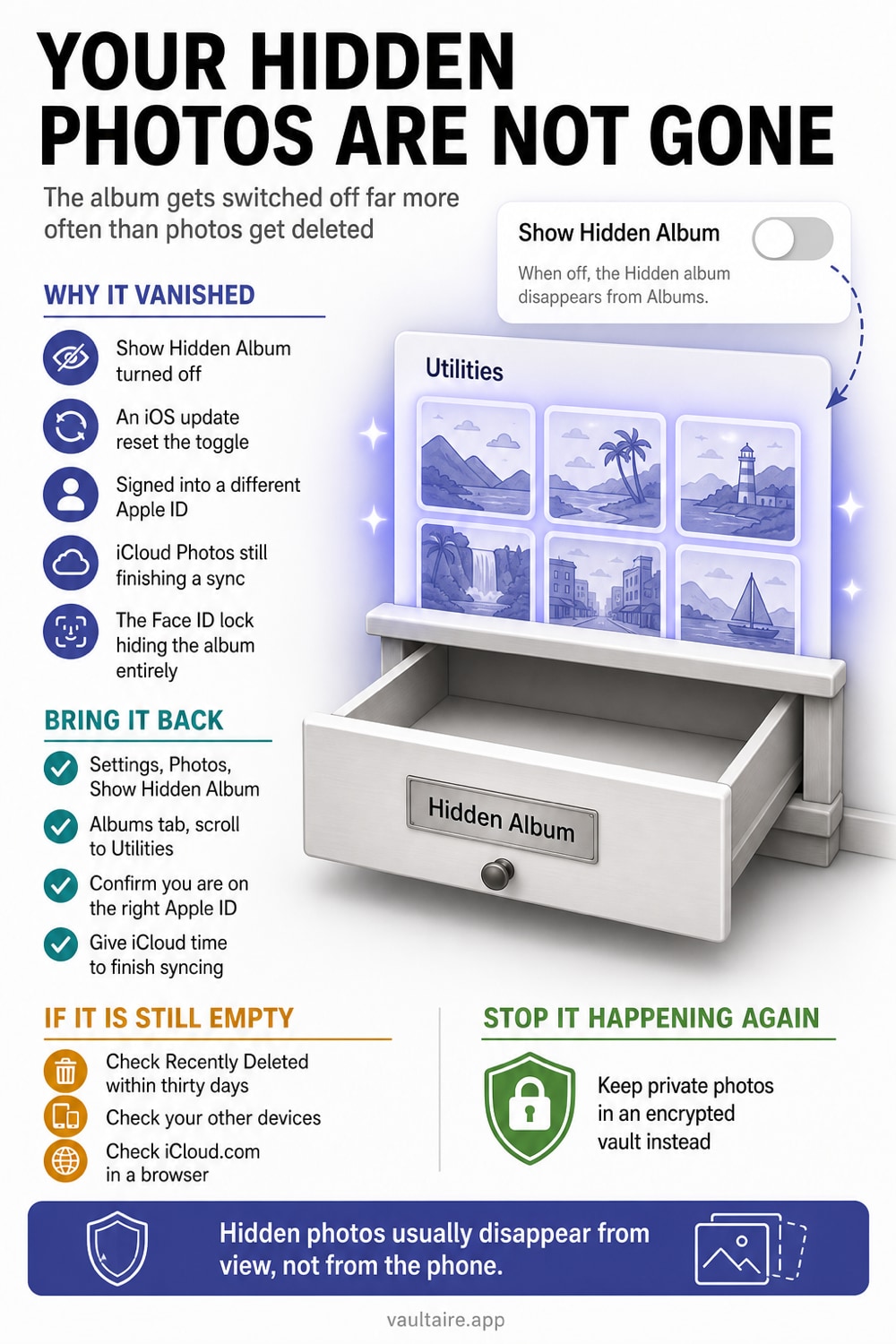
Hidden photos that disappear on iPhone are usually still on the device. Open Settings, tap Photos, and turn on Show Hidden Album, then look under Collections and Utilities in the Photos app. If the album is empty, check Recently Deleted, your iCloud Shared Photo Library, and a second device signed into the same Apple Account. Only photos past the 30 day Recently Deleted window are truly gone.
What You Can Usually Get Back
Start with the good news. When hidden photos disappear from an iPhone, they are almost never deleted. Since iOS 14 you can hide the Hidden album itself, so the album stops appearing under Utilities even though every photo inside it is untouched. Turn that switch back on and the album comes back with its contents intact. The same thing happens after some iOS updates, which can reset the Show Hidden Album setting. It looks identical to data loss, but it is only a display preference that anyone with your passcode can flip.
Photos you deleted rather than hid are also recoverable for a while. Anything removed in the last 30 days waits in Recently Deleted, and a hidden photo that was deleted lands there like any other. If you use iCloud Photos, a slow or interrupted sync can leave part of your library missing on one device while everything is still safe on another, so open iCloud.com or a second device before assuming the worst. A paused upload caused by full iCloud storage produces exactly the same symptom.
What Cannot Be Recovered
Two situations are genuinely final. If a hidden photo passed the 30 day window in Recently Deleted, it is gone from the device and from iCloud, and no setting brings it back. If someone emptied Recently Deleted by hand, that clock ended early and the result is the same. Apple keeps no extra copy for you beyond that window, so the recovery tools advertised for this problem cannot reach anything Apple has already purged.
The other case is the wrong Apple Account. Photos that lived in iCloud Photos belong to the account that uploaded them, so signing into a different Apple Account shows you that library and not yours. Erasing an iPhone without a current backup also takes local only photos with it. Neither of these is a bug you can undo, and it is worth working out which situation you are in before you spend money on recovery software that cannot help.
The Safe Way To Bring Them Back
Work through the checks in order. Open Settings, tap Photos, scroll down, and turn on Show Hidden Album. Go back to the Photos app, tap Collections, scroll to the bottom, and open Hidden under Utilities, then unlock it with Face ID or your passcode. If the album is there but empty, open Albums and unlock Recently Deleted. Give iCloud Photos time to finish syncing on a charger and a good connection, since a partial sync can hide recent items for hours.
Once the photos are back, think about where they should live. Re-hiding them leaves them inside the Photos access model. Importing them into Vaultaire protects the vault copies under a random AES-256-GCM master key and uses a drawn pattern separate from the iPhone passcode. Vault contents are encrypted on the device; iCloud backup, on by default, plus sync or sharing send client-side encrypted CloudKit records. After the import, Vaultaire offers to delete the Photos originals. Accept it and empty Recently Deleted.
If The Hidden Album Is Still Empty
A few less obvious causes are worth ruling out. Photos moved into an iCloud Shared Photo Library behave differently, so check the library toggle at the top of the Photos view and look in both views. Confirm the device is signed into the Apple Account you expect under Settings at the top of the screen. If iCloud storage is full, uploads stop and older items can be replaced by low resolution placeholders that never load, which reads as missing photos rather than a storage warning.
If none of that helps, the honest last resort is an older backup. Restoring an iPhone backup made before the photos vanished can bring them back, though it also rolls everything else on the device back to that date. Third party recovery apps are limited to what is left in local storage or an unencrypted computer backup, so they cannot reach anything that only ever lived in iCloud. Whatever you recover, move the copies you care about into a vault with its own lock so a single toggle can never hide them again.
Related guides
- Hidden Photos on iPhone: How the Hidden Album Really Works
- Are Hidden Photos Saved to iCloud?
- iPhone Photo Recovery After Deleting
- Best free photo vault app, and the paid ones worth buying
- Did Someone Open My Hidden Album? How To Tell On iPhone
Sources
Frequently asked questions
Why did my hidden photos disappear after an iOS update?
An update can reset the Show Hidden Album setting, which removes the album from the Utilities list without touching the photos inside it. Open Settings, tap Photos, turn Show Hidden Album back on, then look under Collections and Utilities in the Photos app. The album usually returns with everything still in place.
Are hidden photos deleted when the Hidden album disappears?
No. Hiding a photo only moves it out of your main library view, and hiding the album only removes the album from the list. Neither action deletes anything. If the album reappears empty, the photos were most likely deleted separately, so check Recently Deleted, where deleted items stay for 30 days.
Where is the Hidden album on iPhone?
Open the Photos app, tap Collections, scroll to the bottom, and tap Hidden under Utilities. On iPad the Utilities section is in the sidebar. If Hidden is not listed at all, it has been switched off in Settings, Photos, Show Hidden Album, which is the most common reason people think their photos vanished.
Can I stop my hidden photos from disappearing again?
Yes, by not relying on the Hidden album. It is a visibility setting that anyone with your device passcode can turn off, and it keeps syncing through iCloud Photos. An encrypted vault app stores the photos on the device behind its own lock, so they do not move or vanish when a Settings switch changes.