Does Unsubscribing From a Shared Album Notify the Owner?
You want out of someone's shared album, or at least want it off your screen, and you do not want to start a conversation about it. The worry is simple: will the owner get a message saying you left? This guide goes through what Apple documents for each action a subscriber can take, from unsubscribing and saving a photo to liking one or leaving a Family Sharing group. Where Apple says nothing, we say so, because a missing notification in the documentation is not a promise that the owner can never tell.
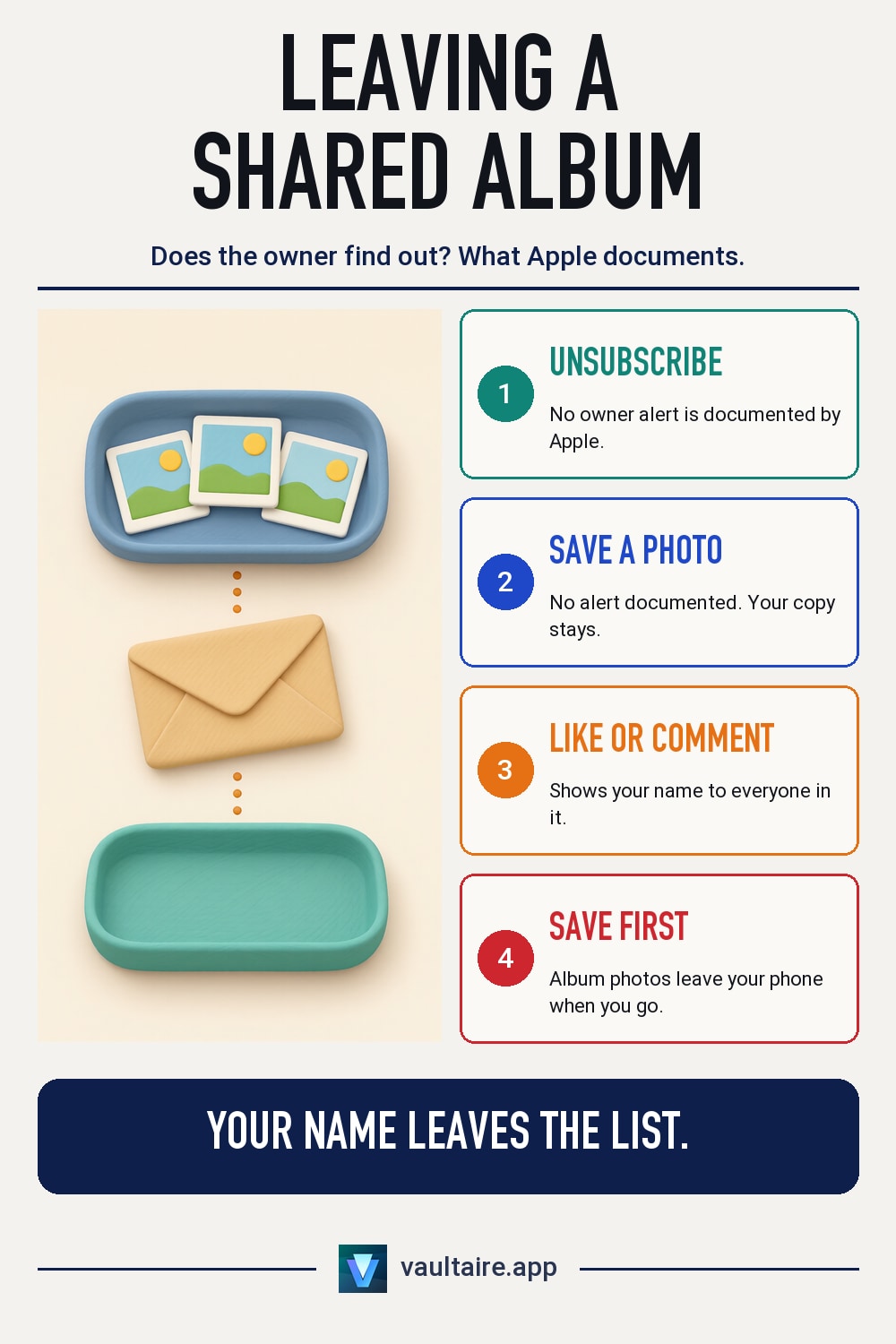
Apple does not document any notification to the owner when you unsubscribe from a shared album on iPhone (in iOS 27 the button is called Leave Shared Album). Apple also documents no notification when you save a photo from a shared album. The owner can still notice you are gone, because your name drops off the album's participant list, and likes and comments you made earlier showed your name. To leave, open Photos, tap Collections, tap Shared Albums, open the album, tap the More button, then tap Unsubscribe or Leave Shared Album. Save the photos you want to keep first.
What happens when you unsubscribe from a shared album
Unsubscribing removes the album from your Shared Albums list. Apple's guide for iOS 26 calls the button Unsubscribe. In iOS 27 Apple renamed it Leave Shared Album and now calls subscribers participants. Photos you saved or downloaded from the album to your own library stay there, and Apple says they stay even if the album is later deleted or the owner stops sharing it.
Apple's shared album guides list the moments that do send a notification: when someone accepts an invitation, the creator is told, and when new photos are added, participants are told. Apple lists no notification for unsubscribing or leaving. That is the most the documentation supports, so read it as no documented alert rather than a guarantee. The owner can still open the album's participant list, and your name will no longer be on it. If they check that list, they can work out that you left.
| Action | What the owner sees | What you see |
|---|---|---|
| You unsubscribe or leave | No notification documented by Apple. Your name is no longer in the participant list. | The album leaves your Shared Albums. Photos you saved stay in your library. |
| You save a photo | No notification documented by Apple. | A copy in your own library. |
| You like or comment | Your like or comment, with your name, in the album and in Activity. | The same. |
| The owner deletes the album | The album is removed from their devices and its photos are deleted. | The album is removed from your devices. Photos you saved stay. |
| The owner removes you | You are no longer in the participant list. | You lose access to the album. Apple does not document whether you are told. |
Will they know if you save a photo from a shared album?
Apple documents no notification for saving. To save a photo, touch and hold it in the shared album, or open it, tap the Share button, then tap Save Image or Save Video. The copy goes into your own library and stays there after you leave the album. The owner is not listed as getting any alert for this, and the album does not show who saved what.
Likes and comments are different. They appear in the album with your name, and they show up in the Activity view that everyone in the album can open. If you liked or commented on photos before, that history is visible to the owner and the other participants. One more detail from Apple: in iOS 26 and earlier, shared albums upload a copy of each photo, and the downloaded copy may not contain the same information as the original, so a saved photo may not match the owner's original file.
How to hide a shared album without unsubscribing
Apple documents no way to hide one shared album while you stay in it. The control Apple does document turns Shared Albums on or off for your whole device: open Settings, tap your name, tap iCloud, tap Photos, then turn off Shared Albums. Every shared album leaves the Photos app on that iPhone, not just the one you want gone. Apple does not say that this switch unsubscribes you or tells anyone, and you can turn it back on later. In the Photos app itself you can also customize Collections and move or collapse the Shared Albums section so it stays out of view (moderate confidence; Apple documents the customize option, not this exact use).
If the photos are the problem rather than the album, a shared album is the wrong place to keep anything you want private. Anything you add can be saved by every participant, as our guide on what the owner of an iCloud shared album can and cannot take back explains. For photos that must stay yours, a separate vault works better. Vaultaire keeps them encrypted on the device behind its own pattern lock, outside the Photos library entirely. Vaultaire's own iCloud backup stores only encrypted copies; it is on by default and you can turn it off in Settings.
How to tell if someone left your shared album
If you own the album, Apple documents no notice when a participant unsubscribes or leaves. The way to check is the participant list. In iOS 27, open the album and tap the Manage Shared Album button. In iOS 26, open the album, tap the More button, then tap the album name. Anyone who left is no longer listed (moderate confidence; Apple documents the list, not how it changes when someone leaves). A participant you removed is also gone from the list.
The Activity view helps too. New likes and comments from a person stop after they leave, and the participant list is where you can tell the difference between someone who is quiet and someone who is gone. If the person was an ex or someone you no longer trust, removing them yourself is more reliable than waiting for them to leave. Our scenario page on an ex who still has shared album access covers that case step by step.
What happens to shared albums when someone leaves the family group
Leaving a Family Sharing group ends the shared features that came with it. Apple's Family Sharing page says: "If you share a photo album, calendar, or reminders with family members, you won't share them anymore." So the family photo album stops being shared with the person who left. Photos they saved to their own library before leaving are copies in their library, and the same rule applies as for any shared album: those stay.
You do not have to leave the family group to get out of the family album. Apple adds: "If you want to keep using Family Sharing but not share certain features with your family, you can unsubscribe from them instead in the Photos, Calendars, or Reminders apps on your device or on iCloud.com." Unsubscribing from the family album works like any other shared album. For the wider picture of what a family group can see, read how to stop sharing photos with family on iPhone.
How to unsubscribe from a shared album, step by step
First, save anything you want to keep, because the album's photos leave your device when you go. Then open Photos, tap Collections, tap Shared Albums, and tap the album. Tap the More button. In iOS 26, tap Unsubscribe. In iOS 27, tap Leave Shared Album. The album disappears from your list. To rejoin later, you need a new invitation or the album link from the owner.
Before you leave, check:
- Every photo and video you want is saved to your own library with Save Image or Save Video.
- You know which version of iOS you have, so you look for Unsubscribe in iOS 26 or Leave Shared Album in iOS 27.
- You are leaving a shared album, not a Shared Library. They are separate features with separate settings.
- If you only want the album out of sight, the Shared Albums switch in Settings may be enough.
If you created the album, you cannot unsubscribe from it. Your option is Delete Shared Album, and that is not quiet: Apple says the album is removed from all of your devices and the devices of every subscriber, and its photos are permanently deleted. Participants keep only what they saved. In iOS 27 you can tap Make Album Temporary instead, and the album is deleted in 30 days. If the album is mixed up with Shared Library, which is a separate feature, see how to turn off Shared Library on iPhone.
Related guides
- iCloud Shared Albums: What the Owner Cannot See or Take Back
- How to Stop Sharing Photos With Family on iPhone
- Stop Photos From Messages Showing in Your Camera Roll
- How to Turn Off Shared Library on iPhone
Sources
Frequently asked questions
If I unsubscribe from a shared album, does it notify the owner?
Apple does not document any notification to the owner when you unsubscribe or leave. The owner can still see that your name is gone from the album's participant list if they check it.
Will someone know if I save a photo from their shared album?
Apple documents no notification for saving a photo. Likes and comments are different: they show your name in the album and in Activity.
Can you hide a shared album on iPhone?
Not one album at a time. You can turn off Shared Albums for the whole device in Settings, your name, iCloud, Photos, which removes every shared album from Photos on that iPhone, or unsubscribe from the one album.
What is the difference between Unsubscribe and Leave Shared Album?
They are the same action under two names. iOS 26 calls it Unsubscribe. iOS 27 calls it Leave Shared Album and calls subscribers participants.
Do I lose the photos when I leave a shared album?
You lose access to the album's photos. Photos you saved to your own library before leaving stay there, even if the owner later deletes the album.