Vault App Alternative With Private Browsing on iPhone
Many vault apps pack a private browser, a video downloader and a hidden album into one app. If you want to leave one of them, you do not need another all-in-one app. Safari already locks its private tabs, and a vault only has to keep what you save. Here is how to set up both, and what each one protects.
Quick answer
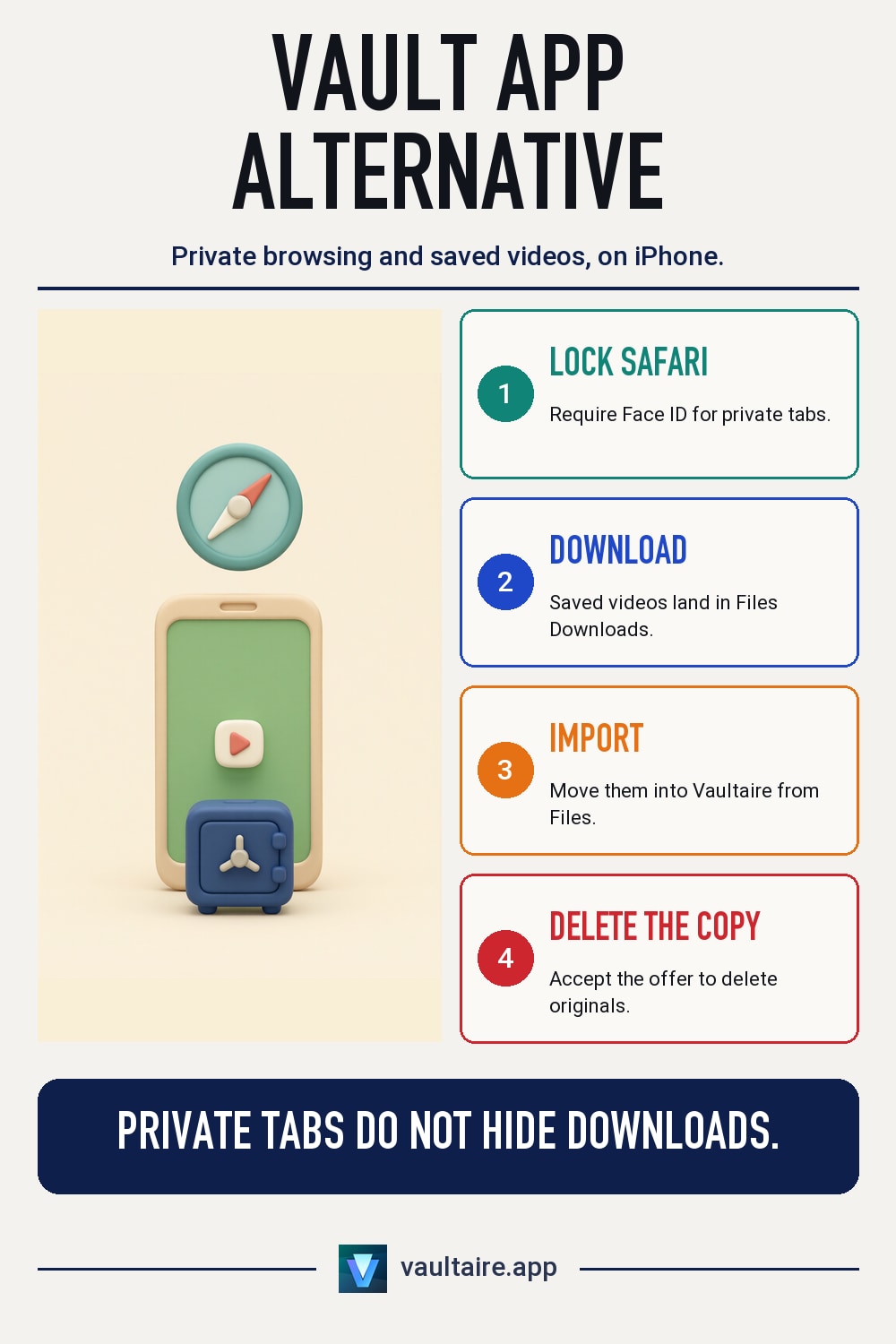
Use Safari's Locked Private Browsing for the browsing and a separate encrypted vault for the videos you save. Download the video in a private tab, import it from Files into a vault app such as Vaultaire, and delete the copy left in Downloads.
What a vault app's private browser actually does
Vault apps with a built-in browser open web pages inside their own app, so the pages do not show up in Safari's history. Most of them add a download button that saves photos and videos straight into the app's hidden album, behind its PIN or pattern. That bundle is the main reason people search for an alternative that does both jobs.
On iPhone, that in-app browser runs on the same WebKit engine as Safari. The private part is mostly that history and downloads stay inside the vault app instead of Safari and Files. Whether the saved videos are encrypted depends on the app, and many listings promise a PIN lock without saying how the files are stored.
Use Safari's Locked Private Browsing for the browsing
Since iOS 17, Safari can lock private tabs behind Face ID, Touch ID or your passcode. Turn it on in Settings, then Apps, then Safari, with Require Face ID to Unlock Private Browsing. The private tabs lock when you leave Safari or lock the iPhone, and pages you open there stay out of your history.
Private Browsing does not hide files you download. A video you save in a private tab still lands in the Downloads folder in the Files app, where anyone holding your unlocked iPhone can play it. That is the gap a vault fills.
Move saved videos into an encrypted vault
In Vaultaire, open the vault with your pattern, tap the add button and choose Files, then pick the video from Downloads. The app encrypts the file on the iPhone with AES-256-GCM and opens it only with your pattern. You can also send a file to Vaultaire from the share sheet in Files.
After a Files import in which every item reached the vault, Vaultaire offers to delete the originals. Accept it, and the download goes to the trash where its location has one, or is deleted for good otherwise. Share sheet imports do not get this offer, so delete those originals yourself.
What to check before you switch
Export your videos from the old vault app before you delete it. Deleting a vault app usually deletes the files it stores, and an encrypted vault cannot be opened by another app. Move the exports into the new vault, check that they play, and only then remove the old app.
Compare the free limits too. Vaultaire's free tier holds 100 photos and 10 videos across all vaults, and its encrypted iCloud backup is included in both tiers and on by default. Vaultaire Pro adds more files and vaults. Vaultaire has no built-in browser, so Safari stays your private browser.
Browser vault app or Safari plus a vault
| Question | Vault app with a built-in browser | Safari Locked Private Browsing | Vaultaire |
|---|---|---|---|
| Private browsing | Yes, inside the app | Yes, private tabs lock with Face ID or passcode | No, Vaultaire has no browser |
| Where downloaded videos go | The app's own hidden album | The Downloads folder in Files, readable on an unlocked iPhone | The vault, after you import them from Files |
| How saved files are protected | Depends on the app, often a PIN lock | Not protected beyond the iPhone passcode | Encrypted on the iPhone with AES-256-GCM, opened with your pattern |
| Backup | Depends on the app | Files in iCloud Drive follow your iCloud settings | Encrypted iCloud backup, on by default in both tiers |
Related guides
- How to use Private Browsing in Safari on iPhone
- Best photo vault apps for iPhone
- Video hider apps for iPhone: what to check
- Does deleting a vault app delete your photos?
Sources
Frequently asked questions
Is there a vault app with a private browser that encrypts videos?
Some vault apps bundle a browser and a downloader, but their listings rarely say how saved files are stored. If encryption matters, pair Safari's Locked Private Browsing with a vault that states it encrypts files, such as Vaultaire, which uses AES-256-GCM.
Does Safari Private Browsing hide downloaded videos?
No. Private Browsing keeps pages out of your history, but downloads still go to the Downloads folder in the Files app. Move the file into a vault and delete the copy in Downloads.
Does Vaultaire have a private browser?
No. Vaultaire stores and encrypts photos, videos, files and notes, and it has no browser. Use Safari with Locked Private Browsing for browsing and import what you save into Vaultaire.
What happens to my videos if I delete my old vault app?
Deleting a vault app usually deletes everything stored inside it. Export the videos first, import them into the new vault, check that they play, and only then delete the old app.