Photo Vault With No Quality Loss: Full Resolution on iPhone
A photo is only worth hiding if it is still worth looking at. Yet many vault apps shrink your pictures the moment you import them, trading the detail you shot for a smaller file you never agreed to. Keeping full resolution is not a luxury setting; it is the difference between protecting your photos and quietly degrading them.
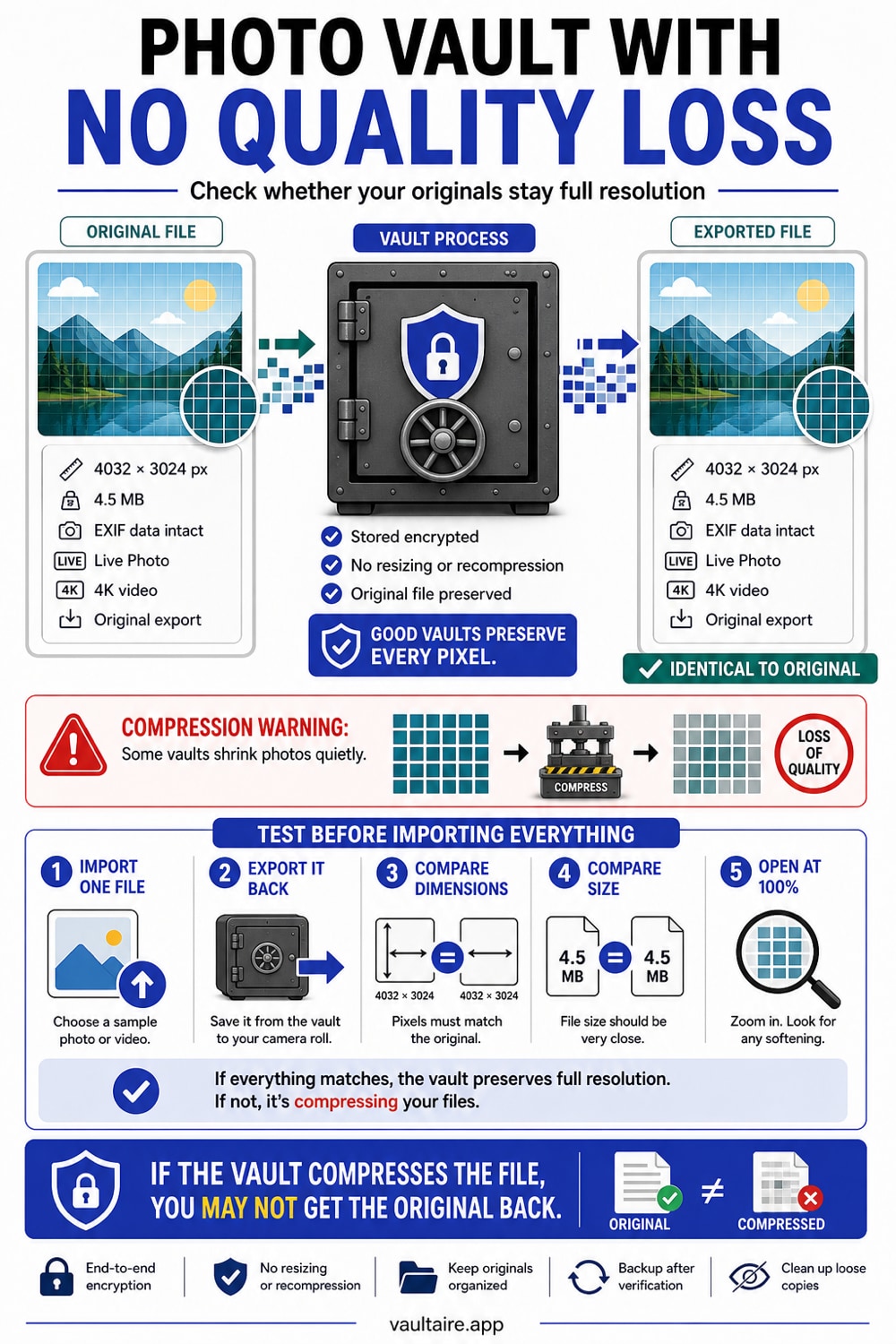
Most photo vault apps re-encode your photos on import, which re-compresses them and lowers quality, often turning a 48MP ProRAW shot or a 4K clip into a smaller JPEG or MP4. A vault that preserves full resolution stores the original file untouched, so the dimensions, file size, and format stay the same. To keep full quality, check the format of your originals first, import one photo and compare it against the original, and only trust a vault that keeps the file identical. In Vaultaire, choose the Original import setting to keep a 48MP photo at 48MP; the default Optimized setting leaves HEIC images, PNGs, and images under 500 KB as they are but saves space by converting other formats to HEIC at up to 4096 pixels.
Why photo vaults quietly lose quality
When you import a photo into many vault apps, the app does not simply store your file. It decodes the image and saves a new copy, usually as a re-compressed JPEG or a smaller video. That step is invisible: the thumbnail looks fine, and you only notice the loss when you zoom in, print, or try to recover the original you already deleted.
The reason is rarely malicious. Re-encoding makes files smaller and easier for the app to handle, and most users never check. But for the photos you care enough to hide, that trade is backwards. You moved them into a vault to protect them, not to swap your sharp 48MP original for a soft copy you cannot undo.
None of this means a smaller file is always wrong. It means the choice should be yours and visible. When you do want a lighter copy, for a message or an upload, make it deliberately from the original and keep the original: the free image compressor runs in the browser, lets you set a size ceiling, and shows the result against the source so you can see what the compression cost. That is the opposite of a vault deciding for you and deleting the evidence.
How to tell if a vault keeps full resolution
There is a simple test. Import a single photo into the vault, then compare the copy against the original in Photos. Check three things: the pixel dimensions, the file size, and the format. If the vault preserves quality, all three match. If the copy is smaller or has become a JPEG when your original was HEIF or ProRAW, the app re-encoded it.
Do the same with a 4K or ProRes video and a Live Photo, since those are the files most likely to be downgraded. A vault that keeps the original leaves the video resolution, frame rate, and the Live Photo motion intact. One that re-compresses will flatten the Live Photo to a still or drop the video to a lower bitrate. Vaultaire keeps only the still of a Live Photo in either import setting, so test the setting you plan to use.
What full resolution means on iPhone
Modern iPhone photos carry far more data than they used to. A 48MP ProRAW file holds enormous detail for editing, HEIF photos pack high quality into a small space, and 4K or ProRes video is large for a reason. Each format exists to preserve detail, and each one loses that detail the moment it is re-compressed into a generic copy.
Keeping full resolution means storing the file at its original format and dimensions. Vaultaire does this when you set import quality to Original: it keeps each file at the size and format Photos supplies (for an edited photo, that can be the edited version), then encrypts it on the device with AES-256. The default, Optimized, leaves HEIC images, PNGs, and images under 500 KB as they are but converts other formats to HEIC and HEVC to save space. Vaultaire does not strip metadata on import, so location and camera details usually stay in the file; a photo converted to HEIC can lose its EXIF data. You get real privacy and the detail you actually shot, not one at the cost of the other.
Moving photos in without losing a pixel
Order matters. Import your photos into the vault first and confirm they open at full size, with video playing as it should. Only once you have verified the copies are genuinely full resolution should you remove anything, so you never delete an original to find the vault kept a worse version.
Then finish cleanly. Vaultaire offers to delete the originals right after an import; if you are still checking, tap Keep Originals and delete them in Photos once you are done. Either way, empty Recently Deleted, where deleted photos linger for 30 days. If your originals had already synced to iCloud Photos, remember those copies existed in the cloud too, so treat anything previously synced as already out there even after you tidy up the phone.
Related guides
Sources
- Apple Support: About High Efficiency HEIF and HEVC formats
- Apple Support: Keep your photos and videos in iCloud Photos
- Apple Support: Recover deleted photos and videos
Frequently Asked Questions
Do photo vault apps reduce photo quality?
Many do. A large number of vault apps re-encode photos on import, which re-compresses them and lowers quality, often converting HEIF or ProRAW files to a smaller JPEG. A vault that preserves full resolution stores the original file unchanged, so quality stays exactly as you shot it.
How can I check if a vault keeps full resolution?
Import one photo, then compare the copy in the vault against the original in Photos. Look at the pixel dimensions, the file size, and the format. If all three match, the vault is keeping your original. If the copy is smaller or converted to JPEG, the app re-encoded it.
Does Vaultaire compress my photos?
Only if you let it. Vaultaire's default import setting, Optimized, leaves HEIC images, PNGs, and images under 500 KB as they are, converts other photos to HEIC at up to 4096 pixels, and converts video to HEVC at up to 1920 pixels on the long edge. It keeps a conversion only when it saves more than 20% of the file size. Choose Original in Settings and Vaultaire keeps each file at the size and format Photos supplies, so a 48MP photo stays 48MP and a 4K clip stays 4K. Either way, the file is encrypted on the device.
What about 4K video and Live Photos?
Those are the files most often degraded, because they are large. A vault that preserves quality keeps the video resolution, frame rate, and Live Photo motion intact. Test one of each before you trust an app with the rest of your library, since re-compression hits video hardest. Vaultaire imports a Live Photo as its still image only, so keep the Live original in Photos if the motion matters.
Will keeping full resolution use more storage?
Yes, a little, because the vault stores the full original instead of a shrunken copy. That is the point: you are protecting the photo you actually shot. On a modern iPhone the difference is usually small next to the value of not silently degrading your private photos.
Can I get the original quality back after a vault compressed it?
Not if you deleted the original. Re-compression cannot be reversed, so once the only copy left is the vault's smaller version, the lost detail is gone. That is why you should verify a vault keeps full resolution before you delete any originals from Photos.