Does a Photo Vault Use iCloud Storage? When to Upgrade
Your iPhone says iCloud storage is almost full, and you wonder whether the photo vault app is to blame. It might be, but not in the way most people expect. A vault keeps its files on the iPhone itself, so the first thing it fills is the phone. It reaches iCloud only if it backs up there, and that backup counts against the same storage your device backups and iCloud Photos use. This guide shows where a vault takes up space, why its backup is larger than the photos inside it, what stops working when iCloud is full, and how to tell whether you need a bigger iCloud plan, a bigger vault plan, or simply fewer duplicate photos.
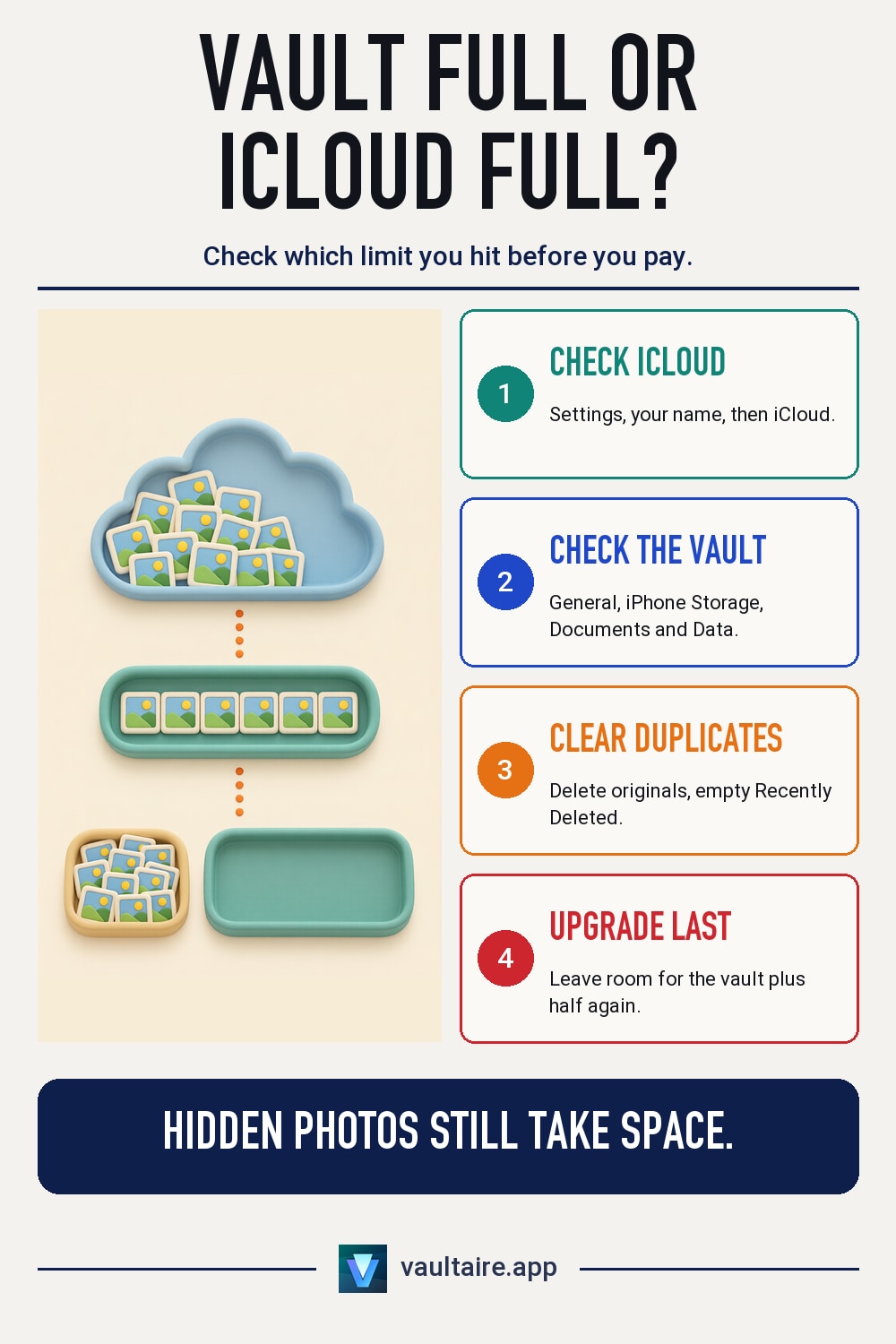
A photo vault app uses iPhone storage for the files it holds. It uses iCloud storage only for its backup, if it has one. Apps that back up to their own iCloud database, as Vaultaire does, count against your iCloud plan, because Apple charges data in an app's private iCloud database to the user's quota. Every Apple Account starts with 5 GB free, and in the US iCloud+ costs $0.99 a month for 50 GB, $2.99 for 200 GB and $9.99 for 2 TB. Before you upgrade, delete originals you already copied into the vault and empty Recently Deleted. Upgrade only if the free space is still smaller than the vault plus a margin for the backup.
Where a photo vault takes up space
A photo vault app stores its files inside the app's own storage on the iPhone. That is why moving 2,000 photos into a vault does not shrink your iPhone Storage figure: the space moves from the Photos app to the vault app. To see the number, open Settings, tap General, then tap iPhone Storage and find the vault app. The Documents and Data line is the vault's content plus whatever the app keeps alongside it. The vault's files are not part of your iCloud Photos library, so they do not count toward the Photos share of your iCloud bar.
The catch is the copy you leave behind. Importing a photo into any vault app makes a new copy; the original stays in the Photos app until you delete it, and then stays in Recently Deleted for up to 30 days. Vaultaire offers to delete the originals after a photo picker import, and they still go to Recently Deleted first. Until the original and its Recently Deleted copy are gone, the same picture takes space twice on the phone and, if iCloud Photos is on, once more in iCloud. The same goes for the iPhone Hidden album. Hidden photos are still part of your Photos library, so they take up storage on the phone and in iCloud exactly like any other photo. Hiding a picture is not a way to save space.
How much iCloud space a vault backup uses
Vault apps handle backup in three ways. Some keep everything on the phone with no backup at all, which uses no iCloud space and loses the vault if the phone is lost. Some ride along in the iPhone's own iCloud backup. Others, Vaultaire among them, back up to the app's private database in your iCloud account. Apple's CloudKit documentation states that data in a private database counts toward the user's iCloud storage quota. So that backup shares your plan with device backups, iCloud Photos, iCloud Drive and Mail, even though it is encrypted before it leaves the phone.
An encrypted backup is also larger than the photos inside it. Vaultaire's iCloud backup is on by default in the free and Pro tiers, runs every 24 hours and uses Wi-Fi only unless you change that. It splits the encrypted data into fixed 10 MB records and adds 20 to 40 percent extra decoy records, so the record count does not give away the size of your library. It also keeps 3, 5 or 8 versions, and each new version uploads the changes since the last one. Plan for the backup to need the size of the vault plus about half again.
What a full iCloud stops
Apple lists what happens when you run out of iCloud storage: your device stops backing up to iCloud, new photos and videos stop uploading to iCloud Photos, iCloud Drive and other iCloud apps stop staying up to date across your devices, and iCloud Mail stops sending and receiving. An app backup that saves to your iCloud is one of those other iCloud apps. The photos already in your vault stay on the iPhone. What stops is new data reaching iCloud, which means anything you add after the storage fills has no fresh copy off the phone.
That gap is the real risk. A full iCloud does not delete anything, so it is easy to ignore the warning for weeks. If the phone is lost, broken or reset during that time, you get back only what reached iCloud before it filled. If your vault app shows when it last backed up, check that date whenever iCloud warns you about space. If the date is old and iCloud is full, fix the space first, then let one backup finish on Wi-Fi before you add more photos to the vault.
When to upgrade iCloud, and when the vault limit is the one you hit
Every Apple Account gets 5 GB of iCloud storage free. In the US, iCloud+ costs $0.99 a month for 50 GB, $2.99 for 200 GB, $9.99 for 2 TB, $29.99 for 6 TB and $59.99 for 12 TB. Upgrade when, after clearing duplicates and Recently Deleted, your free iCloud space is still smaller than the vault plus about half again. A vault of a few hundred photos rarely needs more than the first paid tier. A vault full of video can need 200 GB on its own, because video is where size grows fastest. In Vaultaire, the default Optimized import quality keeps files smaller: it converts photos to HEIC and video to HEVC, and keeps the converted file only when it saves more than 20 percent of the size. Choose Original in Settings to keep every file exactly as imported, apart from video formats the iPhone cannot play, such as MKV and WebM, which are converted to MP4.
Two different limits are easy to confuse. iCloud+ is Apple's storage plan, and it decides how much fits in iCloud. A vault app's plan decides how much fits in the vault. In Vaultaire the free tier holds 100 photos and 10 videos counted across all vaults, and Pro adds more vaults and files; iCloud backup is included in both. Neither purchase includes the other. If the app says your vault is full, more iCloud space will not help. If Settings says iCloud is full, a vault upgrade will not help. Check which message you are seeing before you pay for anything.
Related guides
- Do Photo Vault Apps Back Up to iCloud? Where Vault Photos Live
- iPhone Photo Storage: Local, iCloud, and Encrypted Options
- Photo Vault With No Quality Loss: Full Resolution on iPhone
- Delete Photos from iPhone but Keep Them in iCloud
Sources
Frequently asked questions
Do photo vault apps use iCloud storage?
Only for their backup. The vault's files take space on the iPhone. If the app backs up to your iCloud, as Vaultaire does by default, that backup counts against your iCloud plan.
Do hidden photos take up storage?
Yes. Photos in the iPhone Hidden album are still part of your Photos library, so they take space on the phone and, with iCloud Photos on, in iCloud too. Hiding a photo does not save space.
Why is my vault backup bigger than my photos?
Vaultaire splits the encrypted backup into 10 MB records, adds 20 to 40 percent decoy records and keeps several versions. Plan for about half again the size of the vault.
Does Vaultaire Pro include iCloud storage?
No. Pro adds more vaults and files inside the app. iCloud storage is a separate Apple plan, and iCloud backup works in both the free and Pro tiers.