Delete Photos from iPhone but Keep Them in iCloud
Nobody asks this question for fun. The phone says storage is full, or the camera roll has years of pictures you would rather not scroll past while somebody is watching, and iCloud already holds a copy of all of it. So you start deleting, and by the next morning the same photos are gone from the iPad, gone from the Mac, gone from iCloud.com. That is not a bug and it is not a sync error. With iCloud Photos turned on there is one library with one copy of each picture, and the phone is a window onto it. Deleting through that window deletes the picture. There are still three ways to get what you were actually after, and they are three different jobs.
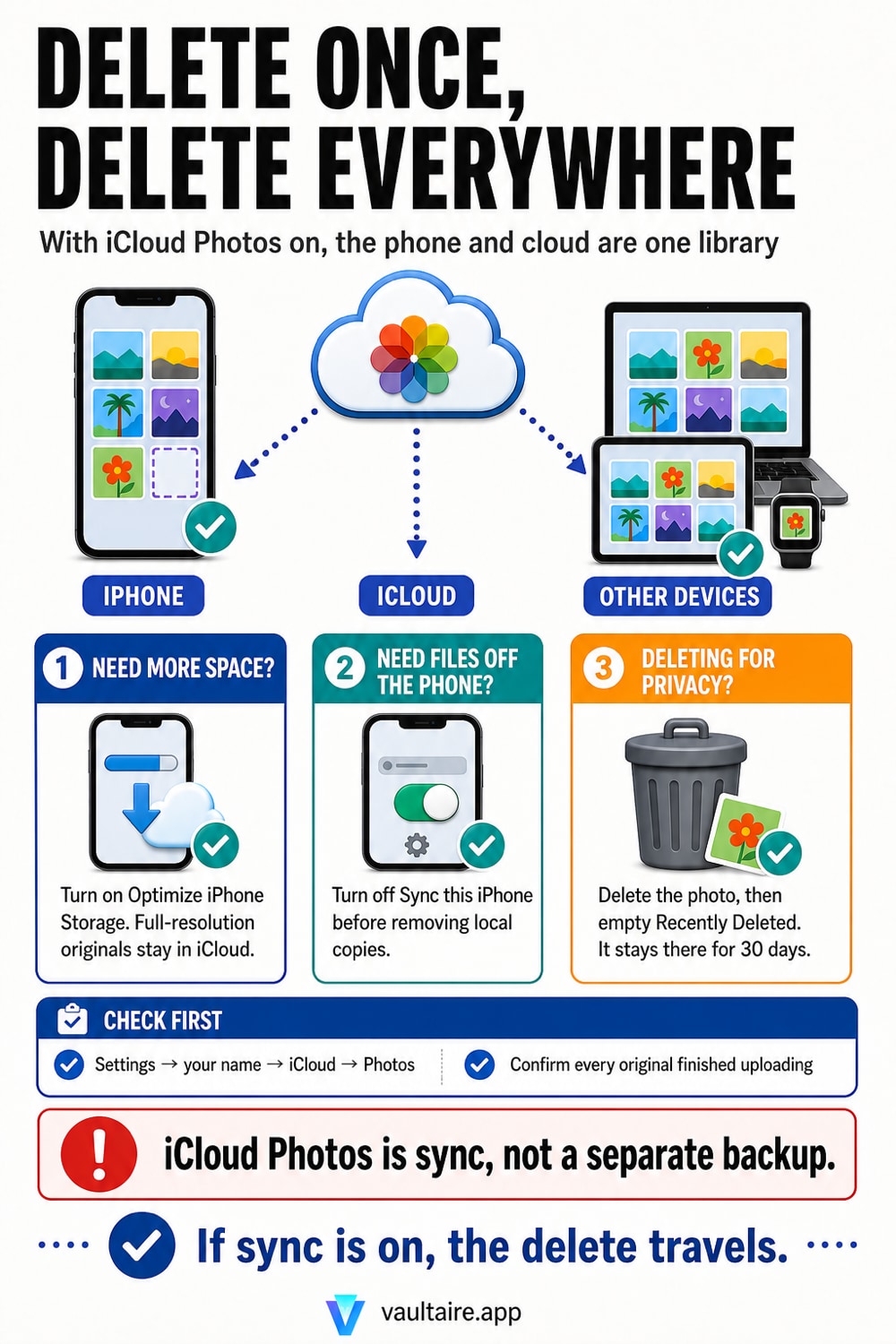
With iCloud Photos on there is no delete that touches only the iPhone. Apple states it plainly: when you delete photos and videos on one device, they are deleted everywhere that you use iCloud Photos. So pick the route that matches your goal. To free up space, delete nothing. Open Settings, tap your name, tap iCloud, tap Photos, and choose Optimize iPhone Storage. Full resolution originals stay in iCloud and the phone keeps space saving copies, which is the supported version of what most people try to build by hand. To actually remove files from the device, turn off Sync this iPhone in that same screen first, tell iOS to remove the copies from the phone rather than download them, and treat the cloud library as the one that survives. Do not turn sync back on afterwards and expect the phone to stay empty, because the library downloads again. To get a picture off the phone and out of a library other people can reach, move it into an encrypted vault app first, then delete the original and empty Recently Deleted, which holds deletions for 30 days. Keeping a photo in iCloud keeps it visible on every device signed in to that Apple Account and on iCloud.com.
One library, not a phone copy and a cloud copy
The whole question rests on a model most people never had explained to them. iCloud Photos is not a backup that takes snapshots of your camera roll. Apple describes it as keeping every photo and video you take in iCloud so you can reach your library from any device, and adds that changes you make on one device change on your other devices too. Deleting is a change. Apple spells that out on its own delete page: when you use iCloud Photos and delete a photo or video on one device, it gets deleted on all other devices where you are signed in with the same Apple Account. So the request to delete from the phone but keep it in iCloud is asking one library to hold two different answers about the same picture, which it cannot do while the switch is on.
What people usually mean is one of three quite different things. Some want storage back, and for them nothing needs deleting at all. Some want the files genuinely off the device, usually before handing it over, selling it, or crossing a border. And some want a particular set of pictures out of the camera roll where anyone scrolling would meet them, while keeping the pictures themselves. Each has a clean answer, and they are not the same answer. It also helps to know that a delete is not instant anywhere: the pictures move to Recently Deleted for 30 days first, on the phone and in the cloud alike, so nothing you do in the next ten minutes is irreversible.
If you want space back, do not delete anything
Open Settings, tap your name, tap iCloud, tap Photos, and select Optimize iPhone Storage rather than Download and Keep Originals. Apple describes the result exactly: when Optimize Storage is turned on, full resolution photos and videos are stored in iCloud, and, when needed, space saving copies are stored on your device. The phone keeps a light version of each picture, downloads the original on demand when you open or export it, and quietly sheds full resolution files as free space runs low. A library that occupies 150 GB in iCloud can sit in a fraction of that on the phone. Nothing is deleted, nothing leaves iCloud, and every picture still appears in the Photos app.
Two things to know before you count on it. The trimming is automatic and demand driven, so the space does not all come back the second you tap the setting; iOS releases originals as it needs room, which means you should check Settings, General, iPhone Storage a day later rather than a minute later. And optimizing is not an offline plan: opening a full resolution original, or exporting one, needs a connection to iCloud. If your problem is really that the cloud library itself has outgrown its plan, that is the opposite job, and how iPhone photo storage actually works covers where the gigabytes are going before you buy more of them.
If you want the files off the device, change the order
The mistake is deleting first and turning sync off afterwards. Do it the other way round. In Settings, your name, iCloud, Photos, turn off Sync this iPhone. iOS then asks whether you want a copy of the library downloaded to this iPhone or removed from it. Choosing to remove clears the local files and leaves the cloud library untouched, which is the outcome the original question was reaching for. Choosing to download is the cautious option if you are not certain every picture finished uploading, and it lets you delete the local copies by hand afterwards, one album at a time, without any of it reaching iCloud.
The catch is that this is a state, not a one time action. Turn Sync this iPhone back on later and the phone merges with the cloud library again, so everything you cleared reappears. That surprises people who treated the switch as a cleanup button. If your goal was to stop the pictures showing up on a shared iPad or a family Mac rather than to clear the phone, that is a different setting and stopping iCloud Photos syncing to your other devices is the right guide. And if the phone is about to change hands, deleting is only one item on a longer list, covered in wiping an iPhone before a trade in.
Keeping it in iCloud is not the same as putting it away
There is a version of this question that is about privacy rather than storage, and for that one the answer above is a trap. Moving a picture out of the phone and leaving it in iCloud does not put it away. It stays in the same library, so it appears on every device signed in to that Apple Account, in Memories and Featured Photos, in search results, and in the browser at iCloud.com behind nothing but the account password and its second factor. Anyone in a Shared Library sees shared items too. Apple encrypts iCloud Photos in transit and on its servers, but the standard configuration leaves Apple holding a key unless you have turned on Advanced Data Protection, which is a real difference explained in how iCloud Photos encryption works.
So separate the two goals before you touch a setting. If the worry is a full phone, Optimize iPhone Storage is the whole answer and you are finished. If the worry is a specific set of pictures that should not be in a library anybody can scroll, then neither the cloud nor the Hidden album is where they belong, because both are just places inside the Photos app. Move those into an encrypted vault first, then delete the original and empty Recently Deleted so the 30 day window does not keep them on the phone. Vaultaire stores them encrypted on the device behind its own pattern lock, outside the Photos app entirely, which means outside iCloud Photos sync, outside Memories, and outside anything a guest reaches by opening Photos. Vaultaire's own iCloud backup stores only encrypted copies; it is on by default and you can turn it off in Settings.
Related guides
- Stop iCloud Photos syncing to your other devices
- How iPhone photo storage actually works
- What Recently Deleted keeps for 30 days
- How iCloud Photos encryption works
Sources
Frequently Asked Questions
If I delete a photo on my iPhone, does it delete from iCloud too?
Yes, as long as iCloud Photos is on. Apple states that when you use iCloud Photos and delete a photo or video on one device, it gets deleted on all other devices where you are signed in with the same Apple Account. There is no per device delete and no setting that makes one. The picture is not copied to the cloud, it lives in one library that your phone, iPad, Mac and iCloud.com all look at. You do get a grace period: the photo moves to Recently Deleted for 30 days, on every device at once, and restoring it from any one of them brings it back everywhere.
Does Optimize iPhone Storage delete my photos?
No. It replaces the full resolution file on the phone with a smaller copy and keeps the original in iCloud. Apple puts it this way: when Optimize Storage is turned on, full resolution photos and videos are stored in iCloud, and, when needed, space saving copies are stored on your device. Every picture still appears in the Photos app, and opening or exporting one downloads the original again. The catch is that you need a connection for that download, so if you edit or print full resolution files while offline, choose Download and Keep Originals instead and free space another way.
I turned iCloud Photos off, deleted photos, then turned it back on. Why are they back?
Because the deletions never reached iCloud. While Sync this iPhone is off, the phone keeps a separate local library and nothing you delete there is reported to the cloud. The moment you turn the switch on again, the phone merges with the iCloud library, and the pictures you cleared download back onto the device. That is working as designed rather than a fault. If you want the phone to stay clear, leave sync off, and remember the reverse case as well: a picture you delete while sync is on is gone from iCloud too, whatever you do afterwards.
How do I get a photo off my phone without leaving it in iCloud at all?
Move it somewhere that is not part of the Photos library, then delete the original. That can be a computer, an external drive, or an encrypted vault app on the phone itself. Whichever you choose, finish the job: delete the picture in Photos, then open Recently Deleted and clear it, because deletions sit there for 30 days and are fully viewable during that window. Check that the new copy opens correctly before you delete anything. A vault app is the option that keeps the picture on the phone but out of the Photos app, so it stays out of iCloud Photos and never surfaces in Memories or search.