How to Switch From Keepsafe to Another Photo Vault (2026)
People leave Keepsafe for different reasons: the Premium price, the account it asks for, or the fact that Private Cloud keeps copies of their photos on Keepsafe's servers. Deciding to leave is the easy part. The move itself has a few traps, because Keepsafe can keep the full-size originals in its cloud and only small copies on the phone, and every exported photo passes through your Photos library on the way out. This guide walks through the move in the order that keeps every file, from bringing the originals home to cancelling the subscription. It works for any destination app, not only ours.
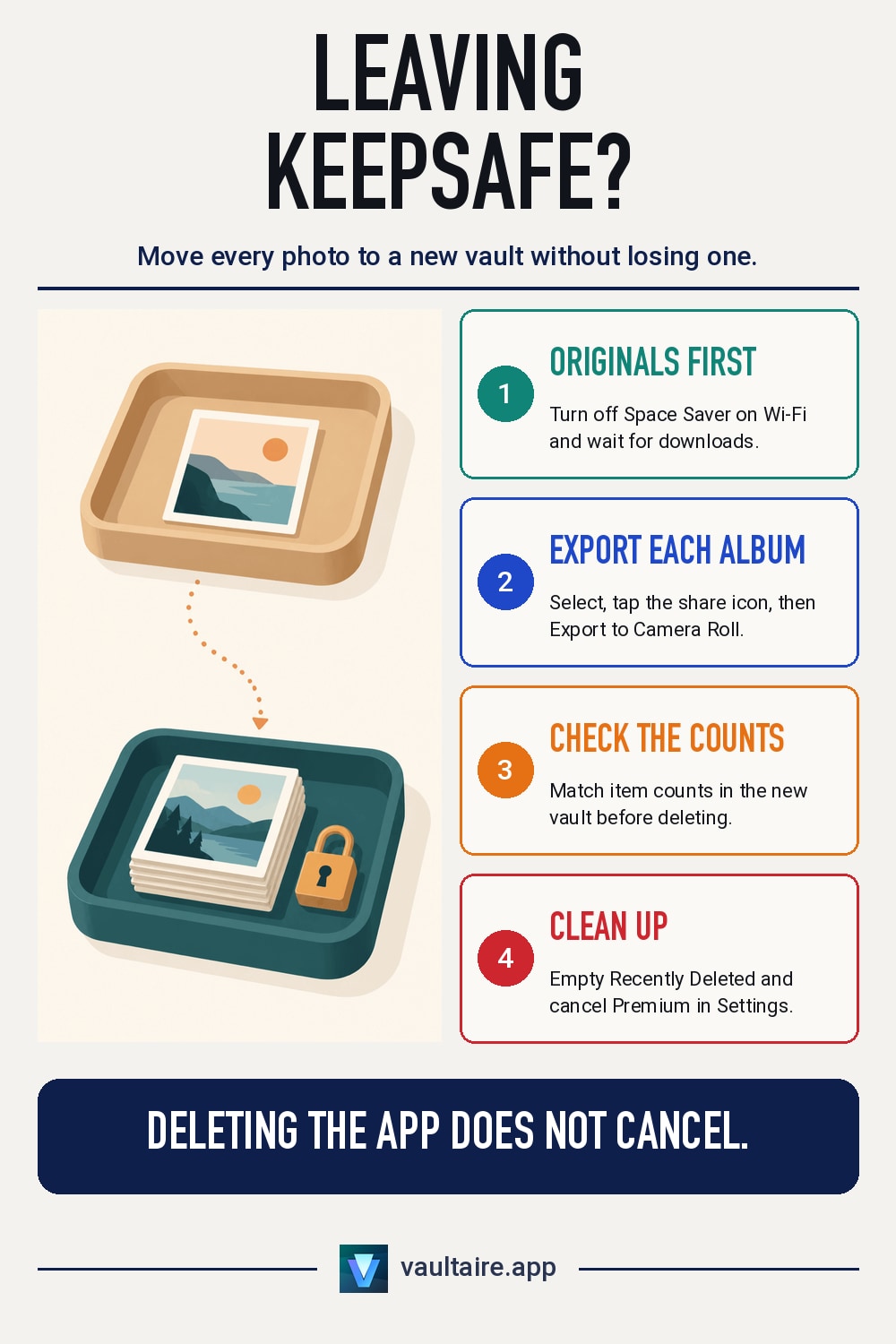
To switch from Keepsafe, first turn off Space Saver on Wi-Fi so every full-size original downloads from Private Cloud. Then export each album with Select, the share icon, and Export to Camera Roll, and import those items into your new vault. Compare counts and open a few files before you delete anything. Finish by deleting the exported copies from Photos, emptying Recently Deleted, cancelling Keepsafe Premium in your Apple ID subscriptions, and asking Keepsafe support to delete your account.
When switching makes sense
Keepsafe works, and plenty of people use it without trouble. Most switch for one of three reasons. Premium is a recurring cost, and the free tier gives up features people came to rely on. Keepsafe asks for an email address, so the account links you to a photo hiding app. And Private Cloud stores your files on Keepsafe's servers, which some people decide they no longer want. If one of those is your reason, write it down before you pick a new app, because it tells you what to check in the replacement.
Pick the destination before you export anything, so your photos spend as little time as possible outside a vault. Check how the new app stores files, whether it needs an account, what its free tier holds, and whether its backup is encrypted before it leaves the phone. Our photo lock app buyer's guide lists the questions to ask. If you are weighing Keepsafe against one option in particular, the Vaultaire vs Keepsafe comparison sets the two side by side feature by feature.
Before you export: bring every original home
Keepsafe Premium includes Space Saver. With it on, Keepsafe keeps the full-size originals in Private Cloud and only smaller, compressed copies on your phone. An export made in that state can hand you the small copies. Keepsafe's help center says to turn Space Saver off while connected to Wi-Fi and to keep the app open, not minimized, until every file has downloaded. Do this while your Premium subscription is still active, since Space Saver and Private Cloud belong to it, and check your free storage first so the downloads have room.
Next, count what you have. Open each album and note how many photos and videos it shows, or take a screenshot of the album list. If you set up a Decoy Vault, the second gallery that opens with a different PIN, its photos live in a separate space, so unlock Keepsafe with that PIN too and count them as well. These numbers are how you will know later that nothing was left behind. Also make sure your phone has room for a second copy of everything, because for a while each item will exist in Keepsafe, in Photos, and in the new vault at the same time.
Export from Keepsafe and import into the new vault
In Keepsafe, open an album, tap Select, choose the items, tap the share icon at the bottom, and choose Export to Camera Roll. Labels can shift slightly between app versions, but the path is the same. Work one album at a time. Keepsafe notes that exported items return to the date they were taken, so a photo from three years ago appears three years back in your library, not at the top. Search by date or look in Recents sorted by date added. If iCloud Photos is on, the exported items also start uploading to iCloud and your other devices, which is one more reason to keep each batch small and move it on quickly.
Now import each batch into the new vault. In Vaultaire, you add files from Photos inside the app or through the Share sheet. Before a large move, open Settings and set Import Quality to Original if you want every file kept exactly as imported, since the default, Optimized, can convert large images and videos to save space. Live Photos import as the still image only. Vaultaire has no account to create, and the free tier holds 100 photos and 10 videos across all vaults, so a larger library needs Pro. The general steps for any app are in how to move photos to a vault app on iPhone.
Clean up Photos, Keepsafe and the subscription
Check the new vault against the counts you wrote down, then open a few videos and some of your oldest photos at full size. Only after that, delete the exported copies from Photos. Deleted items move to the Recently Deleted album, where Apple keeps them for 30 days, so open Collections, find Recently Deleted under Utilities, unlock it, and delete those items there too. With iCloud Photos on, deleting removes them from your other devices as well. For what that album exposes in the meantime, see whether someone can see your Recently Deleted photos.
Deleting the Keepsafe app does not cancel Premium. Open Settings, tap your name, tap Subscriptions, choose Keepsafe, and cancel. Keepsafe advises doing it at least 48 hours before the renewal date. Then delete the items inside Keepsafe, and if you want the account and its cloud copies gone, email Keepsafe support from the address linked to the account and ask them to delete it. Keep the new vault backed up from day one: in Vaultaire, encrypted iCloud backup is on by default, runs every 24 hours, and uses Wi-Fi only unless you change it.
Related guides
- Vaultaire vs Keepsafe: side by side comparison
- How to get photos out of a vault app on iPhone
- How to move photos to a vault app on iPhone
- Can someone see your Recently Deleted photos on iPhone?
Sources
Frequently asked questions
Can I move photos from Keepsafe straight into another vault app?
Not directly. Keepsafe exports to your Camera Roll, and the new vault imports from there. That is why the order matters: export one album, import it, check it, then delete the copies from Photos and from Recently Deleted before you start the next album.
Will I lose photo quality when I leave Keepsafe?
Not if you bring the originals home first. With Space Saver on, the phone holds smaller copies and the full-size files sit in Private Cloud. Turn Space Saver off on Wi-Fi and wait for the downloads to finish before you export. On the import side, choose an app setting that keeps the original file if your new app offers one.
Does deleting Keepsafe cancel my Premium subscription?
No. Premium is billed through your Apple ID, so deleting the app or the account leaves it running. Cancel it in Settings, under your name and Subscriptions. Keepsafe recommends cancelling at least 48 hours before the renewal date.
Does Vaultaire need an account like Keepsafe?
No. Vaultaire has no account, email or sign-up. You draw a pattern to open a vault, and files are encrypted with AES-256-GCM using a random key that your pattern unlocks. iCloud backup and sync use the Apple ID already on your iPhone.