Photo Lock App Buyer's Guide: 6 Checks to Run Before You Pay
Every photo lock app in the App Store shows you the same three screenshots: a grid of thumbnails behind a keypad, a padlock, a promise. None of that tells you whether the app encrypts your files or simply moves them into a folder the Photos app cannot see. The difference only shows up on the day someone plugs your iPhone into a computer, or the day the app stops opening. This guide is the checklist to run on a listing before you pay, ordered so the worst candidates fail first.
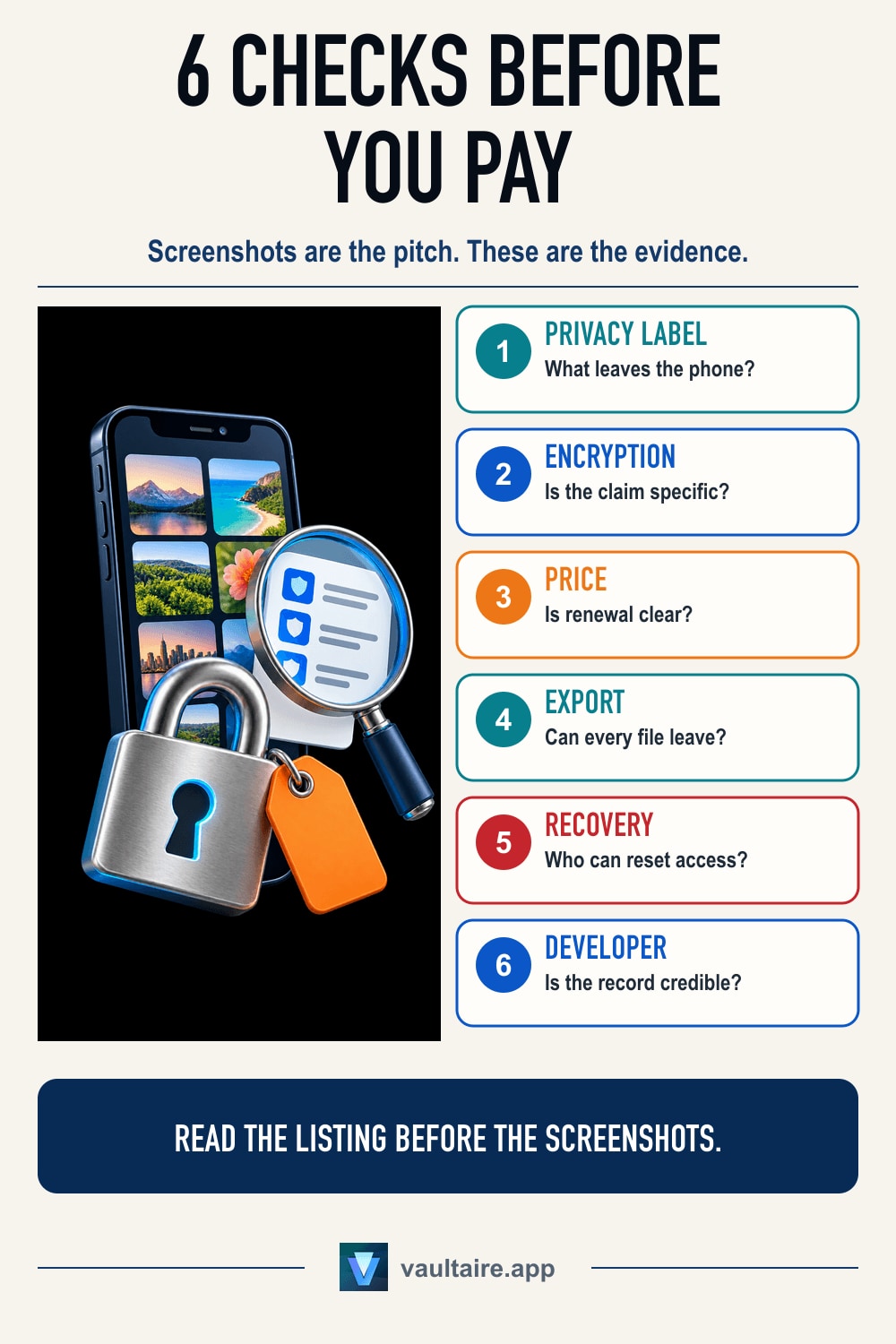
Judge a photo lock app on six things, in this order. One, the App Store privacy label: an app that collects identifiers, usage data or contact info is running a data business next to a lock, whatever its category says. Two, whether it names a cipher. An app that promises military grade security and never writes AES-256 anywhere is describing a feeling. Three, whether it requires an account. An email address turns a private vault into someone else's record that you use one. Four, where the files live. Local only is a claim you can test in airplane mode, and anything that syncs needs to say who holds the key. Five, the price model. A subscription and a one time purchase buy the same encryption, but a lapsed subscription can put your own photos behind a paywall, so read what the app does at the end of the term. Six, the way out. If there is no export path for your originals, your camera roll is hostage to a single developer. Run all six on the listing page, then spend ten minutes testing the app with three throwaway photos before the trial ends.
Start with the privacy label, not the screenshots
Apple makes every developer declare what their app collects before it ships, and the answer sits on the product page under App Privacy. It is the only part of a listing the developer cannot write as marketing copy. Open it before you read the description. A photo lock app has one job and needs nothing from you to do it, so the honest answer for the whole category is Data Not Collected. Anything else is a decision the developer made on purpose, and the label is where that decision is on the record.
Three entries should end the evaluation. Data Used to Track You means the app shares an identifier with advertisers, which is the opposite of what you are buying. Contact Info means an account, and an account means a list of people who installed a privacy app. Usage Data means the developer sees what you do inside the vault, at whatever grain they chose. A security audit of twelve iOS vault apps found seven of the twelve tracking their users, so a clean label is the exception rather than the baseline. Read it first because it takes ten seconds and removes most of the App Store.
Four claims that separate a vault from a folder
An app that hides photos and an app that encrypts them look identical in screenshots. The first moves your files into its own directory, where the Photos app stops showing them and a computer with a file browser still does. The second turns them into ciphertext that needs a key. The claim to search for is a named algorithm: AES-256, AES-256-GCM, ChaCha20. Vague phrases like bank level or military grade are not claims, because nothing about them can be wrong. IOActive took several popular iOS photo vaults apart and found files sitting in plain view behind a passcode screen, which is the failure this one check catches. How photo vault apps actually work covers the mechanics in full.
The second claim is the account. An app that needs an email address, a phone number or a social login has created a record that ties your identity to a privacy tool, and that record outlives your use of the app. The third is location: local only, or synced to the developer's servers. Local only is testable, which is the point of the ten minute test below. The fourth is what happens when you delete the app. On iOS, deleting an app deletes its container, so photos that live only inside a vault leave with it. Deleting a vault app takes the photos with it unless the app told you where else they are, and a listing that never mentions this is one you should not trust with originals.
Free, subscription and one time buy different risks
A free photo lock app still has costs, so ask how they are covered. The usual answer is an advertising SDK, which is also the most common source of a dirty privacy label, and ad SDKs are code you did not choose running next to your private photos. A subscription pays for maintenance, which matters more here than in most categories: an encryption app that stops getting iOS updates becomes a liability rather than a tool. A one time purchase removes the renewal risk and puts the maintenance question back on you. Photo vaults you buy once lists the apps that still sell that way.
Whatever the model, find the sentence that says what happens when you stop paying. Some apps keep your vault readable and switch off new imports. Others lock the vault entirely, which means a lapsed card puts your own photos behind a paywall, and the originals are no longer in the Photos app to fall back on. Pricing a weekly subscription over two years usually settles the argument on its own: 104 weeks at even a small weekly rate beats most lifetime tiers by a wide margin, and the App Store shows renewal terms on the product page before you commit to anything.
Spend ten minutes testing before the trial ends
Install the shortlist and give each app three photos you would not mind losing. Import them, then force quit the app and reopen it. The photos should be there. Turn on airplane mode and open the app again: an app that claims to work offline and then stalls on a spinner is talking to a server it did not mention. Open one photo and check it is the original rather than a compressed preview, which is easiest to see by zooming into fine detail. Then look for the app in Settings under your iPhone's privacy controls to confirm it asked only for the permissions it needs.
Finish with the exit. Export all three photos back to the Photos app, using whatever the app offers: a share sheet, an album export, a Files destination. Time it. If exporting one photo takes three taps, exporting four thousand is not a thing you will ever do, and that is the practical definition of lock in. Getting photos back out of a vault app is worth reading before you commit a library rather than after. An app that passes the label check, names its cipher, needs no account and hands your photos back on request has earned the payment.
Related guides
- Seven photo vault apps for iPhone, ranked
- What a security audit of twelve vault apps found
- Photo vaults you buy once instead of renting
- How to spot a fake calculator vault app
Sources
Frequently asked questions
Is a free photo lock app safe to use?
Some are, but free changes what you have to check. A free app pays for itself with ads, an upsell, or data, and the first and third both put third party code beside your private photos. Read the App Privacy section on the product page: if it lists Data Used to Track You or Identifiers, the app is funded by knowing things about you. A free tier attached to a paid app is a different case, and the label still answers it.
Does military grade encryption mean anything?
On its own, no. It is a marketing phrase with no technical definition, and an app can print it while storing your photos as ordinary files. The claim that carries information is the name of the algorithm and the mode, such as AES-256-GCM, together with a statement about where the key lives. If a developer will not name the cipher in the App Store description or the privacy policy, treat the encryption claim as unproven rather than as a detail they left out.
Should I pick a subscription or a one time purchase?
Price both over two years and read the lapse terms before you decide. A subscription funds ongoing iOS maintenance, which an encryption app genuinely needs, and it is the better deal if the lifetime tier is high and you are unsure about the app. A one time purchase removes the risk that a declined card locks you out of your own vault. What matters more than the model is the answer to what the app does when payment stops: read only access is fine, a sealed vault is not.
What happens to my photos if the app is pulled from the App Store?
A delisted app usually stays in your App Store purchase history, so you can often reinstall it, though not always: an app pulled for legal reasons or by a closed developer account can vanish from that list too. What always stops is updates, and the first iOS release that breaks the app ends the story. That is why the export path is one of the six checks rather than a nice extra. If you can move your originals back into the Photos app or the Files app in a few taps, a delisting is an inconvenience. If you cannot, it is a loss.