Does Full Access to Photos Include Hidden Photos? (2026)
Granting an app Full Access to your photos sounds like handing over everything, including the Hidden album. On a current iPhone, it does not work quite that way. Here is exactly what Full Access shares, what iOS holds back, and how to lock down the photos that truly matter.
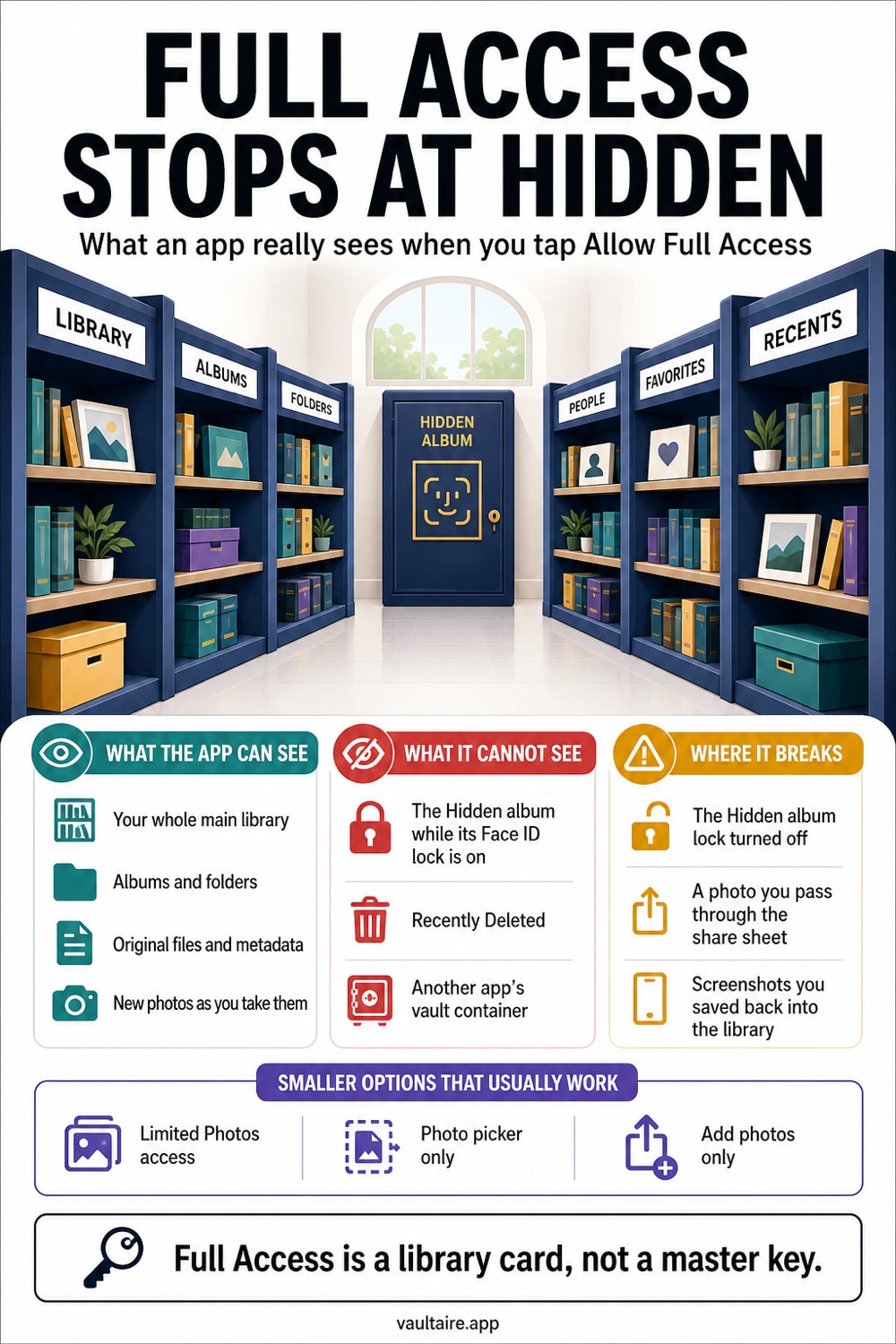
Not by default. Since iOS 16, your Hidden album is locked behind Face ID, and iPhone refuses to hand hidden photos to any app, even one you granted Full Access, as long as that lock stays on. Full Access lets an app read your main library and albums, but the system filters out hidden and recently deleted items at the API level. The catch is that this is a privacy convenience, not encryption. If you ever turned the Hidden album lock off, a full access app can pull those photos in, and hidden photos still ride along to iCloud and into unencrypted backups where other tools can reach them.
Where To Find The Setting
Two separate settings decide whether an app can reach your hidden photos, and it helps to open both. First, go to Settings, then Privacy and Security, then Photos. This screen lists every app that has asked for your library and shows its current level: None, Limited Access, Full Access, or Add Photos Only. Tap any app to change it. Full Access means the app can read every visible photo and video plus your albums, so this is the list you want to audit first.
The second setting is the lock on the Hidden album itself. Open Settings, tap Apps, then Photos, and turn on Use Face ID (older iOS versions place this under Settings, then Photos). With the lock on, both your Hidden album and Recently Deleted require Face ID, Touch ID, or your passcode to open. This same lock is what tells iPhone to withhold hidden items from apps, so leaving it on is the single most useful thing you can do here before you review anything else.
What It Changes
Full Access and Limited Access change how much of your library an app sees, but neither one is a switch for hidden photos specifically. With Limited Access, you hand pick the exact photos an app can view, and it sees nothing else. With Full Access, the app can read your entire visible library through the system photo APIs, including regular albums, shared albums you own, and the location and date details baked into each file. Add Photos Only lets an app save into your library without reading anything back.
Here is the part that answers the question directly. Since iOS 16, when the Hidden album is locked, iPhone does not return hidden or recently deleted items to an app even if that app asks for them explicitly through the photo framework. So on a current iPhone with default settings, granting Full Access does not include your Hidden album. That protection is tied entirely to the lock, though. Turn the Hidden album lock off and the same app can fetch those photos on its next request, which is exactly why the lock matters more than the access level.
Who Can Still Access Your Photos
The API filter is only one wall, and it is easy to overstate. Anyone who can unlock your iPhone can open the Hidden album, because Face ID unlocks it with your face and a shared passcode unlocks it for whoever knows it. Hidden photos are not encrypted or moved anywhere special; they stay in the same library file, just flagged as hidden. If iCloud Photos is on, they sync to every device on your Apple Account, and they land in an iCloud or computer backup like any other photo.
That last point is where hidden photos quietly leak. An unencrypted local backup can be opened with common backup extraction tools, and hidden items come right out with everything else. A shared family device, a repair technician, or anyone with your unlocked phone can reach them too. The Hidden album is genuinely useful for keeping sensitive shots out of your main timeline and out of screen sharing, but treat it as tidy organization, not as a safe. For photos that truly cannot be seen by anyone else, you need real encryption.
What To Do Next
Run a quick checklist. Open Settings, then Privacy and Security, then Photos, and drop any app that does not genuinely need your whole library down to Limited Access or None. Confirm the Hidden album lock is on under Settings, Apps, Photos, Use Face ID. If a photo would be a real problem in the wrong hands, do not rely on the Hidden album for it. Move it somewhere that encrypts the file itself, so that access to your phone is not the same as access to the photo.
That is where a dedicated encrypted vault fits. Vaultaire stores every photo under AES 256 encryption behind its own lock, with no account and no required cloud sync, so the file stays unreadable even from a backup or a full access app. Import the photos you want private, then delete the originals from Photos and from Recently Deleted so no plain copy is left behind. It takes a couple of minutes, and it turns hidden into actually hidden. You can start with the free tier and add only the private photos that matter.
Related reading:
- Which apps can see your iPhone photos
- How Limited Photos access works on iPhone
- Where hidden photos really go on iPhone
- Free and paid iPhone vault apps compared
Sources
Frequently Asked Questions
Who can access my hidden photos?
Anyone who can unlock your iPhone can open the Hidden album, since Face ID or your passcode is the only barrier. If iCloud Photos is on, your hidden photos also sync to every device on your Apple Account, and they appear in iCloud and computer backups. Apps with Full Access cannot pull them while the Hidden album lock is on, but that lock is the only thing holding them back.
Is it safe to allow full access to photos?
It is fine for apps that genuinely need your whole library, like a photo editor or a backup tool you trust. Full Access does let an app read every visible photo, its location, and its date, so grant it sparingly. For most apps, Limited Access is safer because you pick exactly which photos are shared. You can change or revoke access anytime in Settings, Privacy and Security, Photos.
What happens when you allow access to photos on an iPhone?
With Full Access, the app can read your entire visible library through the system photo framework, including albums, shared albums, and the metadata on each file. With Limited Access, it sees only the specific photos you selected. Neither level unlocks your Hidden album while its Face ID lock is on. Add Photos Only lets an app save new photos without reading any of your existing ones.
Are hidden photos really hidden?
They are hidden from casual view, not encrypted. The Hidden album moves photos out of your main timeline and, since iOS 16, locks them behind Face ID by default, which also blocks apps from fetching them. But the files stay in your library unencrypted, so they sync to iCloud, sit in backups, and open for anyone who can unlock your phone. For real privacy, store them in an encrypted vault instead.