Does a Factory Reset Erase Photos Already in iCloud?
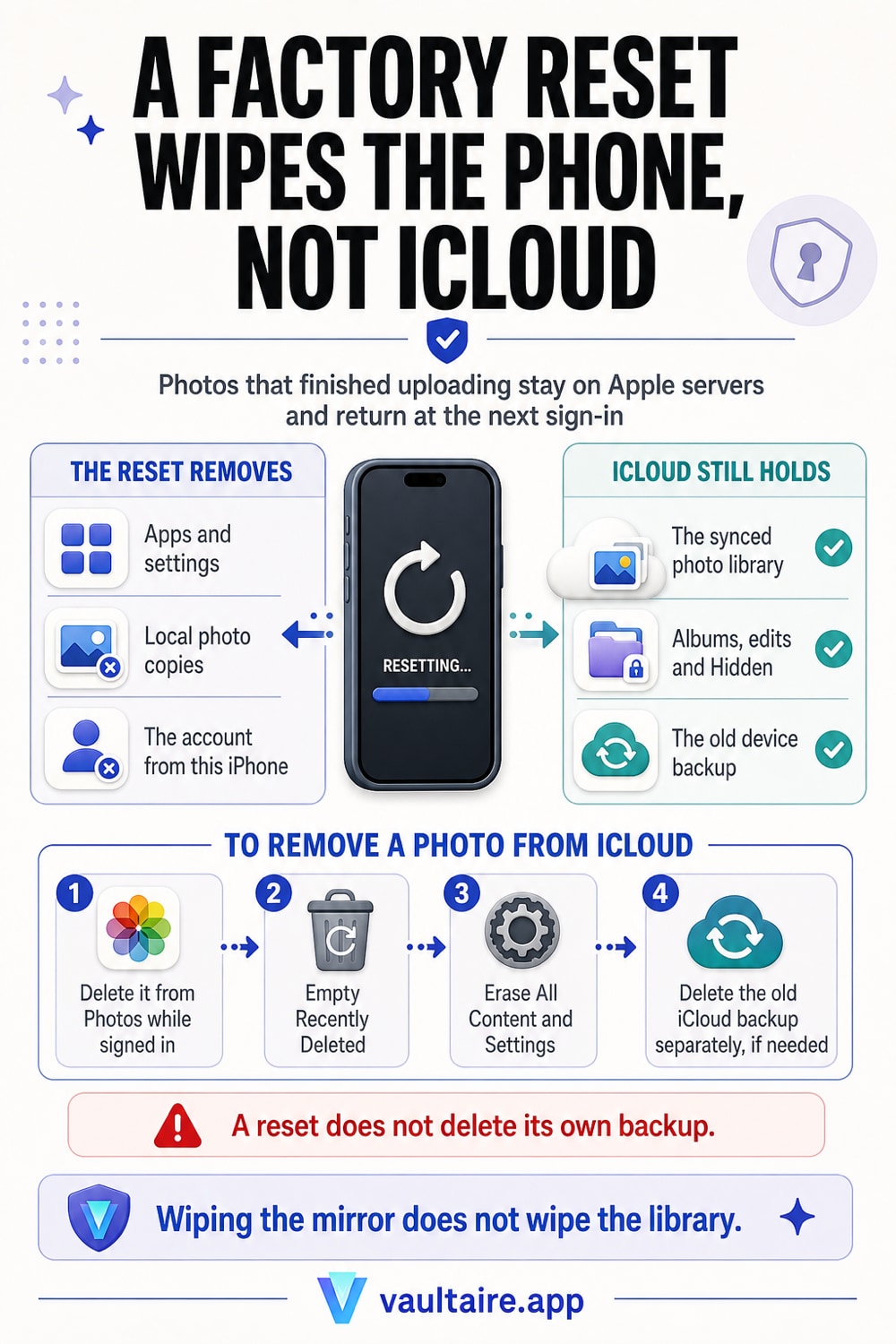
You reset the phone to get it clean, and that instinct is right about the hardware and wrong about the account. Erase All Content and Settings destroys the encryption key held on the device, so everything stored locally becomes unreadable in seconds. It does nothing whatsoever to iCloud. Apple says so directly in its own instructions: your content is not deleted from iCloud when you erase the device. Every photo that finished uploading is still in your library on Apple servers, and it comes back down the first time you sign in with the same Apple Account, on that phone or on any other.
No. A factory reset does not erase photos that are already in iCloud. Erasing an iPhone wipes the device and signs it out of your services, and Apple is explicit that content in iCloud stays where it is. The confusion comes from what iCloud Photos actually is. It is a sync service, not a backup. The phone and the library mirror each other, so a photo you take is uploaded once and then lives on the server whether or not that phone still exists. Wipe the phone and you have removed one mirror. Sign in again and the mirror rebuilds itself, photo for photo and album for album, including the Hidden album and anything still sitting in Recently Deleted. That is good news when you reset a phone to fix a fault and want the library back. It is bad news when you reset the phone to make one private photo go away, because the reset moved nothing. There is exactly one way to remove a photo from iCloud, and it is to delete it from the library while you are still signed in, then empty Recently Deleted, which holds deleted photos for 30 days and syncs that folder to every device on the account. If you want to keep the photo but take it out of the cloud, move it into an encrypted app on the device first, confirm it opens there, then delete the original from Photos. Do all of that before the reset, not after, because once the phone is wiped your only way back into the library is another signed in device or iCloud.com.
What Erase All Content and Settings actually removes
The reset lives in Settings, General, Transfer or Reset iPhone, Erase All Content and Settings, and it is faster than most people expect because it does not overwrite anything. Every file on an iPhone is already encrypted at rest, so the phone only has to throw away the key. Once that key is gone the remaining bits are noise. In the same pass the device signs out of iCloud, iMessage, FaceTime and Game Center, clears the cards in Wallet and returns to the setup screen. What you get back is a phone in the state it left the factory in, holding none of your data.
The boundary is the device. Your Apple Account is untouched, and so is everything that account owns: the iCloud Photo Library, iCloud Drive, Notes, Messages in iCloud, your purchase history and any iCloud Backup you have made. Apple puts the sentence right in the erase instructions, that your content is not deleted from iCloud when you erase the device, and it is easy to read past because it sounds like a reassurance rather than a warning. It is both. The same rule that saves your holiday photos when a phone dies is the rule that keeps a photo you wanted gone.
Sync is not backup, and that is the whole answer
A backup is a copy you make on purpose at a point in time. Sync is continuous mirroring. iCloud Photos is the second one, which is why the Settings toggle is now labelled Sync this iPhone. Take a picture and it uploads within seconds. From that moment the server holds the full resolution master and your phone may be holding a smaller optimized version of it, which is also why a 200 GB library fits on a 128 GB phone. Delete the phone from the world entirely and the library does not notice. It is a library that happened to have a phone attached, not a phone that happened to have a backup.
Mirroring runs in both directions, and that is the part worth internalising before you touch anything. A photo you delete on the phone is deleted on the server and on every other device signed into that account, which is the trap behind deleting photos from an iPhone while keeping them in iCloud. The same link works the other way: nothing you do to one device removes a photo from the account, and nothing removes it from the account except a deletion. If you want the two to stop tracking each other before you start cleaning, turning iCloud Photos syncing off on the other devices is the step that makes the rest predictable.
The three things people find waiting after they sign back in
Recently Deleted is the first one. A photo you deleted before the reset sits in that folder for 30 days, the folder syncs to the account like any other album, and it reappears with a countdown still running. It is protected by Face ID or Touch ID, both of which fall back to the device passcode, which is the point of who can actually see your Recently Deleted photos. The Hidden album is the second. Hiding was built to reduce clutter, not to keep secrets, and hidden photos ride the same sync as everything else, so they return exactly where you left them, as hidden photos being saved to iCloud spells out.
The third is the old iCloud Backup, and it surprises people the most. Erasing a device does not delete the backup that device made. The backup is a separate object stored under your account, and if iCloud Photos was switched off then your photos were riding inside it rather than in the photo library. Delete it deliberately: on another signed in device open Settings, your name, iCloud, Manage Account Storage, Backups, pick the device and delete. Shared Albums are the quiet fourth. A photo you shared to an album months ago sits in the recipients' accounts too, and no reset of yours reaches into somebody else's library.
How to make a photo actually leave
Put the risk in one sentence. A factory reset is a strong answer to the question of who can read this phone, and no answer at all to the question of where this photo lives, so people who reset for privacy reasons end up handing over a clean phone while the sensitive picture stays in an account they will sign into again next week. The order that works is the opposite of what feels natural: move first, delete second, empty Recently Deleted third, erase last. Only step three removes anything from Apple servers, and only if you are still signed in when you do it.
That first step is one use for an encrypted vault. Vaultaire stores encrypted copies on the device and uses a drawn pattern separate from the iPhone passcode. Local vault use works offline. App analytics and crash diagnostics are enabled by default and can be turned off with “Share errors anonymously” in Settings; backup is on by default and can be turned off, sync and sharing run only when you set them up, and all three use client-side encrypted CloudKit records. A factory reset still removes local app data, so restoration needs your pattern or the custom recovery phrase, plus matching encrypted backup records, if backup was still turned on. Before a reset, confirm the copies and recovery path you intend to keep, delete the Photos originals, and empty Recently Deleted. If you would rather install nothing, the manual route is to delete the originals, empty Recently Deleted, account for old backups, and then reset.
Related guides
- Delete photos from iPhone but keep them in iCloud
- Stop iCloud Photos syncing to your other devices
- Who can see your Recently Deleted photos
- Wiping an iPhone before you give it up
Sources
Frequently Asked Questions
Does a factory reset delete my iCloud photos?
No. Erase All Content and Settings clears the device and signs it out of your services, and Apple states in the erase instructions that your content is not deleted from iCloud. Photos that finished uploading are stored under your Apple Account, not on the phone, so wiping the phone removes a local mirror and leaves the library intact. Sign in on that phone or any other and the library downloads again, including albums, edits and the Hidden album. If you want a photo gone from iCloud you have to delete it from the library while you are signed in, then empty Recently Deleted.
If I erase my iPhone, will my photos come back when I sign in again?
Yes, as long as iCloud Photos was on and the uploads had finished. After the reset you set the phone up, sign in with the same Apple Account, turn iCloud Photos on and the library starts downloading. Give it time and a Wi-Fi connection, because a large library rebuilds over hours rather than minutes, and check Settings, your name, iCloud, Photos for a progress line if it looks stalled. The photos that will not come back are the ones that never uploaded: anything shot in the minutes before the wipe, and everything on a phone where iCloud Photos was switched off.
Does a factory reset delete photos in Recently Deleted?
It clears them off the device, and it does not clear them out of iCloud. Recently Deleted holds photos for 30 days and syncs across the account like any other album, so a photo you deleted three days before the reset still has 27 days left on the server and reappears with that counter running when you sign in. Empty it on purpose before the reset: Albums tab, scroll to Utilities, Recently Deleted, Select, Delete All. That deletion propagates to the account, which is the difference between the photo being out of sight and the photo being gone.
Does erasing my iPhone delete its iCloud Backup?
No, and this is where photos survive on phones that never had iCloud Photos turned on. The backup is a separate object stored under your Apple Account, and erasing the device it came from leaves it exactly where it was, ready to restore. Delete it yourself from another signed in device or from iCloud.com: Settings, your name, iCloud, Manage Account Storage, Backups, select the device, delete. Do it after you have confirmed you no longer need anything inside it, because a deleted backup cannot be recovered and it may be the only copy of photos that never reached the photo library.